Activate profanity filter for validation
Introduction
This article walks you through how to activate the profanity filter in your studio namespace to validate the display names of your players.
- The profanity filter feature currently only validates the display names of your players.
Prerequisites
- To use the default profanity database, make sure you have added profane words to the default profanity filter database. See Manage default profane words database.
- To customize your own profanity filter checks, make sure you have created and configured a designated profanity filter Extend App or set up your own custom server. See Create and manage custom profanity filters.
Activate profanity filter for display name validation
To activate the profanity filter for validating player display names, there are two ways to configure it:
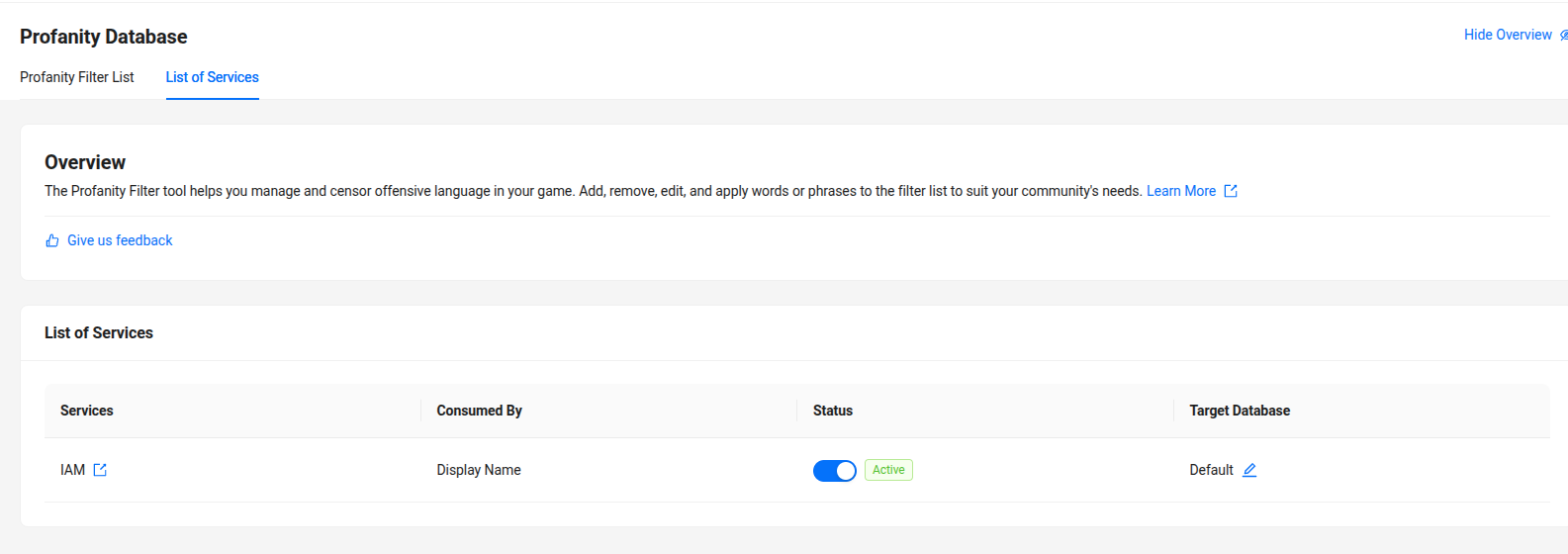
Activate from Profanity Management menu
- In the AGS Admin Portal, go to your studio namespace.
- On the sidebar menu, go to Tools & Utilities > Profanity Management > Profanity Database.
- On the Configurations page, go to List of Services section.
- It will shows services have supported profanity filter.
- Turn on status toggle.
- After activating the Profanity filter toggle, select the database filter that will be used from the Target database dropdown. You can choose the database for the profanity filter:
- Default. See Manage default profane words database.
- Custom. See Create custom filters.
Activate from Input Validation menu
- In the AGS Admin Portal, go to your studio namespace.
- On the sidebar, go to Identity & Access > Account & Profile Setup > Input Validation.
- In the Display Name section, turn on the Profanity filter toggle.
- After activating the Profanity filter toggle, select the database filter that will be used from the Profanity Filter Database options. You can choose the database for the profanity filter:
- Default AGS database. See Manage default profane words database.
- Custom. See Create custom filters.
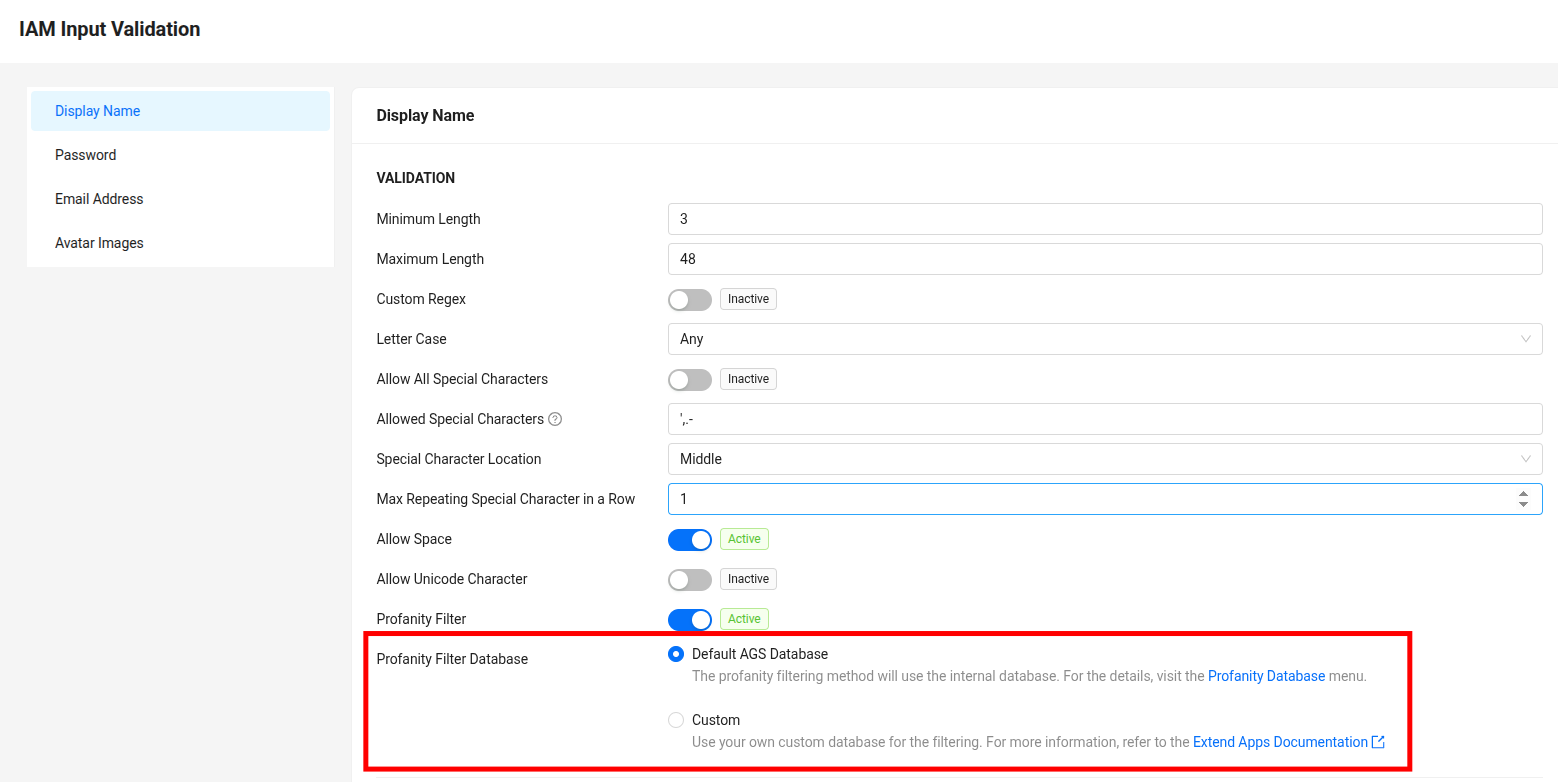
- Click Save.
Implement profanity filter with client SDKs
The validate user endpoint is contained inside the User class on both Unity and Unreal SDK.
Validate user input
- Unreal SDK
- Unreal OSS
- Unity SDK
To enable this endpoint, specify the FUserInputValidationRequest model to put it into the parameter function. AGS has several validations including DisplayName or UniqueDisplayName. If the response is valid, then it will return true. Otherwise, it will return false with an error message.
FUserInputValidationRequest UserInputValidationRequest{};
UserInputValidationRequest.DisplayName = "badwordsexample";
FUserInputValidationResponse UserInputValidationResponse{};

auto ApiClient = AccelByteOnlineSubsystemPtr->GetApiClient(TEXT("YOUR_KEY"));
auto UserApi = ApiClient->GetUserApi().Pin();
UserApi->ValidateUserInput(UserInputValidationRequest, THandler<FUserInputValidationResponse>::CreateLambda([&](const FUserInputValidationResponse& Response)
{
    UE_LOG(LogAccelByteUserServiceTest, Log, TEXT("Success"));
}), FErrorHandler::CreateLambda([&](int32 ErrorCode, const FString& ErrorMessage)
{
    UE_LOG(LogAccelByteUserServiceTest, Warning, TEXT("Error Code: %d, Reason: %s"), ErrorCode, *ErrorMessage);
}));
To enable this endpoint, specify the FUserInputValidationRequest model to put it into the parameter function. AGS has several validations including DisplayName or UniqueDisplayName. If the response is valid, then it will return true. Otherwise, it will return false with an error message.
UserInterface = StaticCastSharedPtr<FOnlineUserAccelByte>(OnlineSubsystem->GetUserInterface());

FUserInputValidationRequest UserInputValidationRequest{};
UserInputValidationRequest.DisplayName = "badwordsexample";
FUserInputValidationResponse UserInputValidationResponse{};
auto ValidateUserInputDelegate = UserInterface->AddOnValidateUserInputCompleteDelegate_Handle(FOnValidateUserInputCompleteDelegate::CreateLambda([&](
    const FUserInputValidationResponse& Response, bool bWasSuccessful, const FOnlineError & OnlineError)
{
    if (bWasSuccessful)
    {
        UE_LOG(LogAccelByteUserInterfaceProfanityFilterTest, Log, TEXT("Success"));
    }
    else
    {
        UE_LOG(LogAccelByteUserInterfaceProfanityFilterTest, Warning, TEXT("Error. Code: %s, Reason: %s"), *OnlineError.ErrorCode, *OnlineError.ErrorMessage.ToString());
    }
}));
UserInterface->ValidateUserInput(LocalUserNum, UserInputValidationRequest);
// ValidateInputRequest accepts DisplayName, UniqueDisplayName and Password. If a field is unused or unneeded, you can leave it as null.
Models.ValidateInputRequest request = new Models.ValidateInputRequest()
{
    DisplayName = displayName
};

Result<Models.ValidateInputResponse> validateResult = null;
AccelByteSDK.GetClientRegistry().GetApi()
    .GetUser()
    .ValidateUserInput(request, result =>
    {
        if (result.IsError)
        {
            // Your code to run when there's an error with the API call
        }

        // Your code to run when the API call is a success
        validateResult = result;
    });