ゲームクライアントを使用してプレイヤーインベントリを管理する
注釈:本資料はAI技術を用いて翻訳されています。
The Inventory service is available but not yet recommended for production use. You are welcome to explore and try it, but please be aware that future updates may introduce breaking changes. For alternatives, consider the following:
- Entitlement: Recommended as the primary option for managing player items.
- Extend: If Entitlement does not fully cover your needs, consider Extend to build a custom solution.
Introduction
You can integrate the AccelByte Gaming Service (AGS) Inventory service into your game client, giving your players the flexibility to manage their own inventories and items. The Inventory service enables your players to control their items in various aspects in-game, from deciding what can be kept and discarded to organizing and transferring items according to needs and preferences.
This article walks you through how to configure your game client to allow your players to manage their inventories and items.
Prerequisites
- Access to the AGS Admin Portal.
- A publisher or a game namespace.
- You have reviewed the key concepts of the Inventory service and the Inventory service API documentation.
- You have integrated the AccelByte Unreal or Unity SDK into your game, including the following permissions:
- Client ID
- Client Secret
Enable players to retrieve inventory configuration
Inventory configuration is a set of information and rules set by the admin to determine the type of inventory that the game will support. The configuration consists of the following:
- code: an ID for the inventory configuration.
- name: name for the inventory configuration.
- description: (optional) a brief description or additional information describing the inventory configuration.
- maxInstancesPerUser: maximum number of inventories that can be owned by a player.
- initialMaxSlots: maximum number of slots a player can have to store their items. Each slot can store a single non-stackable item or multiple identical items stacked as one.
- maxUpgradeSlots: maximum number of slots upgrade a player can own in the inventory.
You can use the list of Inventory Configurations to display the available inventories within the game that the player can obtain.
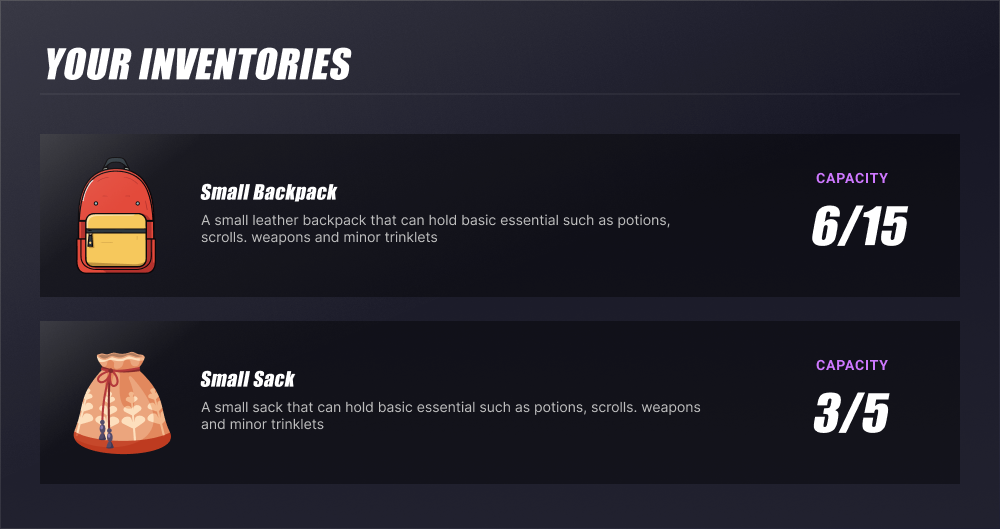
To enable your players to retrieve inventory configuration, use this function:
- Unreal
- Unity Engine
EAccelByteInventoryConfigurationSortBy SortBy = EAccelByteInventoryConfigurationSortBy::CREATED_AT_DESC;
FString ConfigurationCode = FString("SomeConfigurationCode");

FAccelByteModelsInventoryConfigurationsPagingResponse OutResult;

const FApiClientPtr ApiClient = AccelByteOnlineSubsystemPtr->GetApiClient();
ApiClient->Inventory.GetInventoryConfigurations(
THandler<FAccelByteModelsInventoryConfigurationsPagingResponse>::CreateLambda([&](const FAccelByteModelsInventoryConfigurationsPagingResponse& Result)
{
    OutResult = Result;
	// Do something if GetInventoryConfigurations is successful
})
, FErrorHandler::CreateLambda([&](const int32 ErrorCode, const FString& ErrorMessage)
			{
	// Do something if GetInventoryConfigurations has an error
}) , SortBy, 50, 0, ConfigurationCode);
Result<InventoryConfigurationsPagingResponse> getInventoryConfigResult = null;
AccelByteSDK.GetClientRegistry().GetApi().GetInventory().GetInventoryConfigurations(result =>
{
	if (result.IsError)
	{
		Debug.Log($"Failed to get inventory config [{result.Error.Code}]:{result.Error.Message}");
		return;
	}

	// Do something after GetInventoryConfigurations is successful
	getInventoryConfigResult = result;
});
Enable players to retrieve list of own inventories
You can allow your players to retrieve a list of their own inventories, which will provide the following information:
- inventoryConfigurationCode: used to refer to the specific inventory configuration.
- inventoryConfigurationId: used as the identifier for the inventory.
- maxSlots: refers to the maximum number of slots the player can use in the inventory.
- maxUpgradeSlots: refers to the maximum number of slots that can be upgraded by the player in the inventory.
- usedCountSlots: refers to the number of slots already used by the player.
The inventoryConfigurationId is used in various inventory management functions.
You can use the information above to display it to the player. For example:
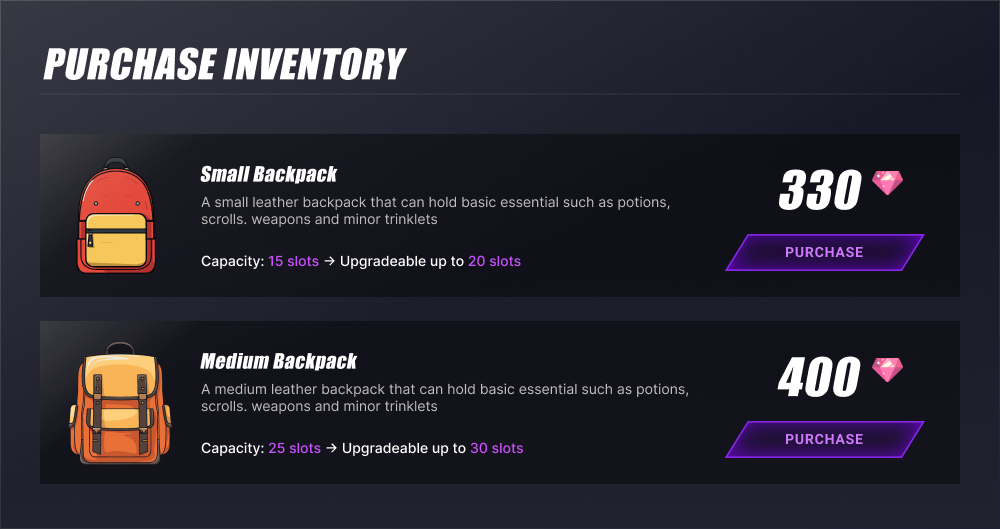
To enable players to retrieve a list of their own inventories, use this function:
- Unreal
- Unity Engine
EAccelByteUserInventoriesSortBy SortBy = EAccelByteUserInventoriesSortBy::CREATED_AT_DESC;
FString ConfigurationCode = FString("SomeConfigurationCode");

FAccelByteModelsUserInventoriesPagingResponse OutResult;

const FApiClientPtr ApiClient = AccelByteOnlineSubsystemPtr->GetApiClient();
ApiClient->Inventory.GetUserInventories(
THandler<FAccelByteModelsUserInventoriesPagingResponse>::CreateLambda([&](const FAccelByteModelsUserInventoriesPagingResponse& Result)
{
    OutResult = Result;
	// Do something if GetUserInventories is successful
})
, FErrorHandler::CreateLambda([&](const int32 ErrorCode, const FString& ErrorMessage)
			{
	// Do something if GetUserInventories has an error
}) , SortBy, 50, 0, ConfigurationCode);
Result<UserInventoriesPagingResponse> getInventoryResult = null;
AccelByteSDK.GetClientRegistry().GetApi().GetInventory().GetUserInventories(result =>
{
	if (result.IsError)
	{
		Debug.Log($"Failed to get user inventory [{result.Error.Code}]:{result.Error.Message}");
		return;
	}

	// Do something after GetUserInventories is successful
	getInventoryResult = result;
});
Enable players to retrieve a list of items from their inventory
You can enable your players to see the items inside a specific inventory and view the following information:
- qty: number of the same items that can be stacked in a slot.
- sourceItemId: ID that will be used to look up the items dictionary.
- slotUsed: number of slots that are being used for the item.
- slotId: ID of the slot where the item is stored. If it's not specified, the default slot will be filled as default.
- serverCustomAttributes: additional attributes that only support server-authoritative actions.
- customAttributes: additional attributes that support both player- and server-authoritative actions.
- type: refers to the item type, such as in-game item, bundle, loot box, option box, etc.
- tag: can be used for grouping and categorizing items.
The sourceItemId will be used to look up the items dictionary. If you are using AccelByte store, you can fill the sourceItemId with the same itemId from the store.
The following images show sample implementations:
-
Simple implementation
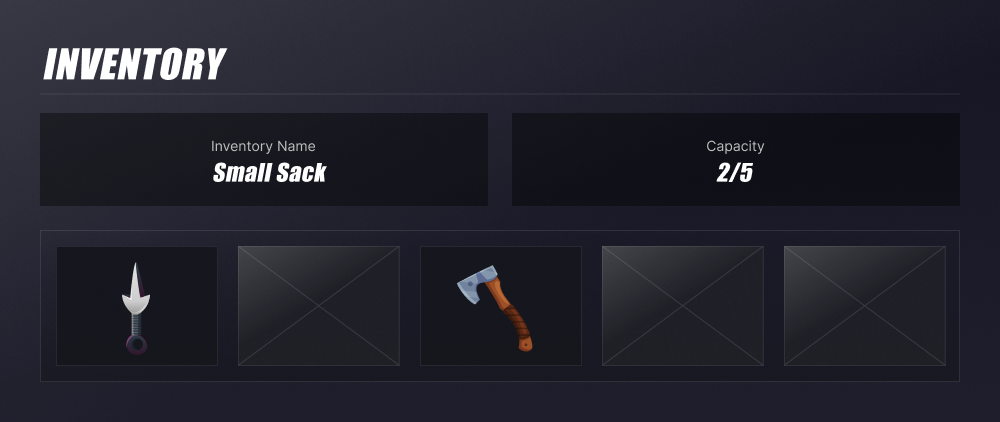
-
Implementation that uses qty, slotUsed, and slotId to flexibly store items
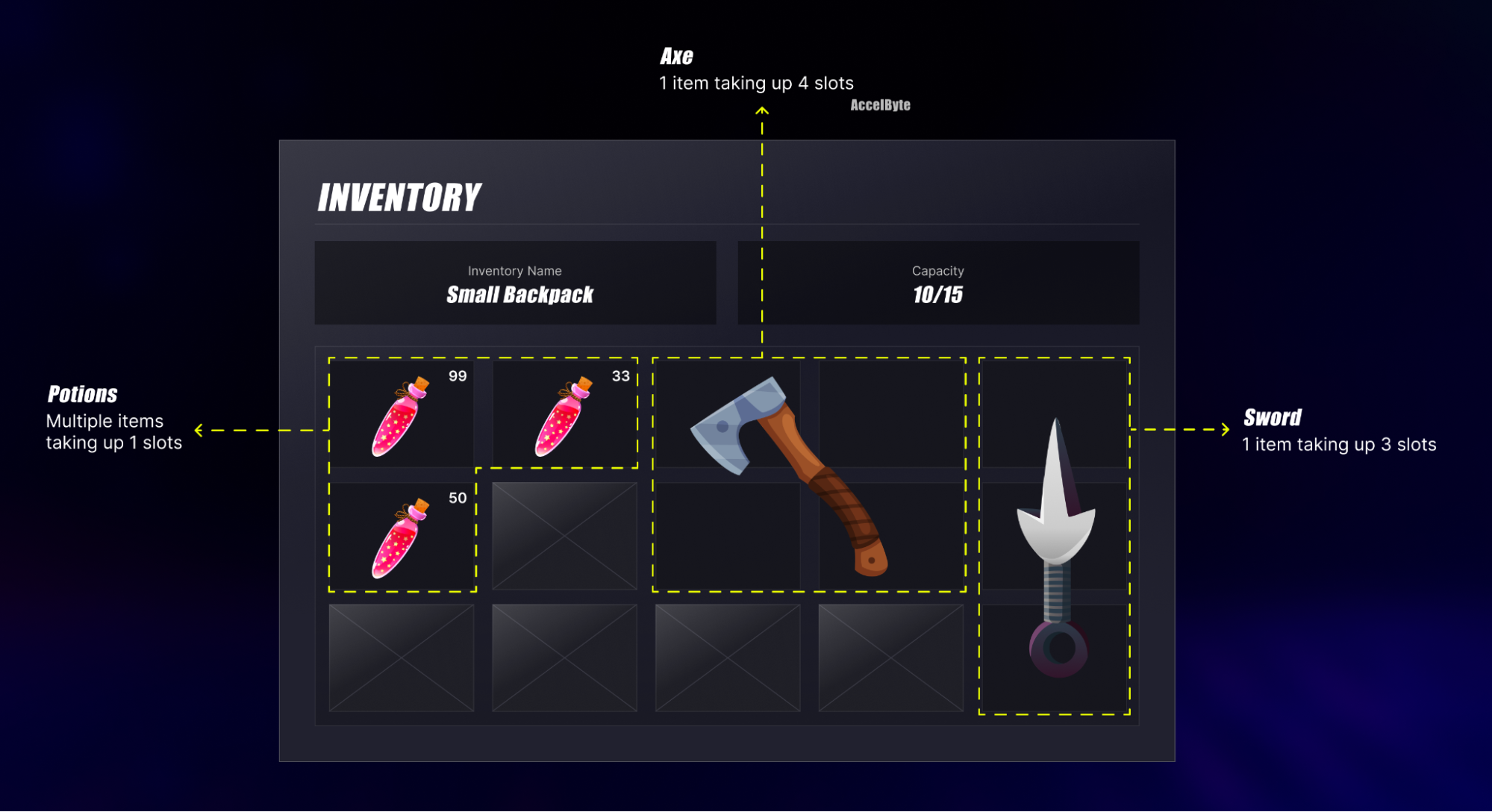
-
You can store a single item in multiple slots by setting the slotUsed field to a specific number. For example, slotUsed: 3 would store one Sword in three slots.
-
You can stack multiple items in a single slot by setting the qty field to a specific number. For example, qty: 99 would store 99 potions in a single slot.
-
You can use slotId to specify which slot to store items in. By default, if you do not specify the slot, it will be filled with default.
- If you want to let your players store potions in the first slot similar to the second example implementation, set slotId to slotId: "0".
- If you want to store the same potions in a different slot (for example, the potions stored in the middle row of the first column of the slot similar to the second example implementation), set slotId to slotId: "5"
-
You can enhance the item's dimension and slot position with serverCustomAttributes and customAttributes. In the second example implementation, the sword takes up three slots in column 5.
"serverCustomAttributes": {
	"slotDimensionHeight": 3,
	"slotDimensionWidth":1,
},
"customAttributes": {
	"slotPosition": "[0,4],[1,4],[2,4]"
}
The item's dimension is stored in serverCustomAttributes to prevent the player from adjusting the information. This information will be used by the game client to identify the item dimension. For the slot position, you can store it in customAttributes to allow your player to move the item position.
-
To enable players to retrieve a list of items from their inventory, use this function:
- Unreal
- Unity Engine
FString InventoryId = FString("SomeInventoryId");
EAccelByteUserItemsSortBy SortBy = EAccelByteUserItemsSortBy::CREATED_AT_DESC;
FString SourceItemId = FString("SomeSourceItemId");
FString Tags = FString("SomeTags");

FAccelByteModelsUserItemsPagingResponse OutResult;

const FApiClientPtr ApiClient = AccelByteOnlineSubsystemPtr->GetApiClient();
ApiClient->Inventory.GetUserInventoryAllItems(InventoryId,
    THandler<FAccelByteModelsUserItemsPagingResponse>::CreateLambda([&](const FAccelByteModelsUserItemsPagingResponse& Result)
   	 {
   		 OutResult = Result;
   		 // Do something if GetUserInventoryAllItems is successful
   	 })
    , FErrorHandler::CreateLambda([&](const int32 ErrorCode, const FString& ErrorMessage)
   	 {
   		 // Do something if GetUserInventoryAllItems has an error
   	 }), SortBy, 50, 0, SourceItemId, Tags);
// prepare inventoryId value
// you can get this value from GetUserInventories step result as follows:
// string inventoryId = getUserInventoriesResult.value.data[0].id;
string inventoryId = "uniqueInventoryId";

Result<UserItemsPagingResponse> getItemResult = null;
AccelByteSDK.GetClientRegistry().GetApi().GetInventory().GetUserInventoryAllItems(inventoryId, result =>
{
	if (result.IsError)
	{
		Debug.Log($"Failed to get inventory [{result.Error.Code}]:{result.Error.Message}");
		return;
	}

	// Do something after GetUserInventoryAllItems is successful
	getItemResult = result;
});
Enable players to update item attributes and tags
You can allow your players to store additional information and tags for the items in their inventory.
Custom attributes
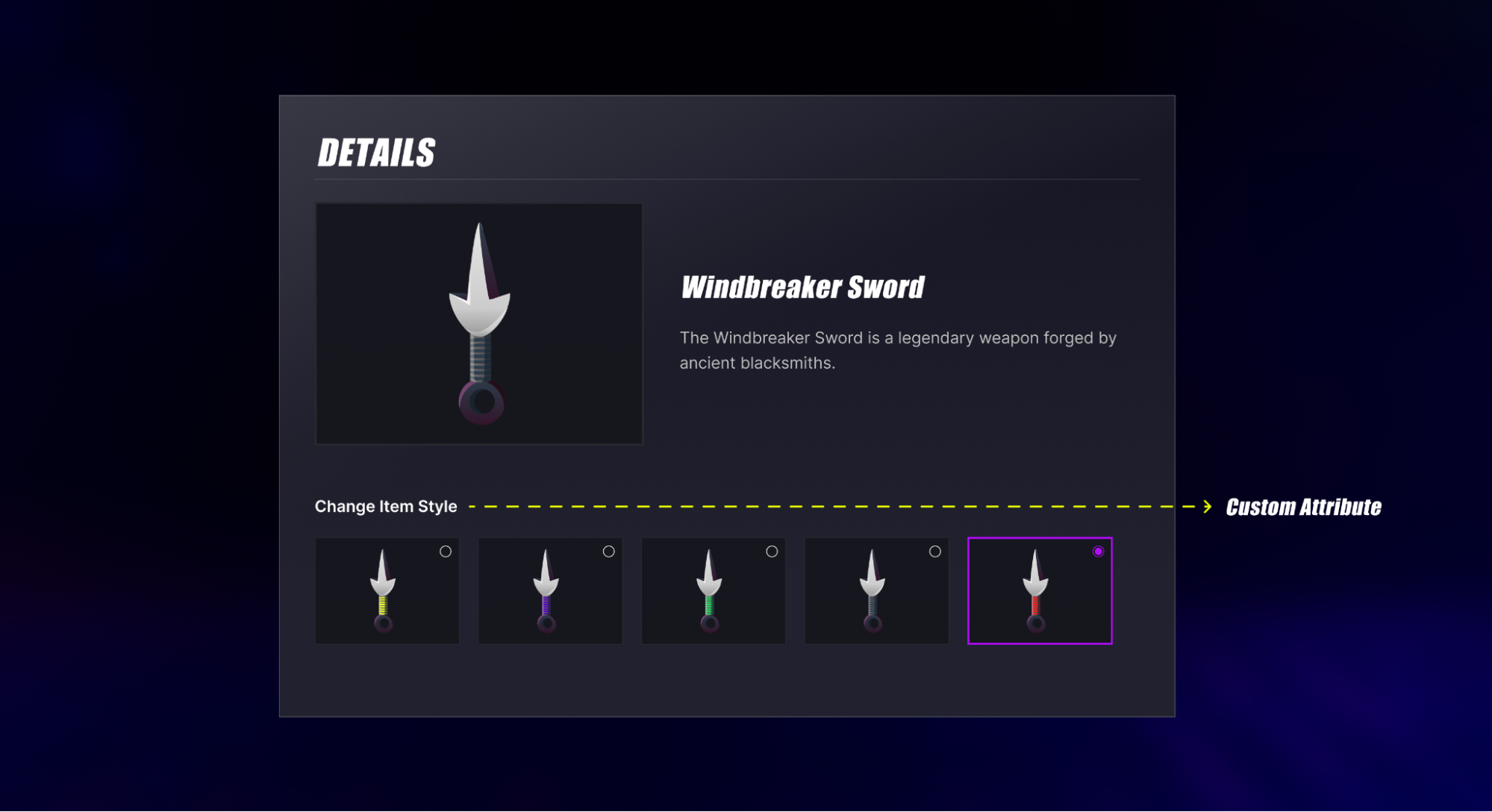
These attributes are allowed to be updated by the player (via game client) or game server. This is suitable if you want to allow your player to store additional information related to the items. The attribute stored is usually the one that does not impact the gameplay mechanics, for example, item style or cosmetic. This attribute will be stored in the customAttributes field.
Tags
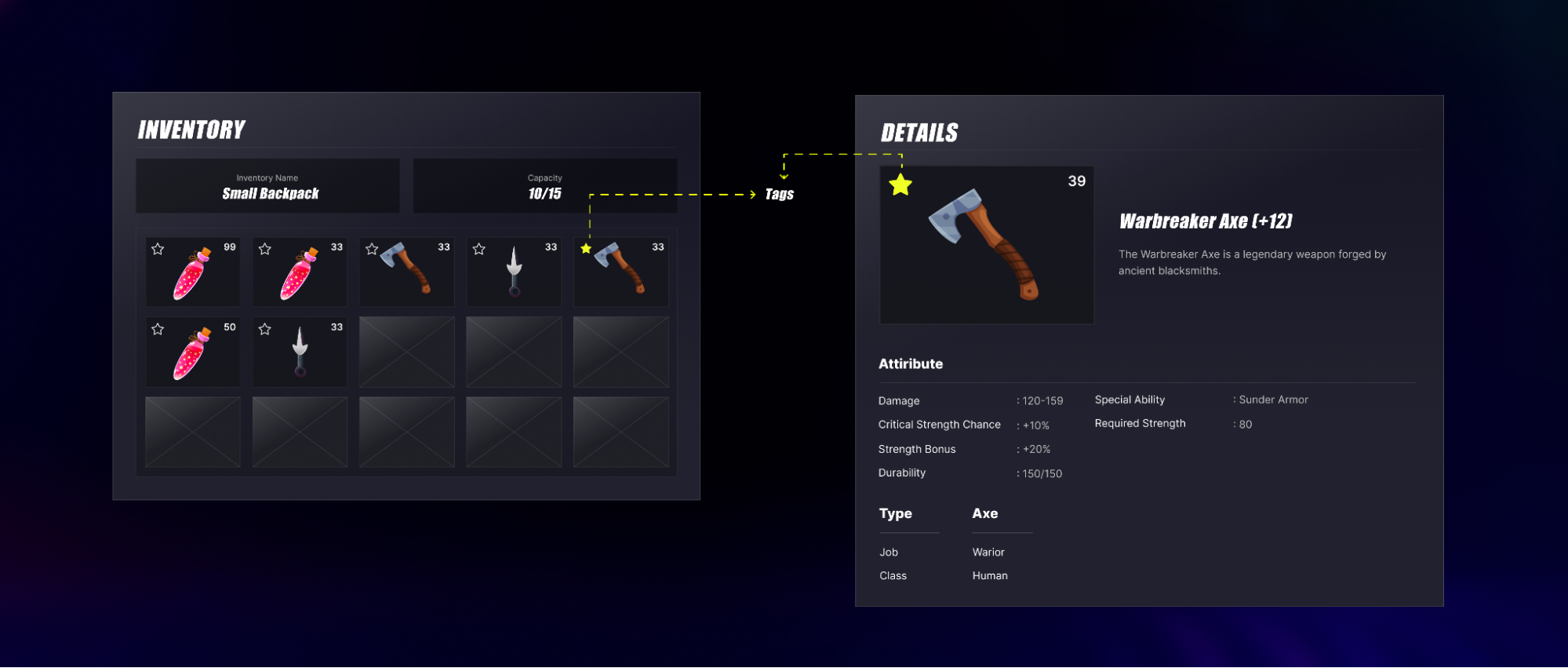
You can enable your players to add tags to items for tagging and grouping purposes.
- Not all tags can be used by the players. Some tags can only be added via the game server. See Update tags via game server.
- Tags are predefined and only admins can add and modify the predefined tags.
Use this function:
- Unreal
- Unity Engine
FJsonObjectWrapper UpdatedCustomAttributes;
UpdatedCustomAttributes.JsonObject = MakeShared<FJsonObject>();
UpdatedCustomAttributes.JsonObject->SetStringField("SomeAttributeStringKey", "UpdatedAttribute");

FAccelByteModelsUpdateUserInventoryItemRequest UpdateInventoryItemRequest = {};
UpdateInventoryItemRequest.CustomAttributes = UpdatedCustomAttributes;
UpdateInventoryItemRequest.SlotId = FString("SomeUpdatedSlotId");
UpdateInventoryItemRequest.SourceItemId = FString("SomeUpdatedSourceItemId");
UpdateInventoryItemRequest.Tags.Add(FString("SomeUpdatedTags"));

FString InventoryId = FString("SomeInventoryId");

TArray<FAccelByteModelsUpdateUserInventoryItemResponse> OutResult;

const FApiClientPtr ApiClient = AccelByteOnlineSubsystemPtr->GetApiClient();
ApiClient->Inventory.BulkUpdateInventoryItems(InventoryId, { UpdateInventoryItemRequest },
    THandler<TArray<FAccelByteModelsUpdateUserInventoryItemResponse>>::CreateLambda([&](const TArray<FAccelByteModelsUpdateUserInventoryItemResponse>& Result)
   	 {
   		 OutResult = Result;
   		 // Do something if BulkUpdateInventoryItems is successful
   	 })
    , FErrorHandler::CreateLambda([&](const int32 ErrorCode, const FString& ErrorMessage)
   	 {
   		 // Do something if BulkUpdateInventoryItems has an error
   	 }));
Dictionary<string, object> customAttribute = new Dictionary<string, object>()
{
	{"someString", "abcd"}
	, {"someInt", 1234}
	, {"someFloat", 10.4f}
};
// you can get this value from GetUserInventories step result as follows:
// string inventoryId = getUserInventoriesResult.value.data[0].id;
string inventoryId = "SomeInventoryId";
string[] tags = new string[]
{
	"tag 1"
	, "tag 2"
};

BulkUpdateInventoryItemsPayload[] payload = new BulkUpdateInventoryItemsPayload[]
{
	new BulkUpdateInventoryItemsPayload(sourceItemId)
	{
		CustomAttributes = customAttribute,
		Tags = tags
	}
};

Result<UpdateUserInventoryItemResponse[]> updateResult = null;
AccelByteSDK.GetClientRegistry().GetApi().GetInventory().BulkUpdateInventoryItems(inventoryId, payload, result =>
{
	if (result.IsError)
	{
		// Do something if BulkUpdateInventoryItems is failed
		UnityEngine.Debug.Log($"Failed to update [{result.Error.Code}]:{result.Error.Message}");
		return;
	}

	// Do something if BulkUpdateInventoryItems is successful
	updateResult = result;
});
Enable players to retrieve all available tags
To enable your players retrieve a list of available tags that they can use to tags items in their inventory, use this function:
- Unreal
- Unity Engine
EAccelByteInventoryUtilitiesSortBy SortBy = EAccelByteInventoryUtilitiesSortBy::CREATED_AT_DESC;

FAccelByteModelsInventoryTagPagingResponse OutResult;

const FApiClientPtr ApiClient = AccelByteOnlineSubsystemPtr->GetApiClient();
ApiClient->Inventory.GetInventoryTags(
    THandler<FAccelByteModelsInventoryTagPagingResponse>::CreateLambda([&](const FAccelByteModelsInventoryTagPagingResponse& Result)
   	 {
   		 OutResult = Result;
   		 // Do something if GetInventoryTags is successful
   	 })
    , FErrorHandler::CreateLambda([&](const int32 ErrorCode, const FString& ErrorMessage)
   	 {
   		 // Do something if GetInventoryTags has an error
   	 }), SortBy, 50, 0);
Result<InventoryTagsPagingResponse> getTagResult = null;
AccelByteSDK.GetClientRegistry().GetApi().GetInventory().GetInventoryTags(result =>
{
	if (result.IsError)
	{
		// Do something if GetInventoryTags has an error
		Debug.Log($"Failed to get inventory tags [{result.Error.Code}]:{result.Error.Message}");
		return;
	}

	// Do something after GetInventoryTags is successful
	getTagResult = result;
});
Enable players to consume items
To enable your players to consume the items in their inventories, use this function:
- Unreal
- Unity Engine
FAccelByteModelsConsumeUserItemsRequest ConsumeItemsRequest = {};
ConsumeItemsRequest.SourceItemId = FString("SomeSourceItemId");
ConsumeItemsRequest.SlotId = FString("SomeSlotId");
ConsumeItemsRequest.Qty = 1;

FString InventoryId = FString("SomeInventoryId");

FAccelByteModelsUserItemResponse OutResult;

const FApiClientPtr ApiClient = AccelByteOnlineSubsystemPtr->GetApiClient();
ApiClient->Inventory.ConsumeUserInventoryItem(InventoryId, { ConsumeItemsRequest },
    THandler<FAccelByteModelsUserItemResponse>::CreateLambda([&](const FAccelByteModelsUserItemResponse& Result)
   	 {
   		 OutResult = Result;
   		 // Do something if ConsumeUserInventoryItem is successful
   	 })
    , FErrorHandler::CreateLambda([&](const int32 ErrorCode, const FString& ErrorMessage)
   	 {
   		 // Do something if ConsumeUserInventoryItem has an error
   	 }));
// you can get this value from GetUserInventories step result as follows:
// string inventoryId = getUserInventoriesResult.value.data[0].id;
string inventoryId = "SomeInventoryId";
int expectedQuantity = 1;
// you can get this value from GetUserInventoryAllItems step result as follows:
// string sourceItemId = getUserInventoryAllItems.Value.Data[0].SourceItemId;
string sourceItemId = "someSourceItemId";

Result<UserItem> consumeResult = null;
AccelByteSDK.GetClientRegistry().GetApi().GetInventory().ConsumeUserInventoryItem(inventoryId, expectedQuantity, sourceItemId, result =>
{
	if (result.IsError)
	{
		// Do something if ConsumeUserInventoryItem has an error
		UnityEngine.Debug.Log($"Failed to consume [{result.Error.Code}]:{result.Error.Message}");
		return;
	}

	// Do something if ConsumeUserInventoryItem is successful
	consumeResult = result;
});
Enable players to remove item
To enable your player to remove items from their inventory, use this function:
- Unreal
- Unity Engine
FAccelByteModelsDeleteUserInventoryItemsRequest DeleteItemsRequest = {};
DeleteItemsRequest.SourceItemId = FString("SomeSourceItemId");
DeleteItemsRequest.SlotId = FString("SomeSlotId");

FString InventoryId = FString("SomeInventoryId");

TArray<FAccelByteModelsDeleteUserInventoryItemResponse> OutResult;

const FApiClientPtr ApiClient = AccelByteOnlineSubsystemPtr->GetApiClient();
ApiClient->Inventory.BulkDeleteInventoryItems(InventoryId, { DeleteItemsRequest },
    THandler<TArray<FAccelByteModelsDeleteUserInventoryItemResponse>>::CreateLambda([&](const TArray<FAccelByteModelsDeleteUserInventoryItemResponse>& Result)
   	 {
   		 OutResult = Result;
   		 // Do something if BulkDeleteInventoryItems is successful
   	 })
    , FErrorHandler::CreateLambda([&](const int32 ErrorCode, const FString& ErrorMessage)
   	 {
   		 // Do something if BulkDeleteInventoryItems has an error
   	 }));
// you can get this value from GetUserInventories step result as follows:
// string inventoryId = getUserInventoriesResult.value.data[0].id;
string inventoryId = "SomeInventoryId";
// you can get this value from GetUserInventoryAllItems step result as follows:
// string sourceItemId = getUserInventoryAllItems.Value.Data[0].SourceItemId;
string sourceItemId = "someSourceItemId";

var payload = new BulkDeleteUserInventoryItemsPayload[]
{
	new BulkDeleteUserInventoryItemsPayload(sourceItemId);
};

Result<DeleteUserInventoryItemResponse[]> deleteResult = null;
AccelByteSDK.GetClientRegistry().GetApi().GetInventory().BulkDeleteInventoryItems(inventoryId, payload, result =>
{
	if (result.IsError)
	{
		// Do something if BulkDeleteInventoryItems has an error
		UnityEngine.Debug.Log($"Failed to delete [{result.Error.Code}]:{result.Error.Message}");
		return;
	}

	// Do something if BulkDeleteInventoryItems is successful
	deleteResult = result;
});
Enable players to move items between inventories
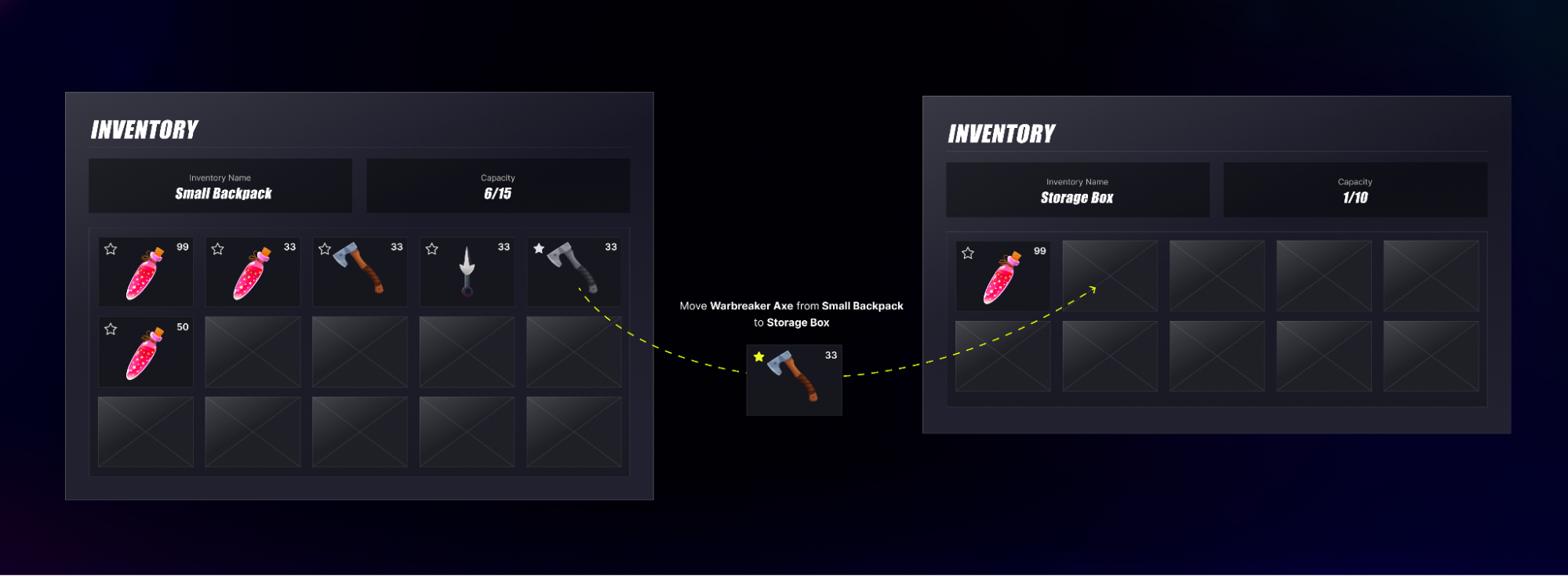
Enable your players to move items between inventories. This gives the the flexibility to manage their items as they prefer and enhances their gameplay and strategic decision-making experience.
Use this function:
- Unreal
- Unity Engine
FAccelByteModelsMoveUserItemDataRequest MoveItem = {};
MoveItem.Qty = 1;
MoveItem.SlotId = FString("SomeSlotId");
MoveItem.SourceItemId = FString("SomeSourceItemId");

FAccelByteModelsMoveUserItemsBetweenInventoriesRequest MoveItemsRequest = {};
MoveItemsRequest.SrcInventoryId = FString("SomeSourceInventoryId");
MoveItemsRequest.Items.Add(MoveItem);

FString DestinationInventoryId = FString("SomeDestinationInventoryId");

FAccelByteModelsMoveUserItemsBetweenInventoriesResponse OutResult;

const FApiClientPtr ApiClient = AccelByteOnlineSubsystemPtr->GetApiClient();
ApiClient->Inventory.MoveItemsBetweenInventories(DestinationInventoryId, MoveItemsRequest,
    THandler<FAccelByteModelsMoveUserItemsBetweenInventoriesResponse>::CreateLambda([&](const FAccelByteModelsMoveUserItemsBetweenInventoriesResponse& Result)
   	 {
   		 OutResult = Result;
   		 // Do something if MoveItemsBetweenInventories is successful
   	 })
    , FErrorHandler::CreateLambda([&](const int32 ErrorCode, const FString& ErrorMessage)
   	 {
   		 // Do something if MoveItemsBetweenInventories has an error
   	 }));
string sourceInventoryId = "SomeSourceInventoryId";
string destinationInventoryId = "SomeDestinationInventoryId";

var payload = new MoveUserItemsBetweenInventoriesPayload[]
{
	new MoveUserItemsBetweenInventoriesPayload(expectedQty, slotId, sourceItemId)
};

Result<MoveUserItemsBetweenInventoriesResponse> moveResult = null;
AccelByteSDK.GetClientRegistry().GetApi().GetInventory().MoveItemsBetweenInventories(destinationInventoryId, sourceInventoryId, payload, result =>
{
	if (result.IsError)
	{
		// Do something if MoveItemsBetweenInventories has an error
		UnityEngine.Debug.Log($"Failed to move item [{result.Error.Code}]:{result.Error.Message}");
		return;
	}

	// Do something if MoveItemsBetweenInventories is success
	moveResult = result;
});