ゲームサーバーを使用してプレイヤーインベントリを管理する
注釈:本資料はAI技術を用いて翻訳されています。
The Inventory service is available but not yet recommended for production use. You are welcome to explore and try it, but please be aware that future updates may introduce breaking changes. For alternatives, consider the following:
- Entitlement: Recommended as the primary option for managing player items.
- Extend: If Entitlement does not fully cover your needs, consider Extend to build a custom solution.
Overview
The AccelByte Gaming Service (AGS) Inventory service allows you to manage players inventory and items directly from the game server, enabling inventory and items management, organization, or manipulation.
This article lists how you can enable your game server to manage the inventories owned by your players.
Prerequisites
- Access to the AGS Admin Portal.
- A publisher or a game namespace.
- You have reviewed the key concepts of the Inventory service and the Inventory service API documentation.
- You have integrated the AccelByte SDK into your game, including the following permissions:
- Client ID
- Client Secret
Grant inventory to the player
You can use this action if you want to allow your game server to grant inventories to players after they reach an achievement or complete a specific action within the game, for example, granting new inventory after a player achieved level 20.
You can enable the game server to grant a new inventory to the player as long as the number of inventory with the same code does not exceed the "maxInstancesPerUser" set in the inventory configuration.
Use this function for reference:
- Unreal Engine
- Unity
- C# Extend SDK
- Go Extend SDK
- Java Extend SDK
- Python Extend SDK
// The code snippet will be available on the future update
string userId = "registeredUserId";
Result<UserInventory> createInventoryResult = null;
ServerCreateInventoryRequest request = new ServerCreateInventoryRequest
{
    UserId = userId,
    InventoryConfigurationCode = inventoryConfigCode
};

createInventoryResult = null;
AccelByteSDK.GetServerRegistry().GetApi()
    .GetInventory()
    .CreateUserInventory(request, result =>
{
    if (result.IsError)
    {
        // Do something if CreateUserInventory is failed
        UnityEngine.Debug.Log($"Failed to CreateUserInventory [{result.Error.Code}]:{result.Error.Message}");
        return;
    }

    // Do something if CreateUserInventory is success
    createInventoryResult = result;
});
AccelByteSDK sdk = AccelByteSDK.Builder
    .UseDefaultHttpClient()
    .SetConfigRepository()
    .UseDefaultTokenRepository()
    .EnableLog() // Optional
    .Build();


string gameNamespace = "gameNamespace";
string inventoryConfigurationCode = "SomeConfigurationCode";
string userId = "userId";


ApimodelsCreateInventoryReq body = new ApimodelsCreateInventoryReq()
{
    InventoryConfigurationCode = inventoryConfigurationCode,
    UserId = userId
};

var response = sdk.Inventory.AdminInventories.AdminCreateInventoryOp
    .Execute(body, gameNamespace);
if (response == null)
    return "No response from server.";


// Do something with the response
adminInventoriesService := &inventory.AdminInventoriesService{
    Client:          factory.NewInventoryClient(&repository.ConfigRepositoryImpl{}),
    TokenRepository: &repository.TokenRepositoryImpl{},
}
inventoryConfigurationCode := "someConfigurationCode"
userId := "userId"
body := &inventoryclientmodels.ApimodelsCreateInventoryReq {
    InventoryConfigurationCode: &inventoryConfigurationCode,
    UserID: &userId,
}
namespace := "gameNamespace"
input := &admin_inventories.AdminCreateInventoryParams{
    Body:      body,
    Namespace: namespace,
}
result, err := adminInventoriesService.AdminCreateInventoryShort(input)
final AccelByteSDK sdk = new AccelByteSDK(httpClient, tokenRepository, configRepository);
AdminInventories AdminInventoriesWrapper = new AdminInventories(sdk);

String gameNamespace = "gameNamespace";
String userId = "<user-id>";
String inventoryConfigurationCode = "SomeConfigurationCode";
ApimodelsInventoryResp response;
try {
    ApimodelsCreateInventoryReq reqBody = ApimodelsCreateInventoryReq.builder()
        .userId(userId)
        .inventoryConfigurationCode(inventoryConfigurationCode)
        .build();
    response = AdminInventoriesWrapper.adminCreateInventory(AdminCreateInventory.builder()
        .namespace(gameNamespace)
        .body(reqBody)
        .build());
} catch (Exception e) {
    // Do something when failed
    return;
}

if (response == null) {
    // Null response from server
} else {
    // Do something when successful
}
import accelbyte_py_sdk.api.inventory as inventory_service
import accelbyte_py_sdk.api.inventory.models as inventory_models

result, error = inventory_service.admin_create_inventory(
    body=inventory_models.ApimodelsCreateInventoryReq()
        .with_inventory_configuration_code("SomeConfigurationCode")
        .with_user_id("********************************"),
    namespace=namespace,  # optional, gets the value from the global instance if unspecified
    sdk=sdk,  # optional, gets the global instance  if unspecified
)
if error:
    exit(error)
Retrieve list of player inventories
Retrieving a list of player inventories can give you information about a player's inventory, such as the inventoryId and inventoryConfigurationId.
To retrieve a list of player inventories via your game server, use this function for reference:
- Unreal Engine
- Unity
- C# Extend SDK
- Go Extend SDK
- Java Extend SDK
- Python Extend SDK
// The code snippet will be available on the future update
Result<UserInventoriesPagingResponse> getUserInventoryResult = null;
AccelByteSDK.GetServerRegistry().GetApi()
    .GetInventory()
    .GetUserInventories(result =>
{
    if (result.IsError)
    {
        // Do something if GetUserInventories is failed
        UnityEngine.Debug.Log($"Failed to GetUserInventories [{result.Error.Code}]:{result.Error.Message}");
        return;
    }

    // Do something if GetUserInventories is success
    getUserInventoryResult = result;
});
AccelByteSDK sdk = AccelByteSDK.Builder
    .UseDefaultHttpClient()
    .SetConfigRepository()
    .UseDefaultTokenRepository()
    .EnableLog() // Optional
    .Build();


string gameNamespace = "gameNamespace";
string inventoryConfigurationCode = "SomeConfigurationCode";
long limit = 10;
long offset = 0;
string userId = "userId";


var response = sdk.Inventory.AdminInventories.AdminListInventoriesOp
    .SetLimit(limit)
    .SetOffset(offset)
    .SetSortBy(AdminListInventoriesSortBy.CreatedAt)
    .SetInventoryConfigurationCode(inventoryConfigurationCode)
    .SetUserId(userId)
    .Execute(gameNamespace);
if (response == null)
    return "No response from server.";


// Do something with the response
adminInventoriesService := &inventory.AdminInventoriesService{
    Client:          factory.NewInventoryClient(&repository.ConfigRepositoryImpl{}),
    TokenRepository: &repository.TokenRepositoryImpl{},
}
namespace := "gameNamespace"
inventoryConfigurationCode := "SomeConfigurationCode"
limit := int64(10)
offset := int64(0)
sortBy := admin_inventories.AdminListInventoriesCreatedAtConstant
userId, _ := cmd.Flags().GetString("userId")
input := &admin_inventories.AdminListInventoriesParams{
    Namespace:                  namespace,
    InventoryConfigurationCode: &inventoryConfigurationCode,
    Limit:                      &limit,
    Offset:                     &offset,
    SortBy:                     &sortBy,
    UserID:                     &userId,
}
result, err := adminInventoriesService.AdminListInventoriesShort(input)
final AccelByteSDK sdk = new AccelByteSDK(httpClient, tokenRepository, configRepository);
AdminInventories AdminInventoriesWrapper = new AdminInventories(sdk);

String gameNamespace = "gameNamespace";
String inventoryConfigurationCode = "SomeConfigurationCode";
int limit = 10;
int offset = 0;
String userId = "userId";
ApimodelsListInventoryResp response;
try {
    response = AdminInventoriesWrapper.adminListInventories(AdminListInventories.builder()
        .namespace(gameNamespace)
            .limit(limit)
            .offset(offset)
            .sortBy(AdminListInventories.SortBy.CreatedAt.toString())
            .inventoryConfigurationCode(inventoryConfigurationCode)
            .userId(userId)
        .build());
} catch (Exception e) {
    // Do something when failed
    return;
}

if (response == null) {
    // No response from server
} else {
    // Do something when successful
}
import accelbyte_py_sdk.api.inventory as inventory_service
import accelbyte_py_sdk.api.inventory.models as inventory_models

result, error = inventory_service.admin_list_inventories(
    inventory_configuration_code="SomeConfigurationCode",
    limit=10,
    offset=0,
    sort_by="createdAt",
    user_id="********************************",
    namespace=namespace,  # optional, gets the value from the global instance if unspecified
    sdk=sdk,  # optional, gets the global instance  if unspecified
)
if error:
    exit(error)
Update player inventory slot limit
Use this action to update a specific player's inventory maximum slot limit by providing the inventory ID and the new number of slots that will be implemented.
To update a player's inventory slot limit via your game server, use this function for reference:
- Unreal Engine
- Unity
- C# Extend SDK
- Go Extend SDK
- Java Extend SDK
- Python Extend SDK
// The code snippet will be available on the future update
string inventoryId = "someInventoryId";
Result<UserInventory> updateUserInventoryResult = null;
ServerUpdateInventoryRequest request = new ServerUpdateInventoryRequest
{
    IncMaxSlots = 3
};

AccelByteSDK.GetServerRegistry().GetApi()
    .GetInventory()
    .UpdateUserInventory(inventoryId, request, result =>
{
    if (result.IsError)
    {
        // Do something if UpdateUserInventory is failed
        UnityEngine.Debug.Log($"Failed to UpdateUserInventory [{result.Error.Code}]:{result.Error.Message}");
        return;
    }

    // Do something if UpdateUserInventory is success
    updateUserInventoryResult = result;
});
AccelByteSDK sdk = AccelByteSDK.Builder
    .UseDefaultHttpClient()
    .SetConfigRepository()
    .UseDefaultTokenRepository()
    .EnableLog() // Optional
    .Build();


string gameNamespace = "gameNamespace";
string inventoryId = "inventoryId";
int incMaxSlots = 10;


ApimodelsUpdateInventoryReq body = new ApimodelsUpdateInventoryReq()
{
    IncMaxSlots = incMaxSlots
};


var response = sdk.Inventory.AdminInventories.AdminUpdateInventoryOp
    .Execute(body, inventoryId, gameNamespace);
if (response == null)
    return "No response from server.";


// Do something with the response
adminInventoriesService := &inventory.AdminInventoriesService{
    Client:          factory.NewInventoryClient(&repository.ConfigRepositoryImpl{}),
    TokenRepository: &repository.TokenRepositoryImpl{},
}
incMaxSlots := int32(10)
body := &inventoryclientmodels.ApimodelsUpdateInventoryReq {
    IncMaxSlots: &incMaxSlots,
}
inventoryId := "inventoryId"
namespace := "gameNamespace"
input := &admin_inventories.AdminUpdateInventoryParams{
    Body:        body,
    InventoryID: inventoryId,
    Namespace:   namespace,
}
result, err := adminInventoriesService.AdminUpdateInventoryShort(input)
final AccelByteSDK sdk = new AccelByteSDK(httpClient, tokenRepository, configRepository);
AdminInventories AdminInventoriesWrapper = new AdminInventories(sdk);

String gameNamespace = "gameNamespace";
String inventoryId = "inventoryId";
int incMaxSlots = 10;
ApimodelsInventoryResp response;
try {
    ApimodelsUpdateInventoryReq reqBody = ApimodelsUpdateInventoryReq.builder().incMaxSlots(incMaxSlots).build();
    response = AdminInventoriesWrapper.adminUpdateInventory(AdminUpdateInventory.builder()
        .namespace(gameNamespace)
        .body(reqBody)
        .inventoryId(inventoryId)
        .build());
} catch (Exception e) {
    // Do something when failed
    return;
}

if (response == null) {
    // No response from server
} else {
    // Do something when successful
}
import accelbyte_py_sdk.api.inventory as inventory_service
import accelbyte_py_sdk.api.inventory.models as inventory_models

result, error = inventory_service.admin_update_inventory(
    body=inventory_models.ApimodelsUpdateInventoryReq().with_inc_max_slots(10),
    inventory_id="inventoryId",
    namespace=namespace,  # optional, gets the value from the global instance if unspecified
    sdk=sdk,  # optional, gets the global instance  if unspecified
)
if error:
    exit(error)
Delete player inventory
Player inventories can only be deleted if they're empty. Ensure that you first remove all the items from a player's inventory before deleting it.
To delete a player's inventory via your game server, use this function for reference:
- Unreal Engine
- Unity
- C# Extend SDK
- Go Extend SDK
- Java Extend SDK
- Python Extend SDK
// The code snippet will be available on the future update
string targetUserId = "userId";
ServerDeleteInventoryRequest request = new ServerDeleteInventoryRequest
{
    Message = "deletion message"
};

AccelByte.Core.Result deleteResult = null;
AccelByteSDK.GetServerRegistry().GetApi()
    .GetInventory()
    .DeleteUserInventory(targetUserId, request, result =>
{
    if (result.IsError)
    {
        // Do something if DeleteUserInventory is failed
        UnityEngine.Debug.Log($"Failed to DeleteUserInventory [{result.Error.Code}]:{result.Error.Message}");
        return;
    }

    // Do something if DeleteUserInventory is success
    deleteResult = result;
});
AccelByteSDK sdk = AccelByteSDK.Builder
    .UseDefaultHttpClient()
    .SetConfigRepository()
    .UseDefaultTokenRepository()
    .EnableLog() // Optional
    .Build();


string gameNamespace = "gameNamespace";
string inventoryId = "inventoryId";


ApimodelsDeleteInventoryReq body = new ApimodelsDeleteInventoryReq()
{
    Message = "message"
};


sdk.Inventory.AdminInventories.DeleteInventoryOp
    .Execute(body, inventoryId, gameNamespace);
adminInventoriesService := &inventory.AdminInventoriesService{
    Client:          factory.NewInventoryClient(&repository.ConfigRepositoryImpl{}),
    TokenRepository: &repository.TokenRepositoryImpl{},
}
message := "message"
body := &inventoryclientmodels.ApimodelsDeleteInventoryReq {
    Message: &message,
}
inventoryId := "inventoryId"
namespace := "gameNamespace"
input := &admin_inventories.DeleteInventoryParams{
    Body:        body,
    InventoryID: inventoryId,
    Namespace:   namespace,
}
err := adminInventoriesService.DeleteInventoryShort(input)
final AccelByteSDK sdk = new AccelByteSDK(httpClient, tokenRepository, configRepository);
AdminInventories AdminInventoriesWrapper = new AdminInventories(sdk);

String gameNamespace = "gameNamespace";
String inventoryId = "inventoryId";
try {
    ApimodelsDeleteInventoryReq reqBody = ApimodelsDeleteInventoryReq.builder().message("message").build();
    AdminInventoriesWrapper.deleteInventory(DeleteInventory.builder()
        .namespace(gameNamespace)
        .inventoryId(inventoryId)
        .body(reqBody)
        .build());
} catch (Exception e) {
    // Do something when failed
    return;
}
import accelbyte_py_sdk.api.inventory as inventory_service
import accelbyte_py_sdk.api.inventory.models as inventory_models

result, error = inventory_service.delete_inventory(
    body=inventory_models.ApimodelsDeleteInventoryReq().with_message("message"),
    inventory_id="inventoryId",
    namespace=namespace,  # optional, gets the value from the global instance if unspecified
    sdk=sdk,  # optional, gets the global instance  if unspecified
)
if error:
    exit(error)
Add item to player inventory using inventoryId
Use this action to add items to a player's inventory. This requires you to provide the player's inventoryId, which is information that you can get from retrieving a list of player inventories.
Use this function for reference:
- Unreal Engine
- Unity
- C# Extend SDK
- Go Extend SDK
- Java Extend SDK
- Python Extend SDK
// The code snippet will be available on the future update
//Please refer to GetUserInventoryAllItems() result to make sure the correct values
string slotId = "slot-1"; // it can be anything, if null it will be set "default"
Dictionary<string, object> customAttributes = new Dictionary<string, object>()
{
    {"durability", 150},
    {"damageGiven", 120.5f},
    {"ability", "Sunder Armor"}
};
Dictionary<string, object> serverCustomAttributes = new Dictionary<string, object>()
{
    {"someInt", 111},
    {"someFloat", 1.2f},
    {"someString", "myString"}
};
uint quantity = 1;
string source = "ECOMMERCE"; // supported values are OTHER and ECOMMERCE
string sourceItemId = "source-item-id"; // if the source is ECOMMERCE, fill this value as item Id from the store
string itemType = "INGAMEITEM"; // if the source is ECOMMERCE, fill this value as item Type from the store
string[] tags = new string[]{"weapon", "melee"};
string targetUserId = "someAccelByteUserId";
string inventoryCode = "someInventoryConfigCode"; // Please refer to GetUserInventories() result to get this value

var optionalParam = new SaveUserInventoryItemOptionalParameters
{
    Tags = tags,
    CustomAttributes = customAttributes,
    ServerCustomAttributes = serverCustomAttributes,
    SlotId = slotId,
};

Result<UserItem> saveItemToUserResult = null;
AccelByteSDK.GetServerRegistry().GetApi().GetInventory().SaveUserInventoryItem(targetUserId
        , inventoryCode
        , source
        , sourceItemId
        , itemType
        , quantity
        , optionalParam
        , result =>
{
    if (result.IsError)
    {
        //Do something if SaveUserInventoryItem is failed
        UnityEngine.Debug.Log($"failed to save item [{result.Error.Code}]:{result.Error.Message}");
        return;
    }

    //Do something if SaveUserInventoryItem is success
    saveItemToUserResult = result;
});
AccelByteSDK sdk = AccelByteSDK.Builder
    .UseDefaultHttpClient()
    .SetConfigRepository()
    .UseDefaultTokenRepository()
    .EnableLog() // Optional
    .Build();

string gameNamespace = "gameNamespace";
string inventoryId = "inventoryId";
string userId = "userId";
Dictionary<string, object> customAttributes = new Dictionary<string, object>();
Dictionary<string, object> serverCustomAttributes = new Dictionary<string, object>();


ApimodelsSaveItemToInventoryReq body = new ApimodelsSaveItemToInventoryReq()
{
    CustomAttributes = customAttributes,
    SlotId = "slot-1",
    SlotUsed = 1,
    Qty = 1,
    ServerCustomAttributes = serverCustomAttributes,
    SourceItemId = "source item id",
    Tags = new List<string>() { "weapon" },
    Type = "ingame"
};


var response = sdk.Inventory.AdminItems.AdminSaveItemToInventoryOp
    .Execute(body, inventoryId, gameNamespace, userId);
if (response == null)
    return "No response from server.";


// Do something with the response
adminItemsService := &inventory.AdminItemsService{
    Client:          factory.NewInventoryClient(&repository.ConfigRepositoryImpl{}),
    TokenRepository: &repository.TokenRepositoryImpl{},
}
slotId := "slot-1"
slotUsed := int32(1)
qty := int32(1)
sourceItemId := "source item id"
type_ := "ingame"
body := &inventoryclientmodels.ApimodelsSaveItemToInventoryReq {
    CustomAttributes: map[string]interface{}{},
    SlotID: &slotId,
    SlotUsed: &slotUsed,
    Qty: &qty,
    ServerCustomAttributes: map[string]interface{}{},
    SourceItemID:&sourceItemId,
    Tags: []string{"weapon"},
    Type: &type_,
}
inventoryId := "inventoryId"
namespace := "gameNamespace"
userId := "userId"
input := &admin_items.AdminSaveItemToInventoryParams{
    Body:        body,
    InventoryID: inventoryId,
    Namespace:   namespace,
    UserID:      userId,
}
result, err := adminItemsService.AdminSaveItemToInventoryShort(input)
final AccelByteSDK sdk = new AccelByteSDK(httpClient, tokenRepository, configRepository);
AdminItems adminItemsWrapper = new AdminItems(sdk);

String gameNamespace = "gameNamespace";
String inventoryId = "inventoryId";
String userId = "userId";
Map<String, Object> customAttributes = Collections.emptyMap();
Map<String, Object>  serverCustomAttributes = Collections.emptyMap();
ApimodelsItemResp response;
try {
    ApimodelsSaveItemToInventoryReq reqBody = ApimodelsSaveItemToInventoryReq.builder()
        .customAttributes(customAttributes)
        .slotId("slot-1")
        .slotUsed(1)
        .qty(1)
        .serverCustomAttributes(serverCustomAttributes)
        .sourceItemId("source item id")
        .tags(List.of("weapon"))
        .type("ingame")
        .build();
    response = adminItemsWrapper.adminSaveItemToInventory(AdminSaveItemToInventory.builder()
        .namespace(gameNamespace)
        .userId(userId)
        .inventoryId(inventoryId)
        .body(reqBody)
        .build());
} catch (Exception e) {
    // Do something when failed
    return;
}

if (response == null) {
    // null response from server
} else {
    // Do something when successful
}
import accelbyte_py_sdk.api.inventory as inventory_service
import accelbyte_py_sdk.api.inventory.models as inventory_models

result, error = inventory_service.admin_save_item_to_inventory(
    body=inventory_models.ApimodelsSaveItemToInventoryReq()
        .with_custom_attributes({})
        .with_qty(1)
        .with_server_custom_attributes({})
        .with_slot_id("slot-1")
        .with_slot_used(1)
        .with_source("source")
        .with_source_item_id("source-item-id")
        .with_tags(["weapon"])
        .with_type("ingame"),
    inventory_id="inventoryId",
    user_id="********************************",
    namespace=namespace,  # optional, gets the value from the global instance if unspecified
    sdk=sdk,  # optional, gets the global instance  if unspecified
)
if error:
    exit(error)
Add item to player inventory by inventoryConfigurationCode
Use this action to add items to a player's specific inventory configuration. This action requires you to provide the inventoryConfigurationCode, which is information that you can get from retrieving a list of player inventories.
Use this function for reference:
- Unreal Engine
- Unity
- C# Extend SDK
- Go Extend SDK
- Java Extend SDK
- Python Extend SDK
// The code snippet will be available on the future update
string inventoryId = "someInventoryId";
string targetUserId = "someAccelByteUserId";
string slotId = "slot-1"; // it can be anything, if null it will be set "default"
string source = "ECOMMERCE"; // supported values are OTHER and ECOMMERCE
string sourceItemId = "source-item-id"; // if the source is ECOMMERCE, fill this value as item Id from the store
string itemType = "INGAMEITEM"; // if the source is ECOMMERCE, fill this value as item Type from the store
uint quantity = 1;
Dictionary<string, object> customAttributes = new Dictionary<string, object>()
{
    {"someInt", 111},
    {"someFloat", 1.2f},
    {"someString", "myString"}
};

var optionalParameters = new SaveUserInventoryItemToInventoryOptionalParameters()
{
    SlotId = slotId,
    CustomAttributes = customAttributes,
};

Result<UserItem> saveItemToUserResult = null;
AccelByteSDK.GetServerRegistry().GetApi().GetInventory().SaveUserInventoryItemToInventory(inventoryId
    , targetUserId
    , source
    , sourceItemId
    , itemType
    , quantity
    , optionalParameters
    , result =>
{
    if (result.IsError)
    {
        //Do something if SaveUserInventoryItemToInventory is failed
        UnityEngine.Debug.Log($"failed to SaveUserInventoryItemToInventory [{result.Error.Code}]:{result.Error.Message}");
        return;
    }

    //Do something if SaveUserInventoryItemToInventory is failed
    saveItemToUserResult = result;
});
AccelByteSDK sdk = AccelByteSDK.Builder
    .UseDefaultHttpClient()
    .SetConfigRepository()
    .UseDefaultTokenRepository()
    .EnableLog() // Optional
    .Build();


string gameNamespace = "gameNamespace";
string userId = "userId";
Dictionary<string, object> customAttributes = new Dictionary<string, object>();
Dictionary<string, object> serverCustomAttributes = new Dictionary<string, object>()
ApimodelsSaveItemReq body = new ApimodelsSaveItemReq()
{
    CustomAttributes = customAttributes,
    InventoryConfigurationCode = "SomeConfigurationCode",
    SlotId = "slot-1",
    SlotUsed = 1,
    Qty = 1,
    ServerCustomAttributes = serverCustomAttributes,
    SourceItemId = "source item id",
    Tags = new List<string>() { "weapon" },
    Type = "ingame"
};


var response = sdk.Inventory.AdminItems.AdminSaveItemOp
    .Execute(body, gameNamespace, userId);
if (response == null)
    return "No response from server.";


// Do something with the response
adminItemsService := &inventory.AdminItemsService{
    Client:          factory.NewInventoryClient(&repository.ConfigRepositoryImpl{}),
    TokenRepository: &repository.TokenRepositoryImpl{},
}
slotId := "slot-1"
slotUsed := int32(1)
qty := int32(1)
sourceItemId := "source item id"
type_ := "ingame"
body := &inventoryclientmodels.ApimodelsSaveItemReq {
    CustomAttributes: map[string]interface{}{},
    SlotID: &slotId,
    SlotUsed: &slotUsed,
    Qty: &qty,
    ServerCustomAttributes: map[string]interface{}{},
    SourceItemID:&sourceItemId,
    Tags: []string{"weapon"},
    Type: &type_,
}
namespace, _ := cmd.Flags().GetString("namespace")
userId, _ := cmd.Flags().GetString("userId")
input := &admin_items.AdminSaveItemParams{
    Body:      body,
    Namespace: namespace,
    UserID:    userId,
}
result, err := adminItemsService.AdminSaveItemShort(input)
final AccelByteSDK sdk = new AccelByteSDK(httpClient, tokenRepository, configRepository);
AdminItems adminItemsWrapper = new AdminItems(sdk);

String gameNamespace = "gameNamespace";
String userId = "userId";
Map<String, Object> customAttributes = Collections.emptyMap();
Map<String, Object>  serverCustomAttributes = Collections.emptyMap();
ApimodelsItemResp response;
try {
    ApimodelsSaveItemReq reqBody = ApimodelsSaveItemReq.builder()
        .customAttributes(customAttributes)
        .slotId("slot-1")
        .slotUsed(1)
        .qty(1)
        .serverCustomAttributes(serverCustomAttributes)
        .sourceItemId("source item id")
        .tags(List.of("weapon"))
        .type("ingame")
        .build();
    response = adminItemsWrapper.adminSaveItem(AdminSaveItem.builder()
        .namespace(gameNamespace)
        .userId(userId)
        .body(reqBody)
        .build());
} catch (Exception e) {
    // Do something when failed
    return;
}

if (response == null) {
    // null response from server
} else {
    // Do something when successful
}
import accelbyte_py_sdk.api.inventory as inventory_service
import accelbyte_py_sdk.api.inventory.models as inventory_models

result, error = inventory_service.admin_save_item(
    body=inventory_models.ApimodelsSaveItemReq()
        .with_custom_attributes({})
        .with_inventory_configuration_code("SomeConfigurationCode")
        .with_qty(1)
        .with_server_custom_attributes({})
        .with_slot_id("slot-1")
        .with_slot_used(1)
        .with_source("source")
        .with_source_item_id("source-item-id")
        .with_tags(["weapon"])
        .with_type("ingame"),
    user_id="********************************",
    namespace=namespace,  # optional, gets the value from the global instance if unspecified
    sdk=sdk,  # optional, gets the global instance  if unspecified
)
if error:
    exit(error)
Retrieve list of items from a player's inventory
Use this function for reference:
- Unreal Engine
- Unity
- C# Extend SDK
- Go Extend SDK
- Java Extend SDK
- Python Extend SDK
// The code snippet will be available on the future update
string inventoryId = "someInventoryId";
Result<UserItemsPagingResponse> getUserItemResult = null;
AccelByteSDK.GetServerRegistry().GetApi().GetInventory().GetUserInventoryAllItems(inventoryId, result =>
{
    if (result.IsError)
    {
        //Do something if GetUserInventoryAllItems is failed
        UnityEngine.Debug.Log($"failed to get item [{result.Error.Code}]:{result.Error.Message}");
        return;
    }

    //Do something if GetUserInventoryAllItems is success
    getUserItemResult = result;
});
AccelByteSDK sdk = AccelByteSDK.Builder
    .UseDefaultHttpClient()
    .SetConfigRepository()
    .UseDefaultTokenRepository()
    .EnableLog() // Optional
    .Build();

string gameNamespace = "gameNamespace";
string inventoryId = "inventoryId";
long limit = 10;
long offset = 0;


var response = sdk.Inventory.AdminItems.AdminListItemsOp
    .SetLimit(limit)
    .SetOffset(offset)
    .SetSortBy(AdminListItemsSortBy.CreatedAt)
    .SetSourceItemId("sourceItemId")
    .SetTags("weapon")
    .Execute(inventoryId, gameNamespace);
if (response == null)
    return "No response from server.";


// Do something with the response
adminItemsService := &inventory.AdminItemsService{
    Client:          factory.NewInventoryClient(&repository.ConfigRepositoryImpl{}),
    TokenRepository: &repository.TokenRepositoryImpl{},
}
inventoryId := "inventoryId"
namespace := "gameNamespace"
limit := int64(10)
offset := int64(0)
qtyGte := int64(1)
sortBy := admin_items.AdminListItemsCreatedAtConstant
sourceItemId := "source item ids"
tags := "weapon"
input := &admin_items.AdminListItemsParams{
    InventoryID:  inventoryId,
    Namespace:    namespace,
    Limit:        &limit,
    Offset:       &offset,
    QtyGte:       &qtyGte,
    SortBy:       &sortBy,
    SourceItemID: &sourceItemId,
    Tags:         &tags,
}
result, err := adminItemsService.AdminListItemsShort(input)
final AccelByteSDK sdk = new AccelByteSDK(httpClient, tokenRepository, configRepository);
AdminItems adminItemsWrapper = new AdminItems(sdk);

String gameNamespace = "gameNamespace";
String inventoryId = "inventoryId";
int limit = 10;
int offset = 0;
ApimodelsListItemResp response;
try {
    response = adminItemsWrapper.adminListItems(AdminListItems.builder()
        .namespace(gameNamespace)
        .inventoryId(inventoryId)
        .limit(limit)
        .offset(offset)
        .sortBy(AdminListItems.SortBy.CreatedAt.toString())
        .sourceItemId("sourceItemId")
        .tags("weapon")
        .build());
} catch (Exception e) {
    // Do something when failed
    return;
}

if (response == null) {
    // Null response from server
} else {
    // Do something when successful
}
import accelbyte_py_sdk.api.inventory as inventory_service
import accelbyte_py_sdk.api.inventory.models as inventory_models

result, error = inventory_service.admin_list_items(
    inventory_id="inventoryId",
    limit=10,
    offset=0,
    qty_gte=1,
    sort_by="createdAt",
    source_item_id="source-item-id",
    tags="weapon",
    namespace=namespace,  # optional, gets the value from the global instance if unspecified
    sdk=sdk,  # optional, gets the global instance  if unspecified
)
if error:
    exit(error)
Update item attributes and tags
Unlike the game client, the game server has more ability to add additional attributes and tags.
Update custom attributes
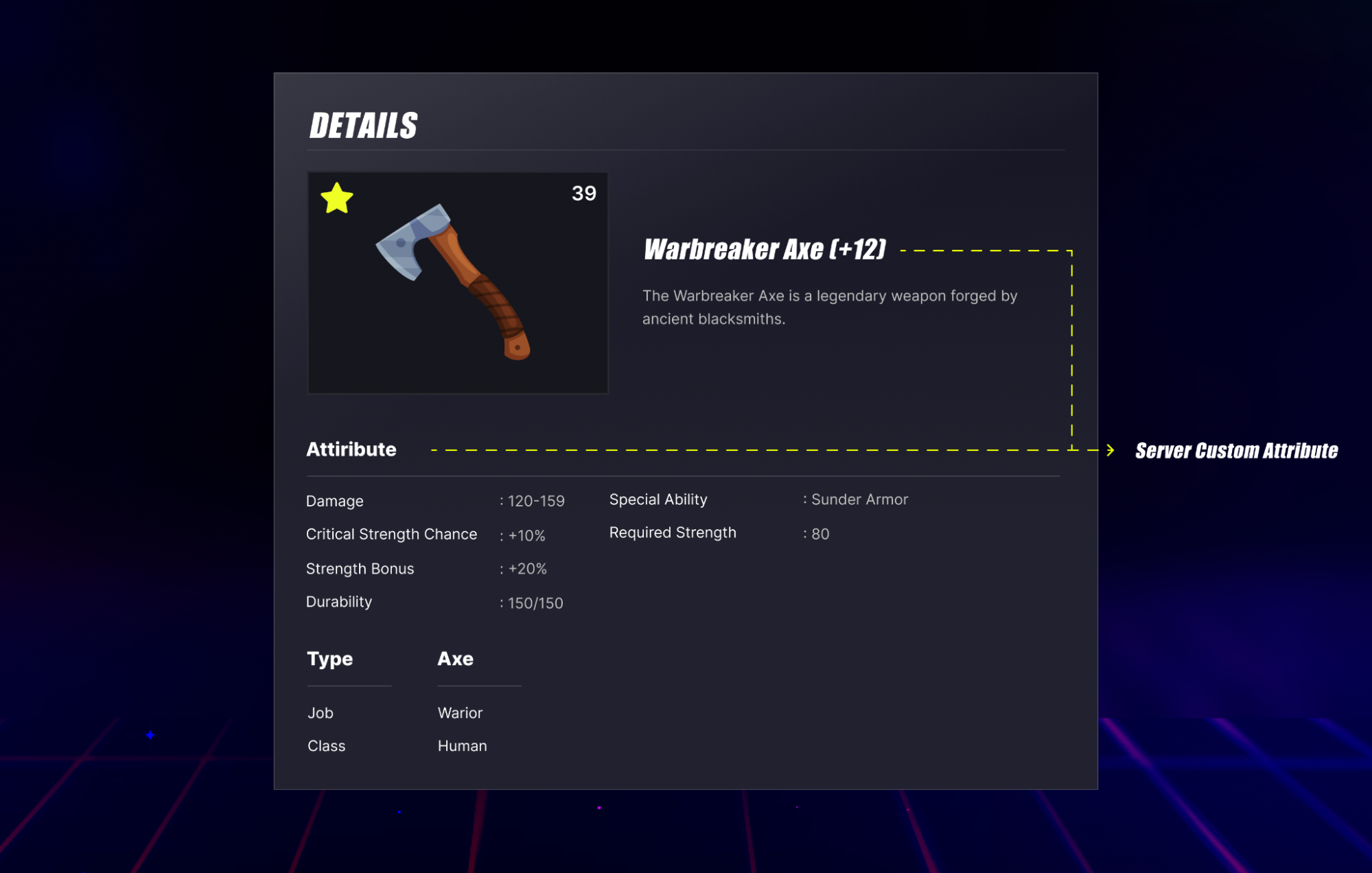
You can use your game server to update custom attributes written by players and attributes that can only be modified by the server with required permissions. You can use this action to update attributes that will impact gameplay experience, such as item stats modifier. This attribute will be stored in the serverCustomAttributes field, for example, items with additional damage, critical, durability, etc.
Update tags
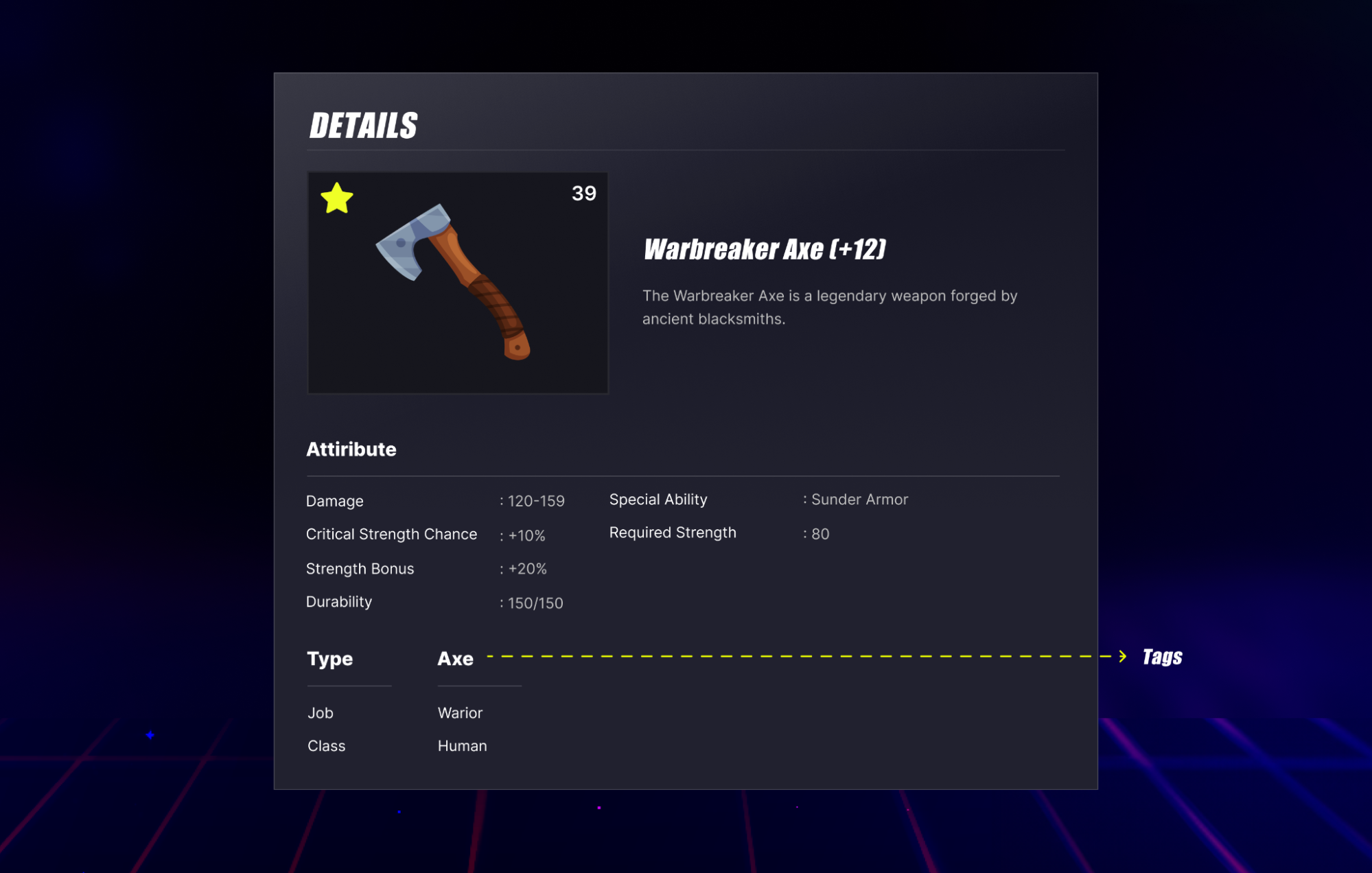
You can use your game server to add tags to the items for the purpose of tagging and grouping them. Game servers can add tags to the items and not allow players to update it.
The following image shows a sample item with a tag.
Use this function for reference:
- Unreal Engine
- Unity
- C# Extend SDK
- Go Extend SDK
- Java Extend SDK
- Python Extend SDK
// The code snippet will be available on the future update
string inventoryId = "someInventoryId";
string targetUserId = "someAccelByteUserId";
string sourceItemId = "source-item-id"; // if the source is ECOMMERCE, fill this value as item Id from the store
Dictionary<string, object> customAttributes = new Dictionary<string, object>()
{
    {"durability", 150},
    {"damageGiven", 120.5f},
    {"ability", "Sunder Armor"}
};
string[] tags = new string[] { "weapon", "melee" };

var payload = new ServerUpdateUserInventoryItemPayload[]
{
    new ServerUpdateUserInventoryItemPayload(sourceItemId)
    {
        CustomAttributes = customAttributes,
        Tags = tags
    }
};

Result<UpdateUserInventoryItemResponse[]> updateInventoryItemResult = null;
AccelByteSDK.GetServerRegistry().GetApi().GetInventory().BulkUpdateUserInventoryItems(inventoryId
    , targetUserId
    , payload
    , result =>
{
    if (result.IsError)
    {
        //Do something if BulkUpdateUserInventoryItems is failed
        UnityEngine.Debug.Log($"failed to update [{result.Error.Code}]:{result.Error.Message}");
        return;
    }

    //Do something if BulkUpdateUserInventoryItems is success
    updateInventoryItemResult = result;
});
AccelByteSDK sdk = AccelByteSDK.Builder
    .UseDefaultHttpClient()
    .SetConfigRepository()
    .UseDefaultTokenRepository()
    .EnableLog() // Optional
    .Build();


string gameNamespace = "gameNamespace";
string inventoryId = "inventoryId";
string userId = "userId";
Dictionary<string, object> customAttributes = new Dictionary<string, object>();
Dictionary<string, object> serverCustomAttributes = new Dictionary<string, object>();


List<ApimodelsAdminUpdateItemReq> body = new List<ApimodelsAdminUpdateItemReq>()
{
    new  ApimodelsAdminUpdateItemReq()
    {
        CustomAttributes = customAttributes,
        SlotId = "slot id",
        SourceItemId = "sourceItemId",
        ServerCustomAttributes = serverCustomAttributes,
        Tags = new List<string>() { "Axe" },
        Type = "ingame"
    }
};


var response = sdk.Inventory.AdminItems.AdminBulkUpdateMyItemsOp
    .Execute(body, inventoryId, gameNamespace, userId);
if (response == null)
    return "No response from server.";


// Do something with the response
adminItemsService := &inventory.AdminItemsService{
    Client:          factory.NewInventoryClient(&repository.ConfigRepositoryImpl{}),
    TokenRepository: &repository.TokenRepositoryImpl{},
}
slotId := "slot id"
sourceItemId := "sourceItemId"
type_ := "ingame"
item := inventoryclientmodels.ApimodelsAdminUpdateItemReq{
    CustomAttributes: map[string]interface{}{},
    SlotID: &slotId,
    SourceItemID: &sourceItemId,
    ServerCustomAttributes: map[string]interface{}{},
    Tags : []string{"Axe"},
    Type: &type_,
}
body := []*inventoryclientmodels.ApimodelsAdminUpdateItemReq{
    &item,
}
inventoryId := "inventoryId"
namespace := "gameNamespace"
userId := "userId"
input := &admin_items.AdminBulkUpdateMyItemsParams{
    Body:        body,
    InventoryID: inventoryId,
    Namespace:   namespace,
    UserID:      userId,
}
result, err := adminItemsService.AdminBulkUpdateMyItemsShort(input)
final AccelByteSDK sdk = new AccelByteSDK(httpClient, tokenRepository, configRepository);
AdminItems adminItemsWrapper = new AdminItems(sdk);

String gameNamespace = "gameNamespace";
String inventoryId = "inventoryId";
String userId = "userId";
Map<String, Object> customAttributes = Collections.emptyMap();
Map<String, Object> serverCustomAttributes = Collections.emptyMap();

List<ApimodelsUpdateItemResp> response;
try {
    final List<ApimodelsAdminUpdateItemReq> reqBody = Arrays.asList(ApimodelsAdminUpdateItemReq.builder()
        .customAttributes(customAttributes)
        .slotId("slot id")
        .sourceItemId("sourceItemId")
        .serverCustomAttributes(serverCustomAttributes)
        .tags(Arrays.asList("Axe"))
        .type("ingame")
        .build());
    response = adminItemsWrapper.adminBulkUpdateMyItems(AdminBulkUpdateMyItems.builder()
        .namespace(gameNamespace)
        .inventoryId(inventoryId)
        .userId(userId)
        .body(reqBody)
        .build());
} catch (Exception e) {
    // Do something when failed
    return;
}

if (response == null) {
    // Null response from server
} else {
    // Do something when successful
}
import accelbyte_py_sdk.api.inventory as inventory_service
import accelbyte_py_sdk.api.inventory.models as inventory_models

result, error = inventory_service.admin_bulk_update_my_items(
    body=[
        ApimodelsAdminUpdateItemReq().
            .with_custom_attributes({})
            .with_server_custom_attributes({})
            .with_slot_id("slot-1")
            .with_source_item_id("source-item-id")
            .with_tags(["Axe"])
            .with_type("ingame")
    ],
    inventory_id="inventoryId",
    user_id="********************************",
    namespace=namespace,  # optional, gets the value from the global instance if unspecified
    sdk=sdk,  # optional, gets the global instance  if unspecified
)
if error:
    exit(error)
Consume items
To consume items owned by the players via your game server, use this function for reference:
- Unreal Engine
- Unity
- C# Extend SDK
- Go Extend SDK
- Java Extend SDK
- Python Extend SDK
// The code snippet will be available on the future update
// Use the result from GetUserInventoryAllItems() to make sure the values
string slotId = "slot-1";
string inventoryId = "someInventoryId";
string targetUserId = "someAccelByteUserId";
string sourceItemId = "sourceItemId";
int quantity = 1;

Result<UserItem> consumeInventoryItemResult = null;
AccelByteSDK.GetServerRegistry().GetApi(apiId).GetInventory().ConsumeUserInventoryItem(inventoryId
        , targetUserId
        , quantity
        , sourceItemId
        , result =>
{
    if (result.IsError)
    {
        //Do something if ConsumeUserInventoryItem is failed
        UnityEngine.Debug.Log($"failed to consume [{result.Error.Code}]:{result.Error.Message}");
        return;
    }

    //Do something if ConsumeUserInventoryItem is success
    consumeInventoryItemResult = result;
});
AccelByteSDK sdk = AccelByteSDK.Builder
    .UseDefaultHttpClient()
    .SetConfigRepository()
    .UseDefaultTokenRepository()
    .EnableLog() // Optional
    .Build();


string gameNamespace = "gameNamespace";
string inventoryId = "inventoryId";
string userId = "userId";


ApimodelsConsumeItemReq body = new ApimodelsConsumeItemReq()
{
    Qty = 1,
    SlotId = "slotId",
    SourceItemId = "source item id"
};


var response = sdk.Inventory.AdminItems.AdminConsumeUserItemOp
    .Execute(body, inventoryId, gameNamespace, userId);
if (response == null)
    return "No response from server.";


// Do something with the response
adminItemsService := &inventory.AdminItemsService{
    Client:          factory.NewInventoryClient(&repository.ConfigRepositoryImpl{}),
    TokenRepository: &repository.TokenRepositoryImpl{},
}
qty := int32(1)
slotId := "slotId"
sourceItemId := "sourceItemId"
body := inventoryclientmodels.ApimodelsConsumeItemReq {
    Qty: &qty,
    SlotID: &slotId,
    SourceItemID: &sourceItemId,
}
inventoryId := "inventoryId"
namespace := "gameNamespace"
userId := "userId"
input := &admin_items.AdminConsumeUserItemParams{
    Body:        &body,
    InventoryID: inventoryId,
    Namespace:   namespace,
    UserID:      userId,
}
result, err := adminItemsService.AdminConsumeUserItemShort(input)
final AccelByteSDK sdk = new AccelByteSDK(httpClient, tokenRepository, configRepository);
AdminItems adminItemsWrapper = new AdminItems(sdk);

String gameNamespace = "gameNamespace";
String inventoryId = "inventoryId";
String userId = "userId";
ApimodelsItemResp response;
try {
    final ApimodelsConsumeItemReq reqBody = ApimodelsConsumeItemReq.builder()
            .qty(1)
            .slotId("slotId")
            .sourceItemId("source item id")
            .build());
    response = adminItemsWrapper.adminConsumeUserItem(AdminConsumeUserItem.builder()
            .namespace(gameNamespace)
            .inventoryId(inventoryId)
            .userId(userId)
            .body(reqBody)
            .build());
} catch (Exception e) {
    // Do something when failed
    return;
}

if (response == null) {
    // Null response from server
} else {
    // Do something when successful
}
import accelbyte_py_sdk.api.inventory as inventory_service
import accelbyte_py_sdk.api.inventory.models as inventory_models

result, error = inventory_service.admin_consume_user_item(
    body=ApimodelsConsumeItemReq()
        .with_qty(1)
        .with_slot_id("slot-1")
        .with_source_item_id("source-item-id"),
    inventory_id="inventoryId",
    user_id="********************************",
    namespace=namespace,  # optional, gets the value from the global instance if unspecified
    sdk=sdk,  # optional, gets the global instance  if unspecified
)
if error:
    exit(error)
Remove items from player's inventory
To remove items owned by players from their inventory via your game server, use this function for reference:
- Unreal Engine
- Unity
- C# Extend SDK
- Go Extend SDK
- Java Extend SDK
- Python Extend SDK
// The code snippet will be available on the future update
// Use the result from GetUserInventoryAllItems() to make sure the values
string slotId = "slot-1";
string sourceItemId = "store-item-id";
string inventoryId = "someInventoryId";
string targetUserId = "someAccelByteUserId";

var payload = new BulkDeleteUserInventoryItemsPayload[]
{
    new BulkDeleteUserInventoryItemsPayload(sourceItemId)
    {
        SlotId = slotId
    }
};

Result<DeleteUserInventoryItemResponse[]> deleteResult = null;
AccelByteSDK.GetServerRegistry().GetApi().GetInventory().BulkDeleteUserInventoryItems(inventoryId
    , targetUserId
    , payload
    , result =>
{
    if (result.IsError)
    {
        //Do something if BulkDeleteUserInventoryItems is failed
        UnityEngine.Debug.Log($"failed to BulkDeleteUserInventoryItems [{result.Error.Code}]:{result.Error.Message}");
        return;
    }

    //Do something if BulkDeleteUserInventoryItems is success
    deleteResult = result;
});
AccelByteSDK sdk = AccelByteSDK.Builder
    .UseDefaultHttpClient()
    .SetConfigRepository()
    .UseDefaultTokenRepository()
    .EnableLog() // Optional
    .Build();


string gameNamespace = "gameNamespace";
string inventoryId = "inventoryId";
string userId = "userId";


List<ApimodelsRemoveInventoryItemReq> body = new List<ApimodelsRemoveInventoryItemReq>()
{
    new  ApimodelsRemoveInventoryItemReq()
    {
        SlotId = "slot id",
        SourceItemId = "source item id"
    }
};


var response = sdk.Inventory.AdminItems.AdminBulkRemoveItemsOp
    .Execute(body, inventoryId, gameNamespace, userId);
if (response == null)
    return "No response from server.";


// Do something with the response
adminItemsService := &inventory.AdminItemsService{
    Client:          factory.NewInventoryClient(&repository.ConfigRepositoryImpl{}),
    TokenRepository: &repository.TokenRepositoryImpl{},
}
slotId := "slot id"
sourceItemId := "source item id"
item := inventoryclientmodels.ApimodelsRemoveInventoryItemReq {
    SlotID: &slotId,
    SourceItemID: &sourceItemId,
}
body := []*inventoryclientmodels.ApimodelsRemoveInventoryItemReq {
    &item,
}
inventoryId := "inventoryId"
namespace := "gameNamespace"
userId := "userId"
input := &admin_items.AdminBulkRemoveItemsParams{
    Body:        body,
    InventoryID: inventoryId,
    Namespace:   namespace,
    UserID:      userId,
}
result, err := adminItemsService.AdminBulkRemoveItemsShort(input)
final AccelByteSDK sdk = new AccelByteSDK(httpClient, tokenRepository, configRepository);
AdminItems adminItemsWrapper = new AdminItems(sdk);

String gameNamespace = "gameNamespace";
String inventoryId = "inventoryId";
String userId = "userId";
List<ApimodelsUpdateItemResp> response;
try {
    final List<ApimodelsRemoveInventoryItemReq> reqBody = Arrays.asList(ApimodelsRemoveInventoryItemReq.builder()
        .slotId("slot id")
        .sourceItemId("source item id")
        .build());
    response = adminItemsWrapper.adminBulkRemoveItems(AdminBulkRemoveItems.builder()
        .namespace(gameNamespace)
        .inventoryId(inventoryId)
        .userId(userId)
        .body(reqBody)
        .build());
} catch (Exception e) {
    // Do something when failed
    return;
}

if (response == null) {
    // Null response from server
} else {
    // Do something when successful
}
import accelbyte_py_sdk.api.inventory as inventory_service
import accelbyte_py_sdk.api.inventory.models as inventory_models

result, error = inventory_service.admin_bulk_remove_items(
    body=[
        ApimodelsRemoveInventoryItemReq()
            .with_slot_id("slot-1")
            .with_source_item_id("source-item-id")
    ],
    inventory_id="inventoryId",
    user_id="********************************",
    namespace=namespace,  # optional, gets the value from the global instance if unspecified
    sdk=sdk,  # optional, gets the global instance  if unspecified
)
if error:
    exit(error)