Manage User Data Portability & Erasure
Overview
AccelByte Gaming Services (AGS) GDPR service ensures your game is compliant with EU's General Data Protection Regulation (GDPR) and the California Consumer Privacy Act (CCPA) of the state of California. These data privacy laws govern how you and your users can use and manage their personal information.
The two most basic rights users have to their data are the right to access that data and the right to delete it. The following sequence diagrams show how these requests are handled by our services.
While we can help you with the technical aspects of data protection and compliance, we cannot provide you with legal advice. We recommend that you consult a legal professional to ensure your compliance with specific legal regulations.
Right of access
Users have the right to request access to their personal data. Once the request is processed, they can download a copy of the personal data associated with their account.
Personal data retrieval statuses
The following chart shows the different statuses a personal data request may move through, and for how long the request can be processed before it expires or is removed from the queue.

These are all the statuses that will happen when requesting the personal data request.
- Pending: The request is waiting to be processed. It will be executed as soon as the queue becomes available.
- In-progress: The request process has been started.
- Retrying: If the request fails it will be automatically retried. The request will be retried a maximum of three times by default.
- Failed: The request will be marked as Failed if the third retry is not successful. Both the user and the admin will be notified of this failure, so that they can re-submit the request either from the user portal or admin portal.
- Expired: This status only occurs when there is an issue on the AGS side that prevents the request from being completed or canceled within 28 days.
- Removed from queue: Any remaining requests are automatically removed after 56 days to optimize the service.
Successful personal data request
Canceled personal data request
Failed personal data request
Right to erasure
Users can request account deletion which will eventually result in the removal of their personal data once the deletion request is executed. Submitted account deletion requests undergo a 28-day grace period before permanent deletion, in accordance with GDPR requirements, allowing users to cancel the request during that period.
Account deletion statuses
The following chart shows the different statuses an account deletion request may move through. It also shows for how long the request can be processed before failing.

The following are the request statuses during the deletion of personal data:
- Request: This indicates that the request has just been made, but the user's access token is not revoked yet.
- Pending: This indicates that the user's access token has already been revoked. The permanent deletion will be processed 28 days later. It is still possible to cancel the deletion request before the grace period expires.
- In Progress: This indicates that the scheduler has begun deleting the user's account.
- Failed: This indicates that the deletion process has failed. In such cases, the admin is notified via email. The admin can then resubmit the request to delete the account, thereby changing its status back to pending.
Successful account deletion request by user
Canceled account deletion request by user
Account deletion request by admin on behalf of user
Account deletion process after reaching the grace period
Retry process for failed account deletion
Manage GDPR in the Admin Portal or with the AGS CLI
This Admin Portal functionality is currently not available in AGS Public Cloud.
Personal data retrieval
The Admin Portal provides an admin feature that allows admins to request personal data on behalf of players. An email is still sent to the player to notify them of the status of their personal data request.
The following functionality is only available in the publisher namespace.
To follow the AGS CLI steps, install the AGS CLI and sign in with an account that has access to these features. See Install and sign in. The examples use a Bash shell.
- Admin Portal
- AGS CLI
-
On the Admin Portal sidebar, go to Foundations > Users.
-
Search for the player whose data you want to retrieve. Click View in the Action column of the account listing to open it.
-
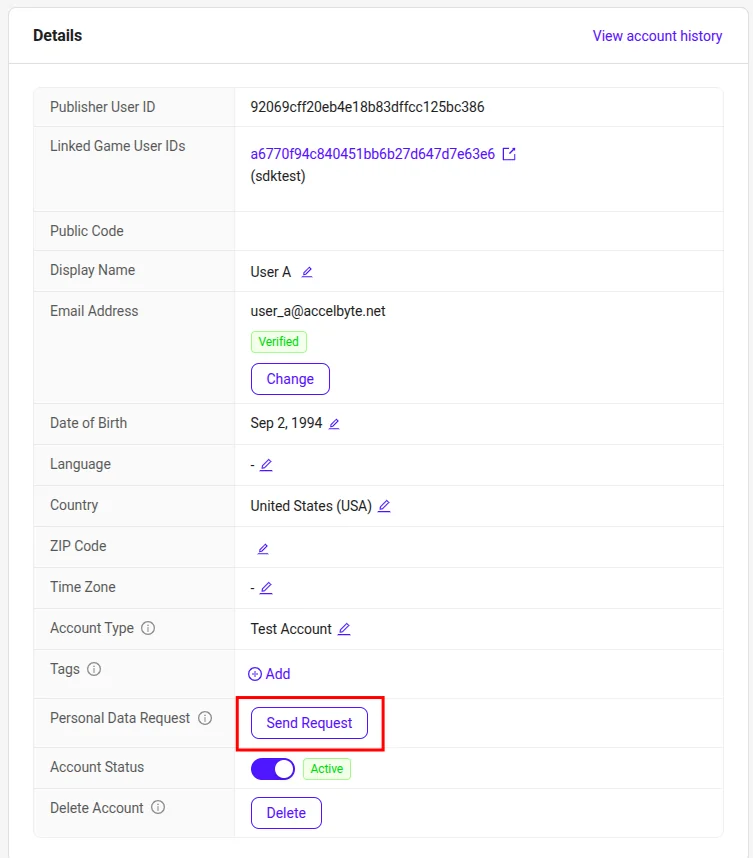
In the Details window of the Overview tab, click the Send Request button next to Personal Data Request.
-
A pop-up will appear and you need to confirm the personal data request by clicking the Send Request button.

Once the request is submitted, the GDPR service will process it asynchronously and notify the player once it is ready.
-
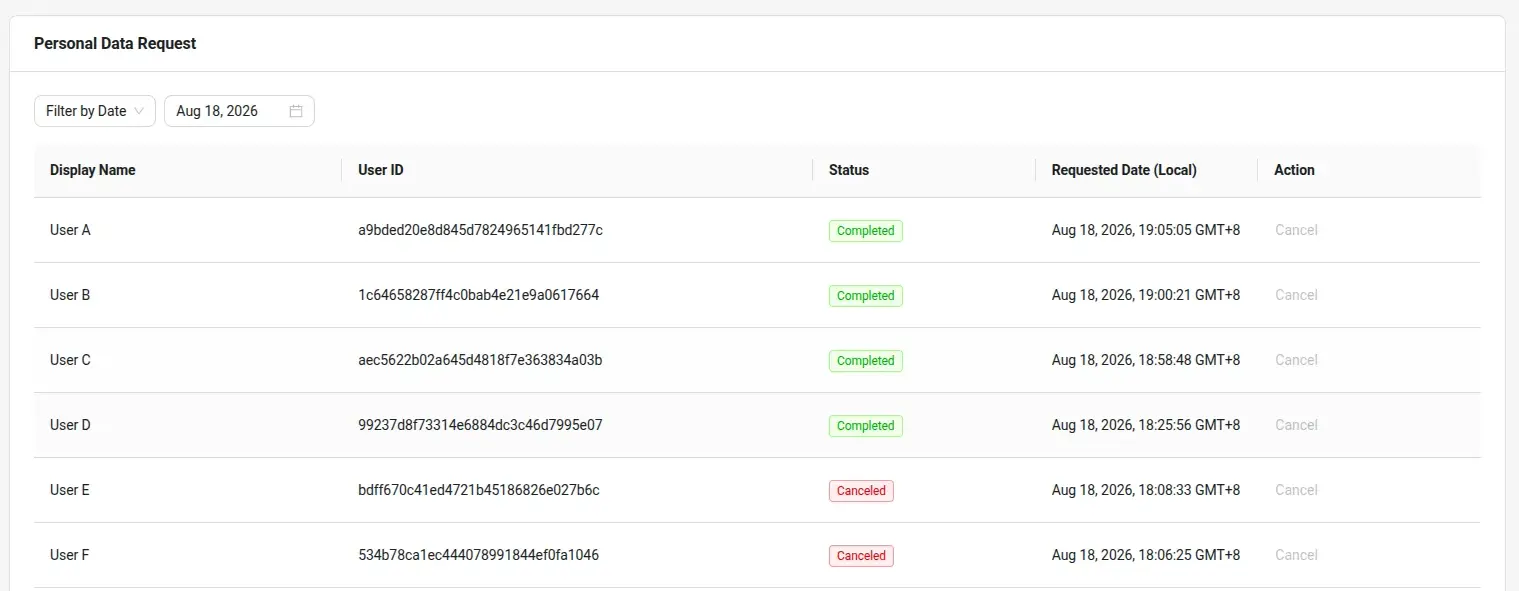
As an admin, you can check the status of a personal data request. On the Admin Portal sidebar, go to Foundations > Legal & Privacy > Personal Data Requests.
-
Here you can see all the lists of personal data requests that are happening. This lists all requests submitted by either players or admin. You can also filter when the request personal data occurs by clicking the filtering system on the top of the list.
-
Find the ID of the player whose data you want to retrieve. Replace
<PlayerEmailOrUsername>with the player's email address, username, or display name. A partial value works too:ags iam users search --namespace <YourPublisherNamespace> --query <PlayerEmailOrUsername>In the output, find the player's account and note its
userId. -
Send the personal data request. Replace
<UserId>with the player's user ID:ags gdpr user-access-requests submit --namespace <YourPublisherNamespace> --user-id <UserId>Once the request is sent, the approval process can take up to 28 days, based on how many requests have occurred at the same time.
-
Check the status of the player's personal data requests:
ags gdpr user-access-requests list --namespace <YourPublisherNamespace> --user-id <UserId>To see all personal data requests in your namespace that were made on a given day, run
ags gdpr user-access-requests list-allwith--request-date <YYYY-MM-DD>. Without--request-date, it lists only today's requests (UTC).
The Admin Portal allows admins to request account deletion on behalf of players. This is useful if your game client doesn't have a GDPR deletion feature UI implemented or if you don't have a Player Portal, allowing players to contact you through any available channel to request account deletion.
-
On the Admin Portal sidebar, go to Foundations > Users.
-
Search for the player you want to delete. Click View in the Action column of the account listing to open it.
-
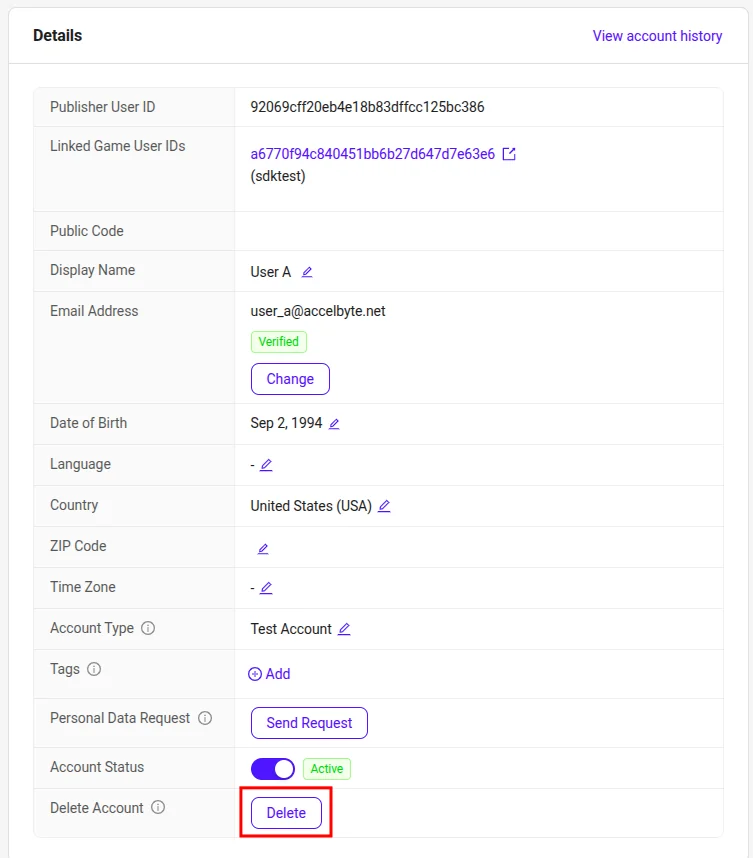
In the Details window of the Overview tab, click the Delete button next to Delete Account.
-
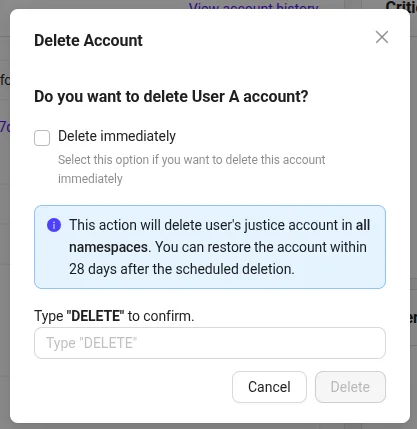
A pop-up will appear and you need to confirm the deletion request.
 warning
Do not select "Delete immediately", as it bypasses the GDPR workflow and 28-day grace period. Use this option only if you fully understand its impact.
Once the request is submitted, it will enter a 28-day grace period before the actual deletion takes place.
-
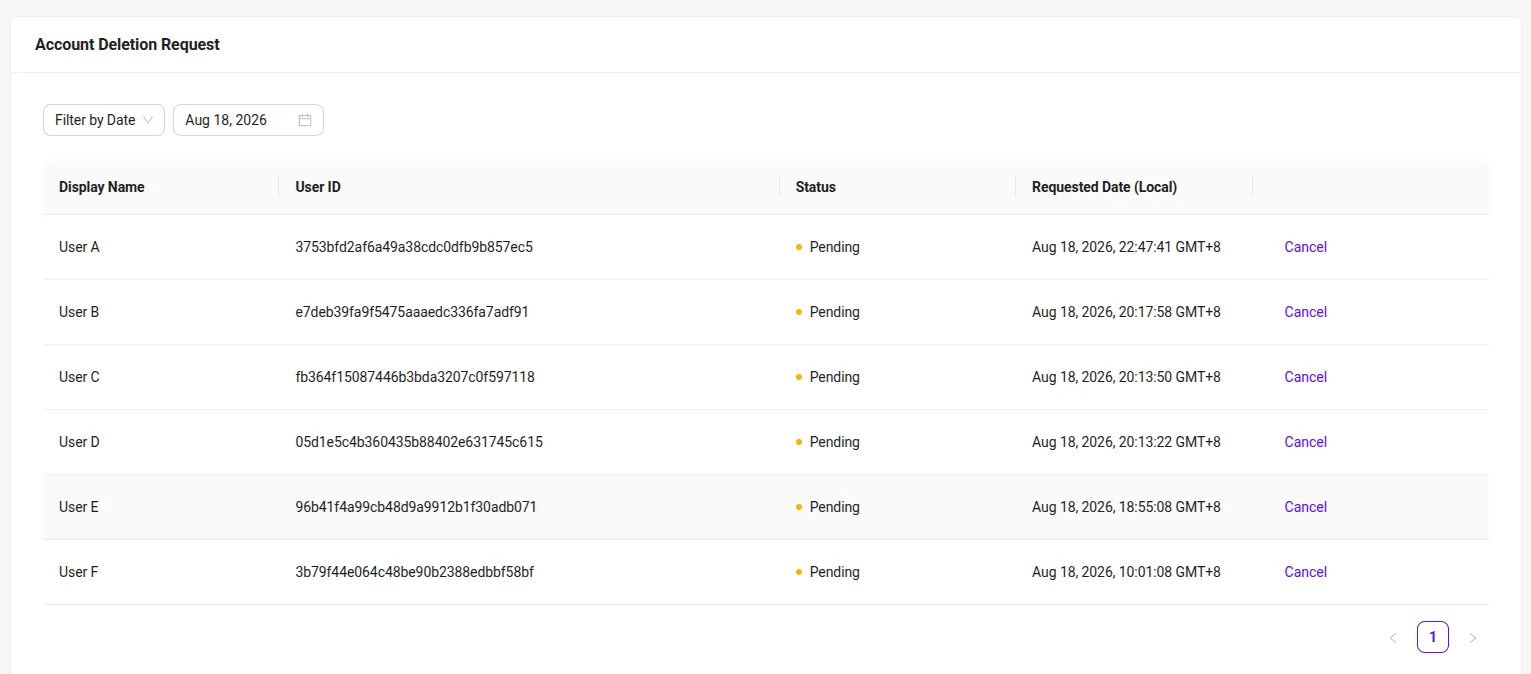
As an admin, you can check the status of deletion request. On the Admin Portal sidebar, go to Foundations > Legal & Privacy > Account Deletion Request.
-
Here you can see all account deletion requests that are still within the grace period. This lists all requests submitted by either players or admin. Completed deletion requests (after 28 days) are removed from the list. You can also filter when the deletion request occurs by clicking the filtering system on the top of the list.
Connect Custom Services to GDPR using the server SDKs
SDK initialization
Before using the GDPR service from the SDK, you will need to initialize your server-side SDK to ensure that you are authorized and able to perform create, read, update, and delete actions.
- C# Extend SDK
- Go Extend SDK
- Java Extend SDK
- Python Extend SDK
-
Create your IAM Client and assign the necessary permissions to access the GDPR service.
-
Log in as a Client using the SDK.
Once completed, you can use the C# Extend SDK to create, read, update, or delete the GDPR service from your serverless app.
-
Create your IAM Client and assign the necessary permissions to access the GDPR service.
-
Log in as a Client using the SDK.
Once completed, you can use the Go Extend SDK to create, read, update, or delete the GDPR service from your serverless app.
-
Create your IAM Client and assign the necessary permissions to access the GDPR service.
-
Log in as a Client using the SDK.
-
Initialize the DataRetrieval wrapper using the following code:
DataRetrieval wGdprRetrieval = new DataRetrieval(sdk);Once completed, you can use the Java Extend SDK to create, read, update, or delete the GDPR service from your serverless app.
-
Create your IAM Client and assign the necessary permissions to access the GDPR service.
-
Log in as a Client using the SDK.
Once completed, you can use the Python Extend SDK to create, read, update, or delete the GDPR service from your serverless app.
Manage Admin email configuration
Create an Admin email configuration
To create an admin email configuration for sending GDPR process notifications, use the following function.
- C# Extend SDK
- Go Extend SDK
- Java Extend SDK
- Python Extend SDK
sdk.Gdpr.Configuration.SaveAdminEmailConfigurationOp
    .Execute(new List<string>
    {
        "dummy@example.com"
    }, sdk.Namespace);

List<string>? emails = sdk.Gdpr.Configuration.GetAdminEmailConfigurationOp
    .Execute(sdk.Namespace);
import (
    ...
    "github.com/AccelByte/accelbyte-go-sdk/gdpr-sdk/pkg/gdprclient/data_retrieval"
)

input := &data_retrieval.SaveAdminEmailConfigurationParams{
    Body:      []string{"dummy@example.com"},
    Namespace: "<namespace>",
}

err := dataRetrievalService.SaveAdminEmailConfigurationShort(input)
if err != nil {
  return err
}
wGdprRetrieval.saveAdminEmailConfiguration(SaveAdminEmailConfiguration.builder()
                                                .namespace(namespace)
                                                .body(Arrays.asList(new String[] { "dummy@example.com" }))
                                                .build());
from accelbyte_py_sdk.api.gdpr import save_admin_email_configuration

result, error = save_admin_email_configuration(
   body=[
       "dummy@example.com"
   ]
)
if error:
   print(error)
Retrieve an Admin email configuration
To retrieve an admin email configuration for sending GDPR process notifications, use the following function.
- C# Extend SDK
- Go Extend SDK
- Java Extend SDK
- Python Extend SDK
List<string>? emails = sdk.Gdpr.Configuration.GetAdminEmailConfigurationOp
    .Execute(sdk.Namespace);
import (
    ...
    "github.com/AccelByte/accelbyte-go-sdk/gdpr-sdk/pkg/gdprclient/data_retrieval"
)

input := &data_retrieval.GetAdminEmailConfigurationParams{
    Namespace: "<namespace>",
}

// using the initiation, invoke the endpoint
ok, err := dataRetrievalService.GetAdminEmailConfigurationShort(input)
if err != nil {
  return err
}
List<String> emails = wGdprRetrieval.getAdminEmailConfiguration(
                                GetAdminEmailConfiguration.builder()
                                                .namespace(namespace)
                                                .build());
from accelbyte_py_sdk.api.gdpr import get_admin_email_configuration

result, error = get_admin_email_configuration()
if error:
   print(error)
Update an Admin email configuration
To update an admin email configuration for sending GDPR process notifications, use the following function.
- C# Extend SDK
- Go Extend SDK
- Java Extend SDK
- Python Extend SDK
sdk.Gdpr.Configuration.UpdateAdminEmailConfigurationOp
    .Execute(new List<string>() { "anotherdummy@example.com" }, sdk.Namespace);
import (
    ...
   	"github.com/AccelByte/accelbyte-go-sdk/gdpr-sdk/pkg/gdprclient/data_retrieval"
)

input := &data_retrieval.UpdateAdminEmailConfigurationParams{
    Body:      []string{"anotherdummy@example.com"},
    Namespace: "<namespace>",
}

err := dataRetrievalService.UpdateAdminEmailConfigurationShort(input)
if err != nil {
  return err
}
wGdprRetrieval.updateAdminEmailConfiguration(UpdateAdminEmailConfiguration.builder()
                                .namespace(namespace)
                                .body(Arrays.asList(new String[] { "anotherdummy@example.com" }))
                                .build());
from accelbyte_py_sdk.api.gdpr import update_admin_email_configuration

result, error = update_admin_email_configuration(
   body=[
       "anotherdummy@example.com"
   ]
)
if error:
   print(error)
Delete an Admin email configuration
To delete an admin email configuration for sending GDPR process notifications, use the following function.
- C# Extend SDK
- Go Extend SDK
- Java Extend SDK
- Python Extend SDK
sdk.Gdpr.Configuration.DeleteAdminEmailConfigurationOp
    .Execute(sdk.Namespace, new List<string>() { "dummy@example.com" });
import (
    ...
   	"github.com/AccelByte/accelbyte-go-sdk/gdpr-sdk/pkg/gdprclient/data_retrieval"
)

input := &data_retrieval.DeleteAdminEmailConfigurationParams{
    Emails:    []string{"dummy@example.com"},
    Namespace: "<namespace>",
}

err := dataRetrievalService.DeleteAdminEmailConfigurationShort(input)
if err != nil {
  return err
}
wGdprRetrieval.deleteAdminEmailConfiguration(DeleteAdminEmailConfiguration.builder()
                                                .namespace(namespace)
                                                .emails(Arrays.asList(new String[] { "dummy@example.com" }))
                                                .build());
from accelbyte_py_sdk.api.gdpr import delete_admin_email_configuration

result, error = delete_admin_email_configuration(
   emails=[
       "dummy@example.com"
   ]
)
if error:
   print(error)
Manage personal data request
Submit user's personal data request
To submit the user's personal data request, use the following function.
- C# Extend SDK
- Go Extend SDK
- Java Extend SDK
- Python Extend SDK
ModelsDataRetrievalResponse? reqResp = sdk.Gdpr.DataRetrieval.AdminRequestDataRetrievalOp
    .Execute(sdk.Namespace, "<user id>");
import (
    ...
    "github.com/AccelByte/accelbyte-go-sdk/gdpr-sdk/pkg/gdprclient/data_retrieval"
)

input := &data_retrieval.AdminRequestDataRetrievalParams{
    Namespace: "<namespace>",
    UserID:    "<user-id>",
}

// using the initiation, invoke the endpoint
ok, err := dataRetrievalService.AdminRequestDataRetrievalShort(input)
if err != nil {
  return err
}
DataRetrieval dataRetrievalWrapper = new DataRetrieval(sdk);

ModelsDataRetrievalResponse retrievalResponse = dataRetrievalWrapper.adminRequestDataRetrieval(
    AdminRequestDataRetrieval.builder()
    .userId("<user_id>")
    .namespace("<namespace>")
    .build());
from accelbyte_py_sdk.api.gdpr import admin_request_data_retrieval

result, error = admin_request_data_retrieval(
   user_id="<user-id>"
)
if error:
   print(error)
Retrieve user's personal data requests
To retrieve the user's personal data request, use the following function.
- C# Extend SDK
- Go Extend SDK
- Java Extend SDK
- Python Extend SDK
ModelsUserPersonalDataResponse? reqResp = sdk.Gdpr.DataRetrieval.AdminGetUserPersonalDataRequestsOp
    .SetLimit(10)
    .SetOffset(0)
    .Execute(sdk.Namespace, "<user id>");
import (
    ...
   	"github.com/AccelByte/accelbyte-go-sdk/gdpr-sdk/pkg/gdprclient/data_retrieval"
)

limit := int64(10)
offset := int64(0)
input := &data_retrieval.AdminGetUserPersonalDataRequestsParams{
    Namespace: "<namespace>",
    UserID:    "<user-id>",
    Limit:     &limit,
    Offset:    &offset,
}

// using the initiation, invoke the endpoint
ok, err := dataRetrievalService.AdminGetUserPersonalDataRequestsShort(input)
if err != nil {
  return err
}
DataRetrieval dataRetrievalWrapper = new DataRetrieval(sdk);

ModelsUserPersonalDataResponse deleteResponse = dataRetrievalWrapper.adminGetUserPersonalDataRequests(
    AdminGetUserPersonalDataRequests.builder()
    .limit(10)
    .offset(0)
    .userId("<user_id>")
    .namespace("<namespace>")
    .build());
from accelbyte_py_sdk.api.gdpr import admin_get_user_personal_data_requests

result, error = admin_get_user_personal_data_requests(
   user_id="<user-id>"
)
if error:
   print(error)
Generate user's personal data download URL
To generate the user's personal data download url, use the following function.
The request date identifies which personal data request the download URL is generated for. It is returned as the RequestDate field when you submit a personal data request, and it is also included in the personal data request list. The value is an RFC 3339 date-time, for example 2026-08-30T07:15:00Z.
- C# Extend SDK
- Go Extend SDK
- Java Extend SDK
- Python Extend SDK
ModelsUserDataURL? urlResp = sdk.Gdpr.DataRetrieval.AdminGeneratePersonalDataURLOp
    .Execute(sdk.Namespace, "<request date>", "<user id>");
import (
    ...
    "github.com/AccelByte/accelbyte-go-sdk/gdpr-sdk/pkg/gdprclient/data_retrieval"
)

input := &data_retrieval.AdminGeneratePersonalDataURLParams{
    Namespace:   "<namespace>",
    UserID:      "<user-id>",
    RequestDate: "<request-date>",
}

// using the initiation, invoke the endpoint
ok, err := dataRetrievalService.AdminGeneratePersonalDataURLShort(input)
if err != nil {
  return err
}
DataRetrieval dataRetrievalWrapper = new DataRetrieval(sdk);

ModelsUserDataURL urlResponse = dataRetrievalWrapper.adminGeneratePersonalDataURL(
    AdminGeneratePersonalDataURL.builder()
    .userId("<user_id>")
    .requestDate("<request_date>")
    .namespace("<namespace>")
    .build());
from accelbyte_py_sdk.api.gdpr import admin_generate_personal_data_url

result, error = admin_generate_personal_data_url(
   user_id="<user-id>",
   request_date="<request-date>"
)
if error:
   print(error)
Manage account deletion request
Submit user's account deletion request
To submit a request for a user's account deletion, use the following function.
- C# Extend SDK
- Go Extend SDK
- Java Extend SDK
- Python Extend SDK
ModelsRequestDeleteResponse? delResp = sdk.Gdpr.DataDeletion.AdminSubmitUserAccountDeletionRequestOp
    .Execute(sdk.Namespace, "<user id>");
import (
    ...
    "github.com/AccelByte/accelbyte-go-sdk/gdpr-sdk/pkg/gdprclient/data_deletion"
)

input := &data_deletion.AdminSubmitUserAccountDeletionRequestParams{
    Namespace: "<namespace>",
    UserID:    "<user-id>",
}

// using the initiation, invoke the endpoint
ok, err := dataDeletionService.AdminSubmitUserAccountDeletionRequestShort(input)
if err != nil {
  return err
}
DataDeletion dataDeletionWrapper = new DataDeletion(sdk);

ModelsRequestDeleteResponse deleteResponse = dataDeletionWrapper.adminSubmitUserAccountDeletionRequest(
    AdminSubmitUserAccountDeletionRequest.builder()
    .userId("<user_id>")
    .namespace("<namespace>")
    .build());
from accelbyte_py_sdk.api.gdpr import admin_submit_user_account_deletion_request

result, error = admin_submit_user_account_deletion_request(
   user_id="<user-id>"
)
if error:
   print(error)
List account deletion requests
To list the account deletion requests, use the following function.
- C# Extend SDK
- Go Extend SDK
- Java Extend SDK
- Python Extend SDK
ModelsListDeletionDataResponse? delListResp = sdk.Gdpr.DataDeletion.AdminGetListDeletionDataRequestOp
    .SetLimit(10)
    .SetOffset(0)
    .Execute(sdk.Namespace);
import (
    ...
    "github.com/AccelByte/accelbyte-go-sdk/gdpr-sdk/pkg/gdprclient/data_deletion"
)

limit := int64(10)
offset := int64(0)
input := &data_deletion.AdminGetListDeletionDataRequestParams{
    Namespace: "<namespace>",
    Limit:     &limit,
    Offset:    &offset,
}

// using the initiation, invoke the endpoint
ok, err := dataDeletionService.AdminGetListDeletionDataRequestShort(input)
if err != nil {
  return err
}
DataDeletion dataDeletionWrapper = new DataDeletion(sdk);

ModelsListDeletionDataResponse listResponse = dataDeletionWrapper.adminGetListDeletionDataRequest(
    AdminGetListDeletionDataRequest.builder()
    .limit(10)
    .offset(0)
    .namespace("<namespace>")
    .build());
from accelbyte_py_sdk.api.gdpr import admin_get_list_deletion_data_request

result, error = admin_get_list_deletion_data_request(
   limit=10,
   offset=0
)
if error:
   print(error)
Implement GDPR functionality inside the game client
The implementation in the game client depends on whether the user is a Full Account or a Headless Account.
- Full Account type = The user signs in with an email and password.
- Headless Account type = The user doesn't have an email or password and signs in using a platform account.
For more details about the differences between Full Account and Headless Account, see How accounts work.
What this means for the in-game GDPR implementation?
-
Full Account type = The user verifies the Personal Data Request or Account Deletion using their password.
-
Headless Account type = The user verifies the Personal Data Request or Account Deletion using their platform authentication ticket.
For Headless Account type integration, a platform authentication ticket acts as proof of identity, the same way a password does for a Full Account. An AGS access token on its own is not enough to trigger a GDPR action. Fetch the ticket from the platform SDK immediately before you submit the request:
- For a Personal Data Request, use a recent ticket. Treat a ticket older than five minutes as stale and fetch a new one.
- For an Account Deletion, always force a fresh platform re-authentication, because the action is irreversible.
noteThe methods for headless Personal Data Requests described in this section require Unreal SDK v28.10.0 or later, or Unity SDK v17.17.0 or later.
Check whether a player is blocked from gameplay
A player who is banned with the GAMEPLAY_BLOCKED ban type can still log in, but only receives a minimal set of permissions to allow them to access their personal data. This lets the banned player exercise their GDPR rights from your game without an admin having to submit the request on their behalf. For more information about this ban type, see Ban and restrict accounts.
Check for this ban right after login, then route the player to your GDPR screens instead of your normal game flow.
The GDPR self-service screen is the same one in both cases. A blocked player reaches it from the blocked message, and an unblocked player reaches it from your account or privacy settings menu. Both entry points are optional, so keep whatever other actions your blocked screen already offers, such as contacting support or viewing the ban reason.
- Unreal Engine
- Unity
auto ApiClient = AccelByteOnlineSubsystemPtr->GetApiClient();

if (ApiClient->CredentialsRef->IsBanned(EBanType::GAMEPLAY_BLOCKED))
{
    // Skip the main menu and show the GDPR self-service screen instead.
    UE_LOG(LogTemp, Log, TEXT("Player is blocked from gameplay."));
}
IsBanned reads the bans embedded in the decoded access token, so it does not make a network call. It returns true only while a ban of the given type is enabled and has not expired.
The same check is available to Blueprints through the Is Banned node on the ABCredentials object.
var session = AccelByteSDK.GetClientRegistry().GetApi().session;

if (session.IsBanned(BanType.GAMEPLAY_BLOCKED))
{
    // Skip the main menu and show the GDPR self-service screen instead.
    Debug.Log("Player is blocked from gameplay.");
}
IsBanned reads the bans embedded in the cached access token, so it does not make a network call. It returns true only while a ban of the given type is enabled and has not expired.
Personal data retrieval
Submit personal data request
The game client SDKs do not yet support the Full Account Personal Data Request method; this is still in our backlog. If you are using Private Cloud, direct players to the Player Portal instead, or call the public endpoint POST /gdpr/public/namespaces/{namespace}/users/{userId}/requests directly with the player's password as a form field.
A Headless Account submits the request with a platform token. You must also pass the player's email address, because the download link for the finished export is delivered by email only. There is no in-game endpoint that returns the link, so a request submitted without an email address produces an export the player cannot retrieve.
- Unreal Engine
- Unity
auto ApiClient = AccelByteOnlineSubsystemPtr->GetApiClient();
auto GDPRApi = ApiClient->GetGDPRApi().Pin();

// Fetch this from the platform SDK right before you submit the request.
const FString PlatformToken = TEXT("<PlatformAuthenticationTicket>");
const FString PlayerEmail = TEXT("<PlayerEmailAddress>");

GDPRApi->SubmitMyPersonalDataRequest(
    EAccelBytePlatformType::Steam,
    PlatformToken,
    THandler<FAccelByteModelsGDPRSubmitPersonalDataRequestResponse>::CreateLambda(
        [](const FAccelByteModelsGDPRSubmitPersonalDataRequestResponse& Response)
        {
            // Keep RequestDate. It identifies the request when you list or cancel it.
            UE_LOG(LogTemp, Log, TEXT("Request submitted at %s"), *Response.RequestDate.ToIso8601());
        }),
    FErrorHandler::CreateLambda(
        [](int32 ErrorCode, const FString& ErrorMessage)
        {
            UE_LOG(LogTemp, Warning, TEXT("Submit failed (%d): %s"), ErrorCode, *ErrorMessage);
        }),
    PlayerEmail);
If your identity provider uses OpenID Connect (OIDC), call SubmitMyPersonalDataRequestOtherPlatformId instead and pass the platform ID as a string:
GDPRApi->SubmitMyPersonalDataRequestOtherPlatformId(
    TEXT("<YourOidcPlatformId>"),
    PlatformToken,
    OnSuccessDelegate,
    OnErrorDelegate,
    PlayerEmail);
Both methods take an optional LanguageTag parameter after Email, which sets the language of the notification email.
var gdpr = AccelByteSDK.GetClientRegistry().GetApi().GetGdpr();

// Fetch this from the platform SDK right before you submit the request.
string platformToken = "<PlatformAuthenticationTicket>";
string playerEmail = "<PlayerEmailAddress>";

gdpr.SubmitMyPersonalDataRequest(PlatformType.Steam, platformToken, result =>
{
    if (result.IsError)
    {
        Debug.Log($"Submit failed: {result.Error.Message}");
        return;
    }

    // Keep RequestDate. It identifies the request when you list or cancel it.
    Debug.Log($"Request submitted at {result.Value.RequestDate:o}");
}, playerEmail);
If your identity provider uses OpenID Connect (OIDC), call SubmitMyPersonalDataRequestPlatformId instead and pass the platform ID as a string:
gdpr.SubmitMyPersonalDataRequestPlatformId("<YourOidcPlatformId>", platformToken, onResultCallback, playerEmail);
Both methods take an optional languageTag parameter after email, which sets the language of the notification email.
Retrieve personal data requests
Use this to build the in-game status screen. Each entry carries a Status of Pending, In-Progress, Completed, Canceled, Failed, or Expired, along with the date the export stops being available.
- Unreal Engine
- Unity
auto GDPRApi = ApiClient->GetGDPRApi().Pin();

GDPRApi->GetMyPersonalDataRequests(
    THandler<FAccelByteModelsGDPRPersonalDataRequestsResponse>::CreateLambda(
        [](const FAccelByteModelsGDPRPersonalDataRequestsResponse& Response)
        {
            for (const FAccelByteModelsGDPRPersonalDataRequest& Request : Response.Data)
            {
                UE_LOG(LogTemp, Log, TEXT("%s is %s, data expires %s"),
                    *Request.RequestDate.ToIso8601(),
                    *Request.Status,
                    *Request.DataExpirationDate.ToIso8601());
            }
        }),
    FErrorHandler::CreateLambda(
        [](int32 ErrorCode, const FString& ErrorMessage)
        {
            UE_LOG(LogTemp, Warning, TEXT("List failed (%d): %s"), ErrorCode, *ErrorMessage);
        }),
    0,   // Offset
    20); // Limit
var gdpr = AccelByteSDK.GetClientRegistry().GetApi().GetGdpr();

gdpr.GetMyPersonalDataRequests(result =>
{
    if (result.IsError)
    {
        Debug.Log($"List failed: {result.Error.Message}");
        return;
    }

    foreach (PersonalDataRequest request in result.Value.Data)
    {
        Debug.Log($"{request.RequestDate:o} is {request.Status}, data expires {request.DataExpirationDate:o}");
    }
},
0,   // offset
20); // limit
Cancel a personal data request
A player can cancel a request that has not finished processing. Identify the request by the RequestDate you received when you submitted it, or by the one you read from the request list.
- Unreal Engine
- Unity
auto GDPRApi = ApiClient->GetGDPRApi().Pin();

GDPRApi->CancelMyPersonalDataRequest(
    RequestDate,
    FVoidHandler::CreateLambda(
        []()
        {
            UE_LOG(LogTemp, Log, TEXT("Request canceled."));
        }),
    FErrorHandler::CreateLambda(
        [](int32 ErrorCode, const FString& ErrorMessage)
        {
            UE_LOG(LogTemp, Warning, TEXT("Cancel failed (%d): %s"), ErrorCode, *ErrorMessage);
        }));
var gdpr = AccelByteSDK.GetClientRegistry().GetApi().GetGdpr();

gdpr.CancelMyPersonalDataRequest(requestDate, result =>
{
    if (result.IsError)
    {
        Debug.Log($"Cancel failed: {result.Error.Message}");
        return;
    }

    Debug.Log("Request canceled.");
});
Pass requestDate as the DateTime you received from the submit response or the request list. The SDK formats it for the endpoint, so you do not need to convert it to a string yourself.
Account deletion
Submit account deletion request
Submitting this request starts the 28-day grace period. The player's access token is revoked once the request moves to Pending, so expect the player's session to end and handle that in your UI.
- Unreal Engine
- Unity
Full Account type
auto GDPRApi = ApiClient->GetGDPRApi().Pin();

GDPRApi->SubmitAccountDeletion(
    TEXT("<PlayerPassword>"),
    THandler<FAccelByteModelsGDPRSubmitAccountDeletionResponse>::CreateLambda(
        [](const FAccelByteModelsGDPRSubmitAccountDeletionResponse& Response)
        {
            UE_LOG(LogTemp, Log, TEXT("Deletion requested for %s"), *Response.UserID);
        }),
    FErrorHandler::CreateLambda(
        [](int32 ErrorCode, const FString& ErrorMessage)
        {
            UE_LOG(LogTemp, Warning, TEXT("Deletion failed (%d): %s"), ErrorCode, *ErrorMessage);
        }));
Headless Account type
auto GDPRApi = ApiClient->GetGDPRApi().Pin();

// Force a fresh platform re-authentication before you call this.
const FString PlatformToken = TEXT("<PlatformAuthenticationTicket>");

GDPRApi->SubmitAccountDeletionOtherPlatform(
    EAccelBytePlatformType::Steam,
    PlatformToken,
    OnSuccessDelegate,
    OnErrorDelegate);
For an OIDC identity provider, call SubmitAccountDeletionOtherPlatformId and pass the platform ID as a string instead of an EAccelBytePlatformType value.
Full Account type
var gdpr = AccelByteSDK.GetClientRegistry().GetApi().GetGdpr();

gdpr.SubmitAccountDeletion("<PlayerPassword>", result =>
{
    if (result.IsError)
    {
        Debug.Log($"Deletion failed: {result.Error.Message}");
        return;
    }

    Debug.Log($"Deletion requested for {result.Value.UserId}");
});
Headless Account type
var gdpr = AccelByteSDK.GetClientRegistry().GetApi().GetGdpr();

// Force a fresh platform re-authentication before you call this.
string platformToken = "<PlatformAuthenticationTicket>";

gdpr.SubmitAccountDeletionOtherPlatform(PlatformType.Steam, platformToken, result =>
{
    if (result.IsError)
    {
        Debug.Log($"Deletion failed: {result.Error.Message}");
        return;
    }

    Debug.Log($"Deletion requested for {result.Value.UserId}");
});
For an OIDC identity provider, call SubmitAccountDeletionPlatformId and pass the platform ID as a string instead of a PlatformType value.
Check account deletion status
Call this on login to find out whether the account is already scheduled for deletion, and to show the player how long they have left to cancel.
- Unreal Engine
- Unity
auto GDPRApi = ApiClient->GetGDPRApi().Pin();

GDPRApi->GetStatusAccountDeletion(
    THandler<FAccelByteModelsGDPRAccountDeletionStatusResponse>::CreateLambda(
        [](const FAccelByteModelsGDPRAccountDeletionStatusResponse& Response)
        {
            if (!Response.DeletionStatus)
            {
                return;
            }

            UE_LOG(LogTemp, Log, TEXT("Deletion is %s, scheduled for %s"),
                *Response.Status,
                *Response.ExecutionDate.ToIso8601());
        }),
    FErrorHandler::CreateLambda(
        [](int32 ErrorCode, const FString& ErrorMessage)
        {
            UE_LOG(LogTemp, Warning, TEXT("Status check failed (%d): %s"), ErrorCode, *ErrorMessage);
        }));
var gdpr = AccelByteSDK.GetClientRegistry().GetApi().GetGdpr();

gdpr.GetAccountDeletionStatus(result =>
{
    if (result.IsError)
    {
        Debug.Log($"Status check failed: {result.Error.Message}");
        return;
    }

    if (!result.Value.DeletionStatus)
    {
        return;
    }

    Debug.Log($"Deletion is {result.Value.Status}, scheduled for {result.Value.ExecutionDate}");
});
Cancel an account deletion request
A player can cancel their deletion request at any point during the 28-day grace period.
- Unreal Engine
- Unity
auto GDPRApi = ApiClient->GetGDPRApi().Pin();

GDPRApi->CancelAccountDeletion(
    FVoidHandler::CreateLambda(
        []()
        {
            UE_LOG(LogTemp, Log, TEXT("Deletion canceled."));
        }),
    FErrorHandler::CreateLambda(
        [](int32 ErrorCode, const FString& ErrorMessage)
        {
            UE_LOG(LogTemp, Warning, TEXT("Cancel failed (%d): %s"), ErrorCode, *ErrorMessage);
        }));
var gdpr = AccelByteSDK.GetClientRegistry().GetApi().GetGdpr();

gdpr.CancelAccountDeletion(result =>
{
    if (result.IsError)
    {
        Debug.Log($"Cancel failed: {result.Error.Message}");
        return;
    }

    Debug.Log("Deletion canceled.");
});