Configure DS Hub with the SDK
Overview
AccelByte Gaming Services (AGS) DS Hub provides continuous connection between your game server and the backend services by using The WebSocket Protocol. WebSockets ensure reliable, real-time data transfer by allowing two-way communication between the server and the backend.
This article covers configuring DS Hub with the AGS Game SDK.
Goals
The goals of this article are to show you how to use the AGS Game SDK to:
- Connect to AGS DS Hub
- Handle connect and disconnect events
- Listen to notifications
Prerequisites
To be able to complete the steps in this article, you will need the following:
- Access to the AGS Admin Portal
- The AGS Game SDK installed in your game server
- DS Hub credentials (obtained during game server deployment)
Connect to DS Hub
This section shows you how to connect your game server to DS Hub.
- Unreal OSS
- Unity
FOnlineSubsystemAccelByte* AccelByteSubsystemPtr = static_cast<FOnlineSubsystemAccelByte*>(IOnlineSubsystem::Get(ACCELBYTE_SUBSYSTEM));

if (AccelByteSubsystemPtr == nullptr)
{
	return;
}

const FOnlineSessionV2AccelBytePtr SessionInterface = StaticCastSharedPtr<FOnlineSessionV2AccelByte>(AccelByteSubsystemPtr->GetSessionInterface());

if (SessionInterface == nullptr)
{
	return;
}

const FOnRegisterServerComplete OnRegisterServerComplete =
	FOnRegisterServerComplete::CreateLambda([&](bool bWasSuccessful) {
		bRegisterSuccess = bWasSuccessful;
		bRegisterServerDone = true;
	});

SessionInterface->RegisterServer(NAME_GameSession, OnRegisterServerComplete);
WaitUntil(bRegisterServerDone, TEXT("Wait until register server success ..."));
string serverId = "ds_65a24d80-0fc2-413c-b87c-1429f08edc4e";
var dsHubClient = AccelByteSDK.GetServerRegistry().GetApi().GetDsHub();

dsHubWrapper.OnConnected += () =>
{
  //Do Something when this is connected
};

dsHubWrapper.Connect(serverId);
Listen to Notifications
DS Hub can receive various notifications from AGS services. Here's how to listen for them:
- Unity
- Unreal OSS
var dshubClient = AccelByteSDK.GetServerRegistry().GetApi(notifications.ApiId).GetDsHub();

// listen AMS server claimed notif, Game Server can perform any action needed to AGS Services
dshubClient.MatchmakingV2ServerClaimed += (result) =>
{
    if (result.IsError)
    {
        Debug.LogWarning($"Failed to claim DS. Error: {result.Error.Message}");
    }
    else
    {
        Debug.Log($"Success to claim DS: {result.Value}");
    }
};

// listen Matchmaking v2 backfill proposal, Game Server can accept / reject the proposal
dshubClient.MatchmakingV2BackfillProposalReceived += (result) =>
{
    if (result.IsError)
    {
        Debug.LogWarning($"Failed to receive backfill proposal. Error: {result.Error.Message}");
    }
    else
    {
        Debug.Log($"Success to receive backfill proposal: {result.Value}");
    }
};

// listen Game Session Ended notification, Game Server can perform any action needed to AGS Services
dshubClient.GameSessionV2Ended += (result) => {
    if (result.IsError)
    {
        Debug.LogWarning($"Failed to receive game session ended notification. Error: {result.Error.Message}");
    }
    else
    {
        Debug.Log($"Success to game session ended notification: {result.Value}");
    }
};

// listen Game Session Member changed notification, Game Server can perform any action needed to AGS Services
dshubClient.GameSessionV2MemberChanged += (result) => {
    if (result.IsError)
    {
        Debug.LogWarning($"Failed to receive game session ended notification. Error: {result.Error.Message}");
    }
    else
    {
        Debug.Log($"Success to receive game session member changed notification: {result.Value}");
    }
};
  // How to Bind

  FOnlineSubsystemAccelByte* AccelByteSubsystemPtr =
      static_cast<FOnlineSubsystemAccelByte*>(IOnlineSubsystem::Get(ACCELBYTE_SUBSYSTEM));

  if (AccelByteSubsystemPtr == nullptr) return;

  FOnlineSessionV2AccelBytePtr SessionInterface =
      StaticCastSharedPtr<FOnlineSessionV2AccelByte>(AccelByteSubsystemPtr->GetSessionInterface());

  if (!SessionInterface.IsValid()) return;

  // 1. Failed to connect
  FDelegateHandle FailedToConnectHandle =
      SessionInterface->AddAccelByteOnDSHubFailedToConnectDelegate_Handle(
          FAccelByteOnDSHubFailedToConnectDelegate::CreateLambda(
              [](const FString& Message)
              {
                  UE_LOG(LogTemp, Error, TEXT("DSHub connection failed: %s"), *Message);
              }
          )
      );

  // 2. Reconnect attempt
  FDelegateHandle ReconnectAttemptHandle =
      SessionInterface->AddAccelByteOnDSHubReconnectAttemptedDelegate_Handle(
          FAccelByteOnDSHubReconnectAttemptedDelegate::CreateLambda(
              [](const AccelByte::FReconnectAttemptInfo& Info)
              {
                  UE_LOG(LogTemp, Warning, TEXT("DSHub reconnecting, attempt #%d"), Info.AttemptCount);
              }
          )
      );

  // 3. Massive outage
  FDelegateHandle MassiveOutageHandle =
      SessionInterface->AddAccelByteOnDSHubMassiveOutageEventDelegate_Handle(
          FAccelByteOnDSHubMassiveOutageEventDelegate::CreateLambda(
              [](const AccelByte::FMassiveOutageInfo& Info)
              {
                  UE_LOG(LogTemp, Error, TEXT("DSHub massive outage, total timeout: %s"),
                      *Info.TotalTimeoutDuration.ToString());
              }
          )
      );

  // Cleanup (Important)
  // Always unbind to prevent leaks:

  SessionInterface->ClearAccelByteOnDSHubFailedToConnectDelegate_Handle(FailedToConnectHandle);
  SessionInterface->ClearAccelByteOnDSHubReconnectAttemptedDelegate_Handle(ReconnectAttemptHandle);
  SessionInterface->ClearAccelByteOnDSHubMassiveOutageEventDelegate_Handle(MassiveOutageHandle);
Listen to Notifications
DS Hub can receive various notifications from AGS services. The following notifications are commonly received by DS Hub (click a notification for payload details):
- BACKFILL_PROPOSAL — matchmaking backfill proposal. Implementation guideline: Managing backfill tickets in AGS OSS. See payload details: Server Notifications — BACKFILL_PROPOSAL
- BACKFILL_TICKET_EXPIRE — backfill ticket expired. See payload details: Server Notifications — BACKFILL_TICKET_EXPIRE
- serverClaimed — server assigned / claimed for a session. See: Server Notifications — serverClaimed
- SESSION_MEMBER_CHANGED — session membership updates. See: Server Notifications — SESSION_MEMBER_CHANGED
- SESSION_ENDED_NOTIF — session ended notification. See: Server Notifications — SESSION_ENDED_NOTIF
- SESSION_SERVER_SECRET — session secret information. See: Server Notifications — SESSION_SERVER_SECRET
- DSHUB_CONNECTED / DSHUB_DISCONNECTED — DS Hub connection lifecycle events (connect / disconnect)
- Other session/party/lobby notifications from AGS (see full list below)
For full payload examples and the complete list of server notifications, see: Server Notifications
Best Practices
-
Connection Management
- Implement reconnection logic with exponential backoff
- Handle connection timeouts appropriately
- Log connection events for debugging
- See the reconnection strategy: WebSocket reconnection strategy
-
Notification Handling
- Process notifications asynchronously
- Validate notification payloads before processing
- Implement error handling for malformed messages
- See implementation example in ByteWars game
-
Security
- Store credentials securely
- Use HTTPS for initial connection
- Validate server certificates
Common Issues and Solutions
-
Connection Failures
- Verify DS Hub URL and credentials
- Check network connectivity
- Ensure proper firewall configuration
-
Message Handling
- Implement proper JSON parsing error handling
- Handle unexpected message formats gracefully
- Log problematic messages for debugging
Send Notifications to Server
Required permissions:
- Private Cloud Required Permission
ADMIN:NAMESPACE:{NAMESPACE}:DSNOTIFICATION 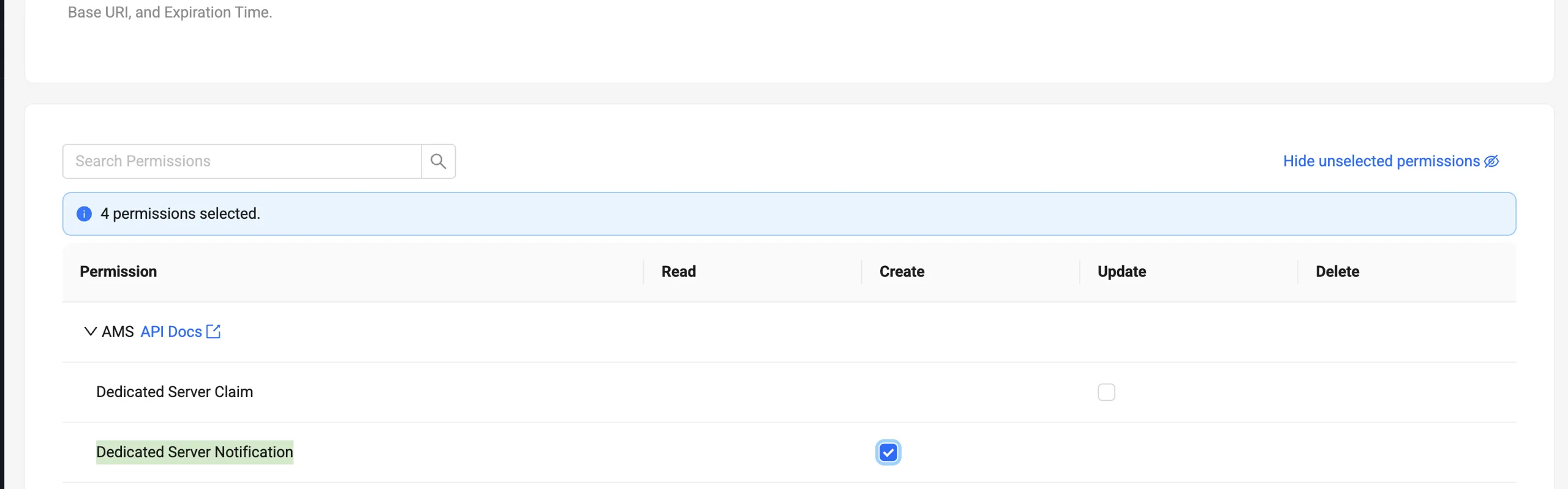
An admin or service can send a custom notification to the server using this endpoint.
Response Codes
The endpoint returns the following HTTP status codes:
200- Success. The notification was successfully sent to the server.404- Not Found. This occurs when:- The specified server (serverId/DS ID/ Server Name) is not found
- The server is not connected to DS Hub
- Invalid server ID was provided
Example Request
curl -X POST \
  https://{domain}/dshub/v1/admin/namespaces/{namespace}/servers/{serverId}/notify \
  -H 'Authorization: Bearer {token}' \
  -H 'Content-Type: application/json' \
  -d '{
    "topic": "CUSTOM_NOTIFICATION",
    "payload": "{\"message\": \"test notification\"}"
  }'