チャレンジメニューの追加 - チャレンジ - (Unreal Engine モジュール)
注釈:本資料はAI技術を用いて翻訳されています。
メニューの内容
このチュートリアルでは、チャレンジを表示するために使用されるウィジェットの準備方法を学びます。ウィジェットはリソースセクションで利用可能で、以下のファイルで構成されています:
-
ChallengePeriodWidget_Starter: チャレンジ期間の選択を表示するための C++ ウィジェットクラス。- ヘッダーファイル:
/Source/AccelByteWars/TutorialModules/Engagement/ChallengeEssentials/UI/ChallengePeriodWidget_Starter.h - CPP ファイル:
/Source/AccelByteWars/TutorialModules/Engagement/ChallengeEssentials/UI/ChallengePeriodWidget_Starter.cpp - Blueprint ウィジェット:
/Content/TutorialModules/Engagement/ChallengeEssentials/UI/W_Challenge_StarterPeriod_Starter.uasset
- ヘッダーファイル:
-
ChallengeWidget_Starter: チャレンジゴールのリストを表示するための C++ ウィジェットクラス。- ヘッダーファイル:
/Source/AccelByteWars/TutorialModules/Engagement/ChallengeEssentials/UI/ChallengeWidget_Starter.h - CPP ファイル:
/Source/AccelByteWars/TutorialModules/Engagement/ChallengeEssentials/UI/ChallengeWidget_Starter.cpp - Blueprint ウィジェット:
/Content/TutorialModules/Engagement/ChallengeEssentials/UI/W_Challenge_Starter.uasset
- ヘッダーファイル:
-
ChallengeWidgetEntry_Starter: 個別のチャレンジゴールとその報酬を表示するための C++ ウィジェットエントリクラス。- ヘッダーファイル:
/Source/AccelByteWars/TutorialModules/Engagement/ChallengeEssentials/UI/ChallengeWidgetEntry_Starter.h - CPP ファイル:
/Source/AccelByteWars/TutorialModules/Engagement/ChallengeEssentials/UI/ChallengeWidgetEntry_Starter.cpp - Blueprint ウィジェット:
/Content/TutorialModules/Engagement/ChallengeEssentials/UI/W_ChallengeEntry_Starter.uasset
- ヘッダーファイル:
-
ChallengeGoalRewardWidgetEntry: 個別のチャレンジゴールの報酬を表示するための C++ ウィジェットエントリクラス。- ヘッダーファイル:
/Source/AccelByteWars/TutorialModules/Engagement/ChallengeEssentials/UI/ChallengeGoalRewardWidgetEntry.h - CPP ファイル:
/Source/AccelByteWars/TutorialModules/Engagement/ChallengeEssentials/UI/ChallengeGoalRewardWidgetEntry.cpp - Blueprint ウィジェット:
/Content/TutorialModules/Engagement/ChallengeEssentials/UI/W_Challenge_StarterGoalRewardEntry.uasset
- ヘッダーファイル:
これらのウィジェットがどのように構築されているかの詳細を見てみましょう。
チャレンジ期間ウィジェット
以下は W_Challenge_StarterPeriod_Starter Blueprint ウィジェットのプレビューです。このウィジェットは、プレイヤーが Byte Wars でチャレンジ期間を選択できるボタンを表示します: All Time、Daily、Weekly。これらのボタンのいずれかがクリックされると、対応するゴールのリストを表示するチャレンジウィジェットにリダイレクトされます。
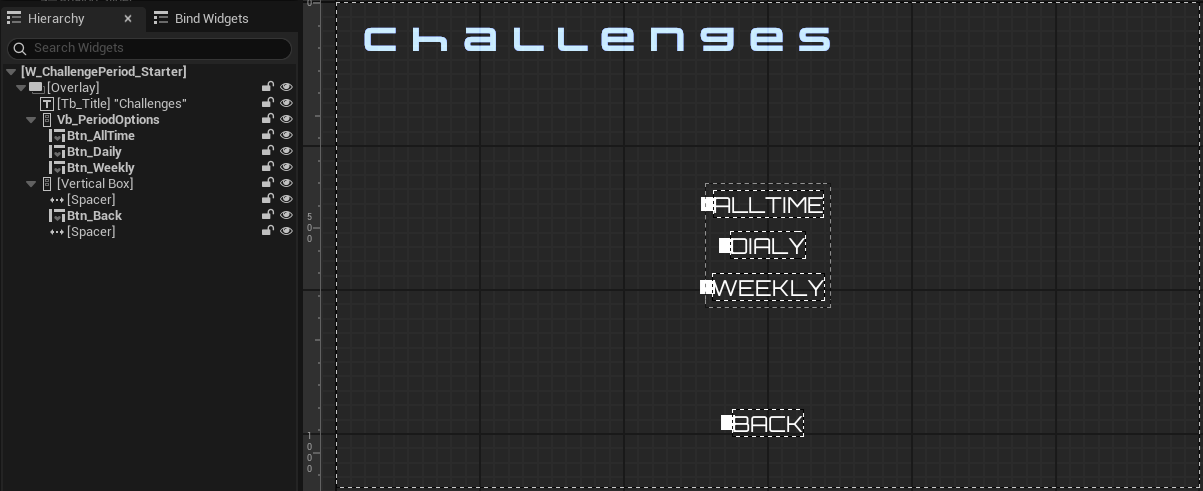
上記のボタンは ChallengePeriodWidget_Starter クラスのヘッダーファイルで宣言されています。
protected:
// ...
    UPROPERTY(BlueprintReadOnly, meta = (BindWidgetOptional, BlueprintProtected = true, AllowPrivateAccess = true))
    UCommonButtonBase* Btn_Alltime;

    UPROPERTY(BlueprintReadOnly, meta = (BindWidgetOptional, BlueprintProtected = true, AllowPrivateAccess = true))
    UCommonButtonBase* Btn_Daily;

    UPROPERTY(BlueprintReadOnly, meta = (BindWidgetOptional, BlueprintProtected = true, AllowPrivateAccess = true))
    UCommonButtonBase* Btn_Weekly;
チャレンジウィジェット
以下は W_Challenge_Starter Blueprint ウィジェットのプレビューです。このウィジェットは、W_Challenge_StarterPeriod_Starter ウィジェットから選択された期間に基づいてチャレンジゴールのリストを表示します。各チャレンジゴールエントリは W_ChallengeEntry_Starter ウィジェットを使用して表示されます。
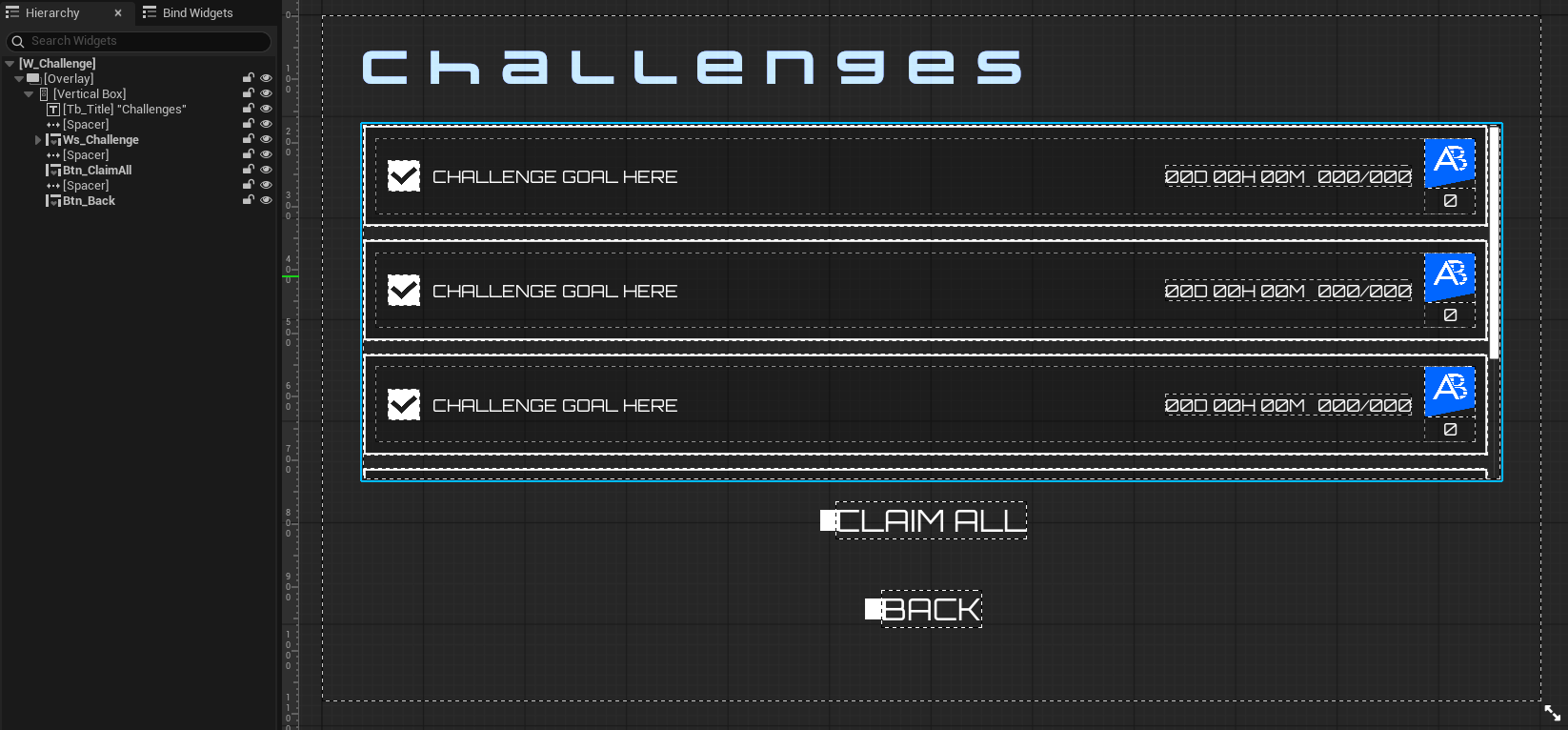
上記の UI コンポーネントは ChallengeWidget_Starter クラスのヘッダーファイルで宣言されています。
protected:
// ...
    UPROPERTY(BlueprintReadOnly, meta = (BindWidgetOptional, BlueprintProtected = true, AllowPrivateAccess = true))
    UAccelByteWarsWidgetSwitcher* Ws_Challenge;

    UPROPERTY(BlueprintReadOnly, meta = (BindWidgetOptional, BlueprintProtected = true, AllowPrivateAccess = true))
    UListView* Lv_Challenge;

    UPROPERTY(BlueprintReadOnly, meta = (BindWidgetOptional, BlueprintProtected = true, AllowPrivateAccess = true))
    UTextBlock* Tb_Title;

    UPROPERTY(BlueprintReadOnly, meta = (BindWidgetOptional, BlueprintProtected = true, AllowPrivateAccess = true))
    UCommonButtonBase* Btn_ClaimAll;
W_Challenge_StarterPeriod_Starter ウィジェットから選択されたチャレンジ期間は、このローカル変数にキャッシュされます。
public:
    EAccelByteModelsChallengeRotation Period = EAccelByteModelsChallengeRotation::NONE;
チャレンジエントリウィジェット
以下は W_ChallengeEntry_Starter Blueprint ウィジェットのプレビューです。このウィジェットは、ゴール名、進捗状況、残り時間、報酬、クレームボタンなど、個別のチャレンジゴール情報を表示します。
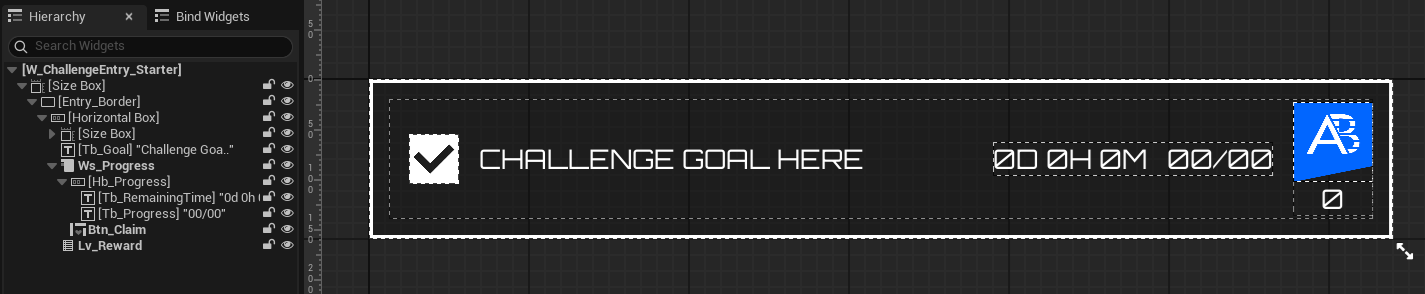
上記のコンポーネントは ChallengeWidgetEntry_Starter クラスのヘッダーファイルで宣言されています。チャレンジゴールが完了している場合、Ws_Progress コンポーネントはエントリを切り替えてクレームボタンを表示します。それ以外の場合は、進捗状況と残り時間を表示します。ゴールの報酬は W_Challenge_StarterGoalRewardEntry ウィジェットによって表示され、Lv_Rewards コンポーネントによってリスト化されます。
protected:
// ...
    UPROPERTY(BlueprintReadOnly, meta = (BindWidgetOptional, BlueprintProtected = true, AllowPrivateAccess = true))
    UCheckBox* Cb_ChallengeStatus;

    UPROPERTY(BlueprintReadOnly, meta = (BindWidgetOptional, BlueprintProtected = true, AllowPrivateAccess = true))
    UTextBlock* Tb_Goal;

    UPROPERTY(BlueprintReadOnly, meta = (BindWidgetOptional, BlueprintProtected = true, AllowPrivateAccess = true))
    UTextBlock* Tb_RemainingTime;

    UPROPERTY(BlueprintReadOnly, meta = (BindWidgetOptional, BlueprintProtected = true, AllowPrivateAccess = true))
    UTextBlock* Tb_Progress;

    UPROPERTY(BlueprintReadOnly, meta = (BindWidgetOptional, BlueprintProtected = true, AllowPrivateAccess = true))
    UHorizontalBox* Hb_Progress;

    UPROPERTY(BlueprintReadOnly, meta = (BindWidgetOptional, BlueprintProtected = true, AllowPrivateAccess = true))
    UAccelByteWarsButtonBase* Btn_Claim;

    UPROPERTY(BlueprintReadOnly, meta = (BindWidgetOptional, BlueprintProtected = true, AllowPrivateAccess = true))
    UWidgetSwitcher* Ws_Progress;

    UPROPERTY(BlueprintReadOnly, meta = (BindWidgetOptional, BlueprintProtected = true, AllowPrivateAccess = true))
    UDynamicEntryBox* Deb_Reward;
チャレンジゴール報酬エントリウィジェット
以下は W_Challenge_StarterGoalRewardEntry Blueprint ウィジェットのプレビューです。このウィジェットは、数量やアイコンなど、個別のチャレンジゴール報酬情報を表示します。
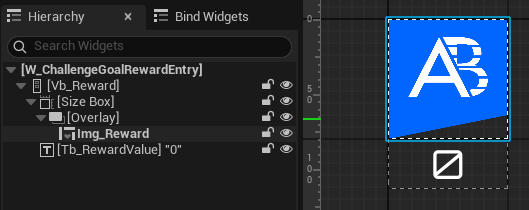
上記のコンポーネントは ChallengeGoalRewardWidgetEntry クラスのヘッダーファイルで宣言されています。
protected:
    UPROPERTY(BlueprintReadOnly, meta = (BindWidgetOptional, BlueprintProtected = true, AllowPrivateAccess = true))
    UTextBlock* Tb_RewardValue;

    UPROPERTY(BlueprintReadOnly, meta = (BindWidgetOptional, BlueprintProtected = true, AllowPrivateAccess = true))
    UAccelByteWarsAsyncImageWidget* Img_Reward;
UI の準備
このセクションでは、ウィジェットを準備する方法を学びます。
-
ChallengeWidget_Starterクラスのヘッダーファイルを開き、以下の関数を宣言します。protected:
// ...
void UpdateClaimAllButton();protected:
// ...
void OnClaimAllButtonClicked(); -
ChallengeWidget_Starterクラスの CPP ファイルを開き、UpdateClaimAllButton()関数を実装します。この関数は、クレーム可能な報酬があるかどうかに基づいて「すべてクレーム」ボタンを切り替えます。void UChallengeWidget_Starter::UpdateClaimAllButton()
{
// Collect all claimable reward IDs.
AllClaimableRewardIds.Empty();
for (const UObject* Item : Lv_Challenge->GetListItems())
{
if (const UChallengeGoalData* GoalData = Cast<UChallengeGoalData>(Item))
{
TArray<FString> GoalRewardIds;
Algo::Transform(GoalData->Progress.ToClaimRewards, GoalRewardIds,
[](const FAccelByteModelsChallengeClaimableUserReward& Reward) { return Reward.Id; });
AllClaimableRewardIds.Append(GoalRewardIds);
}
}
// Toggle claim all button based on claimable reward availability.
Btn_ClaimAll->SetIsEnabled(!AllClaimableRewardIds.IsEmpty());
} -
同じファイル内で、
OnClaimAllButtonClicked()関数を定義します。この関数を使用して、すべてのチャレンジ報酬をクレームするリクエストを送信します。今のところ、プレースホルダーとして以下のコードを追加します。void UChallengeWidget_Starter::OnClaimAllButtonClicked()
{
Btn_ClaimAll->SetIsEnabled(false);
if (AllClaimableRewardIds.IsEmpty())
{
return;
}
// ...
} -
ChallengeWidget_Starterクラスのヘッダーファイルに戻り、以下の関数を宣言します。protected:
// ...
void OnClaimAllButtonClicked(); -
ChallengeWidget_Starterクラスの CPP ファイルを開き、GetChallengeGoalList()関数を実装します。この関数を使用して、チャレンジゴールのリストをクエリし、チュートリアルの後のセクションで表示します。今のところ、ローディング状態を表示するために以下のコードを追加します。void UChallengeWidget_Starter::GetChallengeGoalList()
{
// ...
Ws_Challenge->SetWidgetState(EAccelByteWarsWidgetSwitcherState::Loading);
Lv_Challenge->ClearListItems();
// ...
} -
次に、事前定義された
NativeOnActivated()関数を以下のコードに置き換えます。このコードは、先ほど作成したGetChallengeGoalList()関数を呼び出し、W_Challenge_StarterPeriod_Starterウィジェットから選択されたチャレンジ期間に基づいてウィジェットのタイトルテキストを設定します。void UChallengeWidget_Starter::NativeOnActivated()
{
Super::NativeOnActivated();
// Set widget title based on the challenge type.
FString PeriodStr = FAccelByteUtilities::GetUEnumValueAsString(Period).ToLower();
if (!PeriodStr.IsEmpty())
{
PeriodStr[0] = FChar::ToUpper(PeriodStr[0]);
}
Tb_Title->SetText(
Period == EAccelByteModelsChallengeRotation::NONE ?
ALLTIME_CHALLENGE_TITLE_LABEL :
FText::Format(PERIODIC_CHALLENGE_TITLE_LABEL, FText::FromString(PeriodStr)));
// Bind button events.
Btn_ClaimAll->SetIsEnabled(false);
Btn_ClaimAll->OnClicked().AddUObject(this, &ThisClass::OnClaimAllButtonClicked);
Btn_Back->OnClicked().AddUObject(this, &ThisClass::DeactivateWidget);
// Bind the event to update the claim all button state when an individual challenge reward is claimed.
OnIndividualChallengeRewardsClaimed.BindWeakLambda(this,
[this](bool bWasSuccessful, const FString& ErrorMessage)
{
if (bWasSuccessful)
{
UpdateClaimAllButton();
}
});
// Reset list.
Ws_Challenge->SetWidgetState(EAccelByteWarsWidgetSwitcherState::Empty, true);
Lv_Challenge->ClearListItems();
GetChallengeGoalList();
} -
プロジェクトをビルドし、Unreal Engine エディターで開きます。エディターで
/Content/TutorialModules/Engagement/ChallengeEssentials/に移動します。DA_ChallengeEssentialsというデータアセットが見つかります。それを開き、Is Starter Mode Activeを有効にします。次に、データアセットを保存します。これによりウィジェットがアクティブになり、ゲームをプレイするときにそれらをナビゲートできるようになります。 -
エディターでゲームをプレイし、ログインすると、メインメニューから Challenges にナビゲートし、チャレンジ期間を選択してチャレンジリストを開くことができます。チャレンジメニューがローディング状態になっていることがわかります。後で、この動作を変更して実際にチャレンジゴールリストをロードするようにします。
リソース
-
このチュートリアルセクションで使用されるファイルは、Unreal Byte Wars GitHub リポジトリで利用可能です。
- AccelByteWars/Content/TutorialModules/Engagement/ChallengeEssentials/UI/W_Challenge_StarterPeriod_Starter.uasset
- AccelByteWars/Source/AccelByteWars/TutorialModules/Engagement/ChallengeEssentials/UI/ChallengePeriodWidget_Starter.h
- AccelByteWars/Source/AccelByteWars/TutorialModules/Engagement/ChallengeEssentials/UI/ChallengePeriodWidget_Starter.cpp
- AccelByteWars/Content/TutorialModules/Engagement/ChallengeEssentials/UI/W_Challenge_Starter.uasset
- AccelByteWars/Source/AccelByteWars/TutorialModules/Engagement/ChallengeEssentials/UI/ChallengeWidget_Starter.h
- AccelByteWars/Source/AccelByteWars/TutorialModules/Engagement/ChallengeEssentials/UI/ChallengeWidget_Starter.cpp
- AccelByteWars/Content/TutorialModules/Engagement/ChallengeEssentials/UI/W_ChallengeEntry_Starter.uasset
- AccelByteWars/Source/AccelByteWars/TutorialModules/Engagement/ChallengeEssentials/UI/ChallengeWidgetEntry_Starter.h
- AccelByteWars/Source/AccelByteWars/TutorialModules/Engagement/ChallengeEssentials/UI/ChallengeWidgetEntry_Starter.cpp
- AccelByteWars/Content/TutorialModules/Engagement/ChallengeEssentials/UI/W_Challenge_StarterGoalRewardEntry.uasset
- AccelByteWars/Source/AccelByteWars/TutorialModules/Engagement/ChallengeEssentials/UI/ChallengeGoalRewardWidgetEntry.h
- AccelByteWars/Source/AccelByteWars/TutorialModules/Engagement/ChallengeEssentials/UI/ChallengeGoalRewardWidgetEntry.cpp