「Extend App」の環境変数とシークレット
Overview
Extend apps publish gRPC services — interfaces that AGS calls to run your custom logic instead of its default behavior. Each app has default Environment Secret Configuration and Environment Variable Configuration values, shown in the image below.
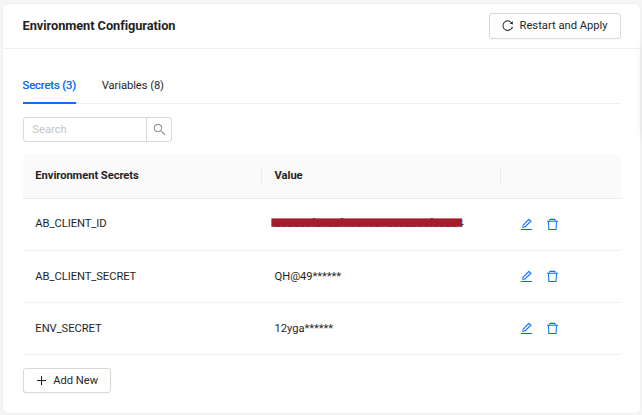
This guide explains how to add, update, and delete environment secrets and variables for your Extend app.
Configure environment secrets
Add a new environment secret configuration
- C#
- Go
- Java
- Python
- Use the
Environment.GetEnvironmentVariablemethod anywhere you need to read environment variable. For example, get the value from the secret for the NEW_SECRET_URL as shown below:
string? newSecretUrl = Environment.GetEnvironmentVariable("NEW_SECRET_URL");
if (newSecretUrl == null)
{
    //do something here
}
- Create a new function to call the environment secret as necessary. For example, add the secret for the NEW_SECRET_URL as shown below:
func main() {
    ...

    logrus.Infof("gRPC server started")
    logrus.Infof("app server started")

    _ = newFunctionHere() // call the function here
}

func newFunctionHere() error {
	// we can use existing GetEnv() function from this repo, or use native golang function os.GetEnv()
    logrus.Printf("New secret variable: %s", server.GetEnv("NEW_SECRET_URL", "www.secreturlfallback.com"))

	return nil
}
- Use the annotation
@Valueon any property to get the environment variable value. For example, get the value from the secret for the NEW_SECRET_URL as shown below:
public class Example {

    ...

    @Value("${NEW_SECRET_URL}")
    private String newSecretUrl;

    ...

}
- Create a new function to call the environment secret as necessary. For example, add the secret for the NEW_SECRET_URL as shown below:
async def main(port: int, profanities_file: Optional[str] = None, **kwargs) -> None:
    env = Env(
        eager=kwargs.get("env_eager", True),
        expand_vars=kwargs.get("env_expand_vars", False),
    )
    env.read_env(
        path=kwargs.get("env_path", None),
        recurse=kwargs.get("env_recurse", True),
        verbose=kwargs.get("env_verbose", False),
        override=kwargs.get("env_override", False),
    )

    new_function_here(env)

    ...

    await App(port, env, opts=opts).run()


def new_function_here(env):
    print('New secret variable: ' + env("NEW_SECRET_URL", "www.secreturlfallback.com"))


def parse_args():
    ...
    return result


if __name__ == "__main__":
    asyncio.run(main(**parse_args()))
If docker-compose is used, add the new variable NEW_SECRET_URL in the docker-compose.yaml file under the environment: section.
services:
  app:
    build:
    ...
    environment:
      ...
      - NEW_SECRET_URL
-
Re-deploy the gRPC server latest image to the cluster. Make sure the code is updated.
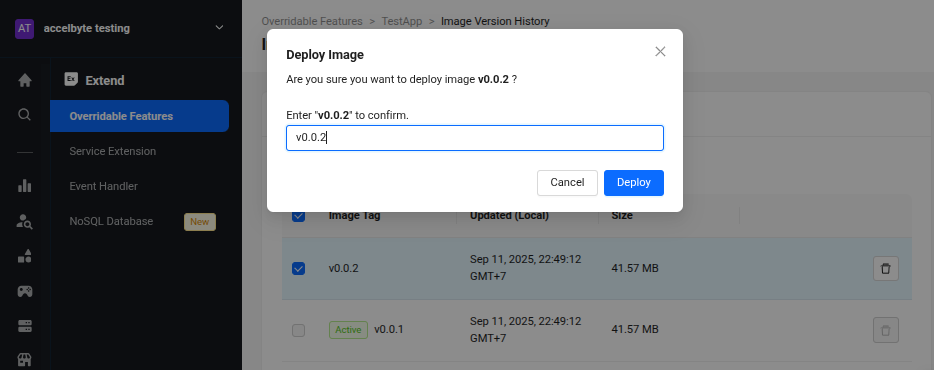
-
Click Add Secret to add NEW_SECRET_URL as the key and its value. Then click Add.
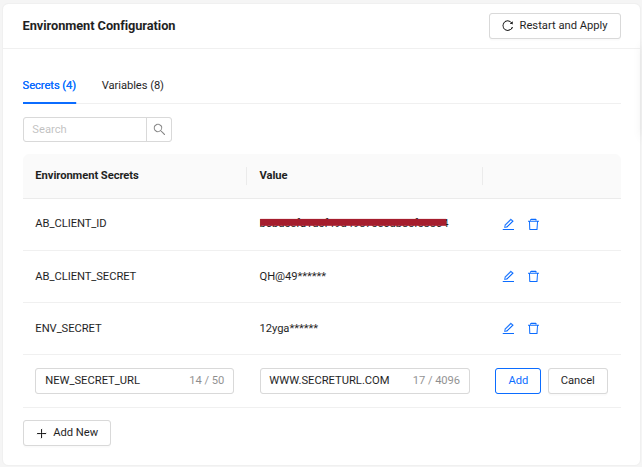
-
After it's successfully added, finish by clicking Restart and Apply.
Update an existing environment secret configuration
-
Click edit icon on the left side of the secret value, adjust the value according to the need, then click Save.
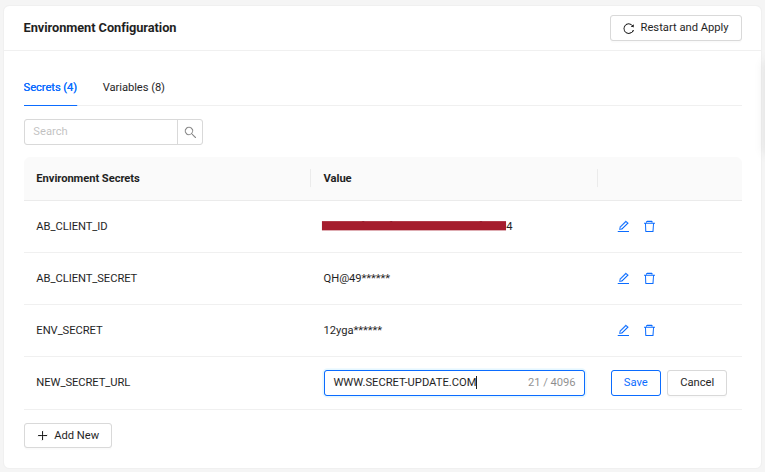
-
After it's successfully updated, finish by clicking Restart and Apply.
Delete an existing environment secret configuration
-
Click on the trash icon beside the environment secret, then click on the Delete button on the confirmation message that appears.
-
Click on the Restart and Apply button to apply the changes to the Extend app.
Configure environment variables
Add a new environment variable configuration
- C#
- Go
- Java
- Python
- Use
Environment.GetEnvironmentVariablemethod anywhere to read environment variable. For example, get the value from secret for the NEW_ENVAR_URL as shown below:
string? newVarUrl = Environment.GetEnvironmentVariable("NEW_ENVAR_URL");
if (newVarUrl == null)
{
    //do something here
}
- Create a new function to call the environment variable as necessary. For example, add the environment variable NEW_ENVAR_URL as shown below:
func main() {
    ...

    logrus.Infof("gRPC server started")
    logrus.Infof("app server started")

    _ = anotherNewFunctionHere() // call the function here
}

func anotherNewFunctionHere() error {
    // we can use existing GetEnv() function from this repo, or use native golang function os.GetEnv()
    logrus.Printf("New environment variable: %s", server.GetEnv("NEW_ENVAR_URL", "www.envarurlfallback.com"))

return nil
}
- Use the annotation
@Valueon any property to get the environment variable value. For example, get the value from the secret for the NEW_ENVAR_URL as shown below:
public class Example {

    ...

    @Value("${NEW_ENVAR_URL}")
    private String newVarUrl;

    ...

}
- Create a new function to call the environment variable as necessary. For example, add the environment variable NEW_ENVAR_URL as shown below:
async def main(port: int, profanities_file: Optional[str] = None, **kwargs) -> None:
    env = Env(
        eager=kwargs.get("env_eager", True),
        expand_vars=kwargs.get("env_expand_vars", False),
    )
    env.read_env(
        path=kwargs.get("env_path", None),
        recurse=kwargs.get("env_recurse", True),
        verbose=kwargs.get("env_verbose", False),
        override=kwargs.get("env_override", False),
    )

    another_new_function_here(env)

    ...

    await App(port, env, opts=opts).run()


def another_new_function_here(env):
    print('New environment variable: ' + env("NEW_ENVAR_URL", "www.envarurlfallback.com"))


def parse_args():
    ...
    return result


if __name__ == "__main__":
    asyncio.run(main(**parse_args()))
If docker-compose is used, add the new variable NEW_ENVAR_URL in the docker-compose.yaml file under the environment: section.
services:
  app:
    build:
    ...
    environment:
      ...
      - NEW_ENVAR_URL
-
Re-deploy the gRPC server latest image to the cluster. Make sure the code is updated.
-
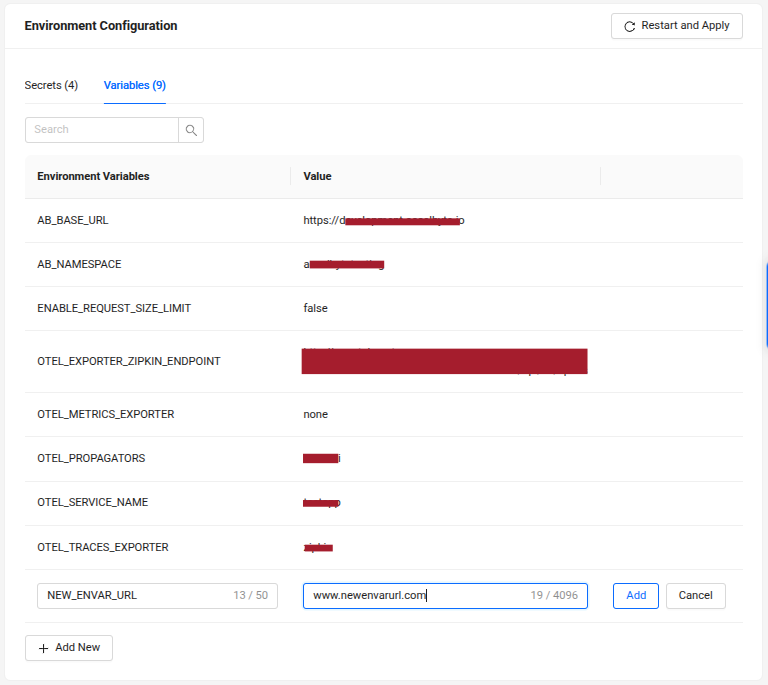
Click Add Variable to add NEW_ENVAR_URL as the key and its value. Then click Add.
-
After successfully added, finish it by clicking the Restart and Apply button on the right side of the page.
Update an existing environment variable configuration
-
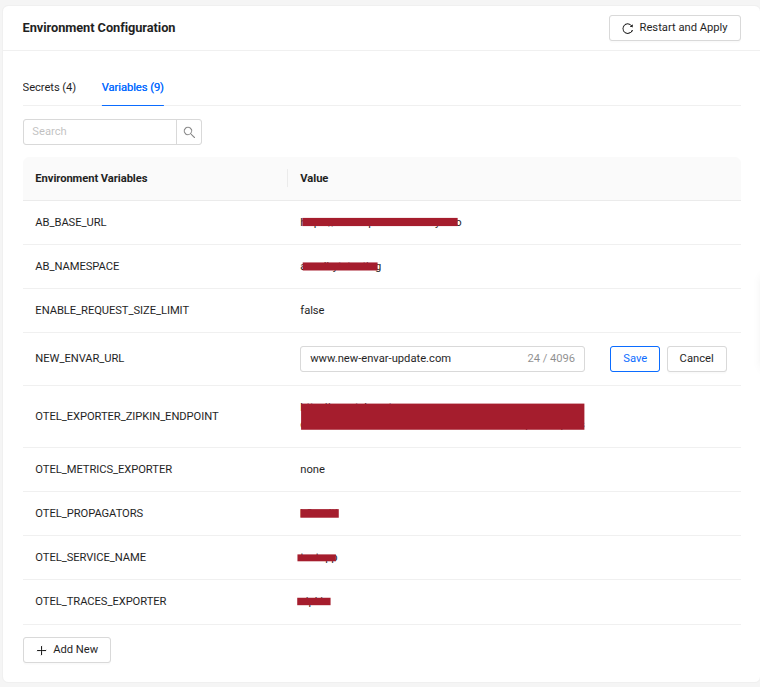
Click the edit icon on the left side of the variable value, adjust the value, and click Save.
-
After it's successfully updated, finish by clicking Restart and Apply.
Delete an existing environment variable configuration
-
Click on the trash icon beside the variable and click on the Delete button on the confirmation message that appears.
-
Click on the Restart and Apply button to apply the changes to the Extend app.