Configure purchasing requirements
Overview
Purchasing requirements are conditions that players must meet to be eligible to buy an item. These requirements can include conditions such as entitlements, season pass, season tier, and statistic code.
This article walks you through how to configure purchasing requirements for your store items in the AGS Admin Portal or with the AGS CLI.
To follow the AGS CLI steps, install the AGS CLI and sign in with an account that has access to these features. See Install and sign in. The examples use a Bash shell.
Add and configure purchasing requirements for an item
- Admin Portal
- AGS CLI
-
On the Admin Portal sidebar, go to Online > Store & Catalog > Stores. The Stores page appears.
-
On the Store page, open the draft store by clicking on its View button.
-
On the draft store's details page, open the Items tab of draft and find the item with the purchasing requirements you want to configure. Click on the item's View button to open its details page.
-
In the item's Basic Information section, click on View Configurations beside Purchasing Requirement. The Purchasing Requirement Configurations page appears.
-
Create and configure the purchasing requirements for the item.
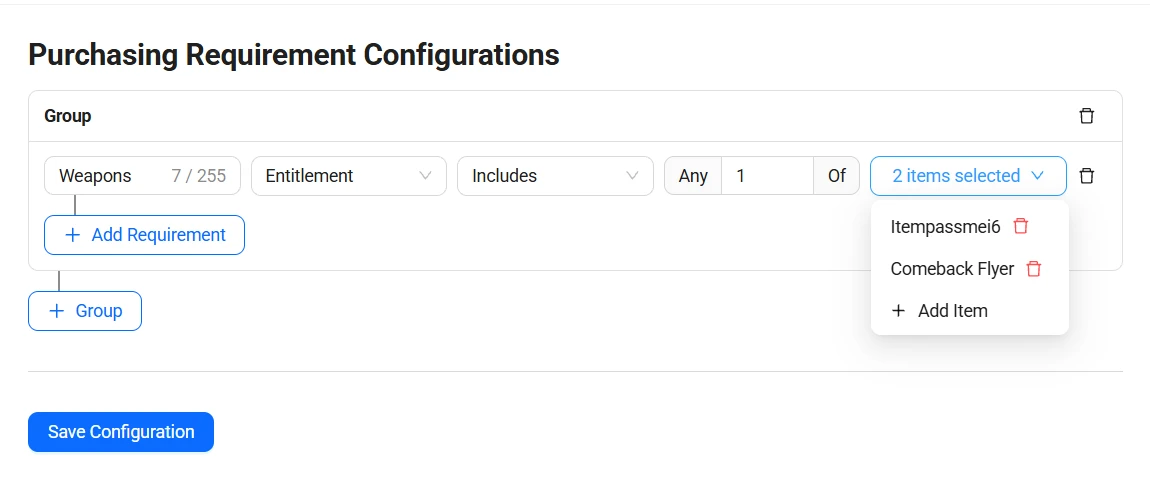
For guidelines on how to configure each requirement type, see:
-
Add more requirements or requirement groups.
noteA single item can have multiple groups of purchasing requirements with each group able to contain multiple purchasing conditions:
- Requirements within the same group use the AND logic, which means that a player must meet every requirement in the group to purchase the item.
- Requirement groups use the OR logic, which means that a player only need to meet any of the group requirements to be able to purchase the item.
-
Click on Save Configuration to save your changes.
-
Find the ID of your draft store. In the output, it's the
storeIdof the store withpublishedset tofalse.ags platform stores list --namespace <YourNamespace> --format json -
Find the item that you want to add purchasing requirements to. Replace
<ItemName>with all or part of the item's name:ags platform items list --namespace <YourNamespace> --store-id <StoreId> --item-name '<ItemName>' --format jsonUse the item's
itemId. Use the same command to find theitemIdof each item that you want to use in entitlement requirements. -
Check the item's current purchasing requirements in the
purchaseConditionfield of the output:ags platform items get --namespace <YourNamespace> --store-id <StoreId> --item-id <ItemId> --active-only false --format json -
Create a JSON file with every purchasing requirement that the item should have, including the ones from step 3 that you want to keep. Any file name works. This example uses
purchase-condition.json, with one group that has an entitlement and a statistic code requirement, and a second group that has a season pass and a season tier requirement:{
"purchaseCondition": {
"conditionGroups": [
{
"operator": "and",
"predicates": [
{
"name": "Owns two of three swords",
"predicateType": "EntitlementPredicate",
"comparison": "includes",
"anyOf": 2,
"values": ["<ItemId1>", "<ItemId2>", "<ItemId3>"]
},
{
"name": "Level 10 or higher",
"predicateType": "StatisticCodePredicate",
"code": "<StatCode>",
"comparison": "isGreaterThanOrEqual",
"value": "10"
}
]
},
{
"operator": "and",
"predicates": [
{
"name": "Season pass holder",
"predicateType": "SeasonPassPredicate",
"comparison": "includes",
"anyOf": 1,
"values": ["<PassCode>"]
},
{
"name": "Tier 5 or higher",
"predicateType": "SeasonTierPredicate",
"comparison": "isGreaterThanOrEqual",
"value": "5"
}
]
}
]
}
}conditionGroups: the requirement groups. A player must meet every requirement in at least one group.name: a name for the requirement.anyOf: the Any [number] Of value. It can't be more than the number ofvalues.values: item IDs for an entitlement requirement, or pass codes for a season pass requirement.value: the number to compare against, written as a string.
Each requirement type uses these fields:
Requirement type predicateTypeFields Entitlement EntitlementPredicatecomparison,anyOf, andvaluesSeason pass SeasonPassPredicatecomparison,anyOf, andvaluesSeason tier SeasonTierPredicatecomparisonandvalueStatistic code StatisticCodePredicatecode(the statistic code),comparison, andvalueEach Admin Portal Condition has a
comparisonvalue:Admin Portal condition comparisonincludes, enrolled includesexcludes, not enrolled excludesequals isnot equals isNotis less than isLessThanis less than or equal isLessThanOrEqualis greater than isGreaterThanis greater than or equal isGreaterThanOrEqual -
Save the purchasing requirements to the item. The update replaces all of the item's purchasing requirements with the ones in your file. After
@, pass the path to your JSON file:ags platform items update-purchase-condition --namespace <YourNamespace> --store-id <StoreId> --item-id <ItemId> \
--json @purchase-condition.json
Configuration guidelines
This section describes guidelines and provides sample scenarios for configuring each purchasing requirement type.
Entitlement
Entitlements can be used to set specific conditions for purchasing an item based on what items a player does or does not have in their inventory. To add or configure entitlements as purchasing requirement, configure the fields as follows:
- Condition:
- Use includes to specify items that a player must already have in their inventory to qualify for the purchase.
- Use excludes to specify items that a player must not have in their inventory to qualify for the purchase.
- Any [number] Of: Indicate the number of the listed items a player must have or must not have in their inventory.
- Items selected: List the items (in-game items, coins, and media) that determine the eligibility for the purchase.
Here's the sample configuration for specific scenarios:
| Requirement Scenario | Condition | Any [number] of | Items selected |
|---|---|---|---|
| Require players to have any two of four specified items. | includes | 2 | Diamond Sword, Scarlet Sword, Solar Cape, and Moon Shield |
| Require players to own all four specified items. | includes | 4 | Diamond Sword, Scarlet Sword, Solar Cape, and Moon Shield |
| Require players to not own any of the four specified items. | excludes | 1 | Diamond Sword, Scarlet Sword, Solar Cape, and Moon Shield |
Season Pass
Season passes can be used as a condition for purchasing an item based on seasons a player is enrolled or not enrolled in. For more information, see Configure a season pass.
To configure season passes as a purchasing requirement, configure the fields as follows:
- Condition:
- Use enrolled to indicate the player must be enrolled in the listed season passes.
- Use not enrolled to indicate the player must not be enrolled in the listed season pass
- Any [number] Of: Indicate the number of the listed season passes a player must be enrolled or not enrolled in.
- Pass codes selected: List the season passes that determine the eligibility for the purchase.
Here's the sample configuration for specific scenarios:
| Requirement Scenario | Condition | Any [number] of | Pass codes selected |
|---|---|---|---|
| Require players to be enrolled in any of the listed season passes. | enrolled | 1 | SeasonPassCode1, SeasonPassCode2, SeasonPassCode3, and SeasonPassCode4 |
| Require players to be enrolled in any three of the listed season passes. | enrolled | 3 | SeasonPassCode1, SeasonPassCode2, SeasonPassCode3, and SeasonPassCode4 |
| Require players to not be enrolled in any of the listed season passes. | not enrolled | 1 | SeasonPassCode1, SeasonPassCode2, SeasonPassCode3, and SeasonPassCode4 |
Season Tier
Season tiers can be used as a condition for purchasing an item based on which tier within a season a player is in. For more information, see Configure a tier.
To configure season tiers as a purchasing requirement, configure the fields as follows:
- Condition: Set the season tier condition. The available condition options are:
- Equals
- not equals
- is less than
- is less than or equal
- is greater than
- is greater than or equal
- Value: Specify the numeric value for the season tier. For example, set this to "10" to refer to tier 10.
Here's the sample configuration for specific scenarios:
| Requirement Scenario | Condition | Value |
|---|---|---|
| Players must be in any tier between 1 to 5. | is less than or equal to | 5 |
| Players must not be in tier 10; any other tier is fine. | not equals | 10 |
| Players must be in tier 10 or higher. | is greater than or equal | 10 |
Statistic Code
Statistic codes can be used as a condition for purchasing an item based on player statistics, such as scores or levels. For more information about managing statistic codes, see Track player and game-wide global statistics.
To configure statistic codes as a purchasing requirement, configure the fields as follows:
- Condition:
- equals
- not equals
- is less than
- is less than or equal
- is greater than
- is greater than or equal
- Value: To specify the numeric value for the statistic that the condition applies to. For example, setting this to "10" could mean the requirement is related to a score or level of 10.
Here's the sample configuration for specific scenarios:
| Requirement Scenario | Condition | Value |
|---|---|---|
| Players must have a score between 0 and 100. | is less than or equal to | 100 |
| Players must not have a score equal to 100; any score less than or greater than 100 is fine. | not equals | 100 |
| Players must be level 10 or higher. | is greater than or equal | 10 |
| Players must be any level between 0 and 9. | is less than | 10 |