Smart Builds
注釈:本資料はAI技術を用いて翻訳されています。
Smart Buildとは?
Smart Buildは、レガシービルド配信システムを置き換える新機能で、ゲームバイナリのアップロードとダウンロードの速度を向上させます。Smart Buildは、ゲームアーカイブ形式を解析し、それを展開して、各バージョン間の差分のみをアップロードすることで機能します。
Smart Buildとレガシービルド配信システムの違いは何ですか?
レガシービルド配信システムは、通常のファイルアップロードです。レガシービルドにはバイナリの差分処理やパッチ適用はありません。
Smart Buildは、アップロードとダウンロードの帯域幅と時間を改善する特別な技術を使用します。ゲームアーカイブファイル内のゲームアセットファイルレベルで動作するため、アップロードとダウンロードの速度と帯域幅が向上します。
データ構造について
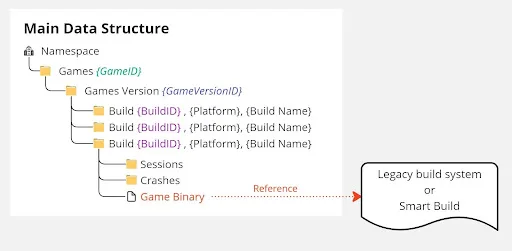
下の画像は、Smart Buildのデータ構造を示しています。階層はゲーム > ゲームバージョン > ビルドです。ビルドは、ゲームバイナリをアップロードするためのプラットフォームと考えてください。ゲームバイナリは、レガシー配信またはSmart Buildを指すことができます。
例
レガシービルド配信用のゲームバイナリをアップロードするプロセスは次のとおりです:
- CLIでバージョンを作成します。
- CLIでビルドを登録します。
- ゲームをコンパイルまたはビルドします。
- レガシーアップロードコマンドを使用してゲームバイナリをアップロードします。
Smart Build用のゲームバイナリをアップロードするプロセスは次のとおりです:
- CLIでバージョンを作成します。
- CLIでビルドを登録します。
- ゲームをコンパイルまたはビルドします。
- Smart Buildアップロードコマンドを使用してゲームバイナリをアップロードします。
Smart Buildを使用してビルドをアップロードする
Smart Buildを使用してアップロードするには、次のCLIコマンドを使用します:
./BlackBoxCLI.exe smartbuild upload
--apikey {API_KEY}
--namespace {NAMESPACE}
--game-project {GAME_PROJECT_DIR}
--entry-point=${ENTRY_POINT}
--upload-dir=${GAME_DIR}
Smart Buildを使用してアップロードする際のログの例は次のとおりです:
[SmartBuild] [info] 2023-12-07 11:45:50: Log file stored at: C:/Users/<users>/.blackbox/smartbuild_20231207T044550Z.log
[SmartBuild] [info] 2023-12-07 11:45:50: Log enabled
version  :0.13.1
commit   :ff443d9
timestamp:2023-11-23T06:32:08Z
[SmartBuild] [info] 2023-12-07 11:45:50: Local cache: C:/Users/<users>/.blackbox/sm_cache
[SmartBuild] [info] 2023-12-07 11:45:50: PHASE 1: checking manifest for current build
[SmartBuild] [info] 2023-12-07 11:45:50: Check manifest for build ID 731b2696-f78b-4843-9e75-43d07e421960
[SmartBuild] [info] 2023-12-07 11:45:50: Fetching manifest with files...
[SmartBuild] [info] 2023-12-07 11:45:50: Fetching manifest for build ID 731b2696-f78b-4843-9e75-43d07e421960
[SmartBuild] [info] 2023-12-07 11:45:51: Fetching manifest for build ID 731b2696-f78b-4843-9e75-43d07e421960 ends and it took 1 seconds
[SmartBuild] [info] 2023-12-07 11:45:51: Check manifest for build ID 731b2696-f78b-4843-9e75-43d07e421960 ends and it took 1 seconds
[SmartBuild] [info] 2023-12-07 11:45:51: E:/Avengers/smartbuild/C8AutomationBuild/EnemiesUnity-Init/Enemies2023.exe
[SmartBuild] [info] 2023-12-07 11:45:51: PHASE 1 result : Create new manifest
[SmartBuild] [info] 2023-12-07 11:45:51: PHASE 2A: [Create new manifest] scan folder, detect schema, calculate hash
[SmartBuild] [info] 2023-12-07 11:45:51: Fetching user specified ignore list...
[SmartBuild] [info] 2023-12-07 11:45:51: Fetching user specified ignore list finished and it took 0 seconds
[SmartBuild] [info] 2023-12-07 11:46:03: File: .ignoreconfig process with default processor.
[SmartBuild] [info] 2023-12-07 11:46:03: File: buildID process with default processor.
[SmartBuild] [info] 2023-12-07 11:46:03: File: Config/Preset-Medium.txt process with default processor.
[SmartBuild] [info] 2023-12-07 11:46:03: File: Gamedata/app.info process with default processor.
[SmartBuild] [info] 2023-12-07 11:46:03: File: Gamedata/boot.config process with default processor.
[SmartBuild] [info] 2023-12-07 11:46:03: File: Gamedata/globalgamemanagers process with default processor.
[SmartBuild] [info] 2023-12-07 11:46:03: File: Gamedata/globalgamemanagers.assets process with unity processor.
[SmartBuild] [info] 2023-12-07 11:46:03: File: Gamedata/globalgamemanagers.assets.resS process with default processor.
[SmartBuild] [info] 2023-12-07 11:46:03: File: Gamedata/globalgamemanagers.assets.txt process with default processor.
[SmartBuild] [info] 2023-12-07 11:46:03: File: Gamedata/level0 process with default processor.
[SmartBuild] [info] 2023-12-07 11:46:04: File: Gamedata/level1 process with unity processor.
[SmartBuild] [info] 2023-12-07 11:46:04: File: nvngx_dlss.dll process with default processor.
[SmartBuild] [info] 2023-12-07 11:46:04: File: NVUnityPlugin.dll process with default processor.
[SmartBuild] [info] 2023-12-07 11:46:04: File: README-Enemies.txt process with default processor.
[SmartBuild] [info] 2023-12-07 11:46:04: File: UnityCrashHandler64.exe process with default processor.
[SmartBuild] [info] 2023-12-07 11:46:04: File: UnityPlayer.dll process with default processor.
[SmartBuild] [info] 2023-12-07 11:46:04: PHASE 2: File Processor, extract, put into list
[SmartBuild] [info] 2023-12-07 11:46:04: Creating cached folder for package manifest: C:/Users/<users>/.blackbox/sm_cache/manifest/1f34b359-6c3b-41a2-8365-5f97b36383a0/731b2696-f78b-4843-9e75-43d07e421960
[SmartBuild] [info] 2023-12-07 11:46:04: start processing all files...
[SmartBuild] [info] 2023-12-07 11:46:04: Parsing Unity Asset: E:\Avengers\smartbuild\C8AutomationBuild\EnemiesUnity-Init\Gamedata\globalgamemanagers.assets
[SmartBuild] [info] 2023-12-07 11:46:04: Saving package manifest to local cache: C:/Users/<users>/.blackbox/sm_cache/manifest/1f34b359-6c3b-41a2-8365-5f97b36383a0/731b2696-f78b-4843-9e75-43d07e421960/48154c221f9fa3caf99c9a405e1912b33939b1f00d37e8f5078cb4143d33dccc_295305
[SmartBuild] [info] 2023-12-07 11:46:04: Parsing Unity Asset: E:\Avengers\smartbuild\C8AutomationBuild\EnemiesUnity-Init\Gamedata\level1
[SmartBuild] [info] 2023-12-07 11:46:06: Saving package manifest to local cache: C:/Users/<users>/.blackbox/sm_cache/manifest/1f34b359-6c3b-41a2-8365-5f97b36383a0/731b2696-f78b-4843-9e75-43d07e421960/21d4eefeb73ca809a18c42f45e3fe53ddd03bbdf9cd37ca0b895dd0f3c45adea_1541596
[SmartBuild] [info] 2023-12-07 11:46:06: Parsing Unity Asset: E:\Avengers\smartbuild\C8AutomationBuild\EnemiesUnity-Init\Gamedata\Resources\unity default resources
[SmartBuild] [info] 2023-12-07 11:46:06: Saving package manifest to local cache: C:/Users/<users>/.blackbox/sm_cache/manifest/1f34b359-6c3b-41a2-8365-5f97b36383a0/731b2696-f78b-4843-9e75-43d07e421960/82efe0c4fc2049bf0d274eab7e30eed361ee46d363e8b063c689ca00dad39b3d_9380
[SmartBuild] [info] 2023-12-07 11:46:06: Parsing Unity Asset: E:\Avengers\smartbuild\C8AutomationBuild\EnemiesUnity-Init\Gamedata\resources.assets
[SmartBuild] [info] 2023-12-07 11:46:06: Saving package manifest to local cache: C:/Users/<users>/.blackbox/sm_cache/manifest/1f34b359-6c3b-41a2-8365-5f97b36383a0/731b2696-f78b-4843-9e75-43d07e421960/f7b5ea6d01117e9bc128fa10d71e09830d6ffef5bc109837803d1e8d7f3684b4_151026
[SmartBuild] [info] 2023-12-07 11:46:06: Parsing Unity Asset: E:\Avengers\smartbuild\C8AutomationBuild\EnemiesUnity-Init\Gamedata\sharedassets1.assets
[SmartBuild] [info] 2023-12-07 11:46:13: Saving package manifest to local cache: C:/Users/<users>/.blackbox/sm_cache/manifest/1f34b359-6c3b-41a2-8365-5f97b36383a0/731b2696-f78b-4843-9e75-43d07e421960/cc43d3d03163ca71ea610290a61723fecce8eaf0caae8aa1ad9c33fde3b16f12_296778
[SmartBuild] [info] 2023-12-07 11:46:16: Create manifest
[SmartBuild] [info] 2023-12-07 11:46:16: getting info about build ID 731b2696-f78b-4843-9e75-43d07e421960
[SmartBuild] [info] 2023-12-07 11:46:16: getting info about build ID 731b2696-f78b-4843-9e75-43d07e421960 ends and it took 0 seconds
[SmartBuild] [info] 2023-12-07 11:46:16: Appending platform flag 1024 to build ID 731b2696-f78b-4843-9e75-43d07e421960
[SmartBuild] [info] 2023-12-07 11:46:17: Appending platform flag 1024 to build ID 731b2696-f78b-4843-9e75-43d07e421960 ends and it took 0 seconds
[SmartBuild] [info] 2023-12-07 11:46:17: Serializing manifest...
[SmartBuild] [info] 2023-12-07 11:46:17: Serializing manifest ends and it took 0 seconds
[SmartBuild] [info] 2023-12-07 11:46:17: Saving manifest to local is enabled and will be written to E:/Avengers/Cycle9/SB/ManifestCycle9.json
[SmartBuild] [info] 2023-12-07 11:46:17: Saving manifest to local...
[SmartBuild] [info] 2023-12-07 11:46:17: Saving manifest to local ends and it took 0 seconds
[SmartBuild] [info] 2023-12-07 11:46:17: Submitting initial manifest for build ID 731b2696-f78b-4843-9e75-43d07e421960
[SmartBuild] [info] 2023-12-07 11:46:39: Submit response manifest response saved in: C:/Users/<users>/.blackbox/sm_cache/manifest/1f34b359-6c3b-41a2-8365-5f97b36383a0/1f34b359-6c3b-41a2-8365-5f97b36383a0.json
[SmartBuild] [info] 2023-12-07 11:46:40: Submitting initial manifest for build ID 731b2696-f78b-4843-9e75-43d07e421960 ends and it took 22 seconds
[SmartBuild] [info] 2023-12-07 11:46:40: Uploading files (hash) : 20910 of 20911
[SmartBuild] [info] 2023-12-07 11:46:40: Uploading 20910 files
{"status":"uploading files","current":22,"total":20910,"filename":"[Memory Mapped File Buffer] ComputeShader_20.bin","filesize":4764,"current_byte":78766,"total_byte":2238132545,"rate":0.0,"time_remaining":0.0}
{"status":"uploading files","current":52,"total":20910,"filename":"[Memory Mapped File Buffer] MonoScript_1675.bin","filesize":148,"current_byte":250608,"total_byte":2238132545,"rate":7470.142180094786,"time_remaining":299576.88663050375}
{"status":"uploading files","current":89,"total":20910,"filename":"[Memory Mapped File Buffer] Transform_7784.bin","filesize":104,"current_byte":704515,"total_byte":2238132545,"rate":24853.94921812396,"time_remaining":90023.03860701647}
{"status":"uploading files","current":118,"total":20910,"filename":"[Memory Mapped File Buffer] GameObject_1279.bin","filesize":47,"current_byte":1395415,"total_byte":2238132545,"rate":63844.38368019782,"time_remaining":35034.20349711597}
{"status":"uploading files","current":150,"total":20910,"filename":"[Memory Mapped File Buffer] MeshRenderer_10180.bin","filesize":156,"current_byte":8692126,"total_byte":2238132545,"rate":137642.53237685465,"time_remaining":16197.32200869397}
{"status":"uploading files","current":175,"total":20910,"filename":"[Memory Mapped File Buffer] MonoScript_2464.bin","filesize":140,"current_byte":19826999,"total_byte":2238132545,"rate":1136713.4862397609,"time_remaining":1951.5080738050685}
{"status":"uploading files","current":210,"total":20910,"filename":"[Memory Mapped File Buffer] GameObject_4214.bin","filesize":43,"current_byte":25024191,"total_byte":2238132545,"rate":1891192.5344411817,"time_remaining":1170.2184276303415}
{"status":"uploading files","current":240,"total":20910,"filename":"[Memory Mapped File Buffer] GameObject_3481.bin","filesize":63,"current_byte":31209895,"total_byte":2238132545,"rate":2289023.1809970634,"time_remaining":964.1329403395113}
{"status":"uploading files","current":20910,"total":20910,"filename":"[Memory Mapped File Buffer] MeshRenderer_10468.bin","filesize":156,"current_byte":2238132545,"total_byte":2238132545,"rate":704684.7866437414,"time_remaining":0.0}
[SmartBuild] [info] 2023-12-07 11:56:23: Uploading 20910 files ends and it took 582 seconds
[SmartBuild] [info] 2023-12-07 11:56:23: Committing manifest for build ID 731b2696-f78b-4843-9e75-43d07e421960
[SmartBuild] [info] 2023-12-07 11:56:23: Committing manifest for build ID 731b2696-f78b-4843-9e75-43d07e421960 ends and it took 0 seconds
ChannelとTrackを使用する
ChannelとTrack機能は、最近のADT Hubの刷新で導入されました。このセクションでは、channelとtrackの関係のデータ構造について説明します。
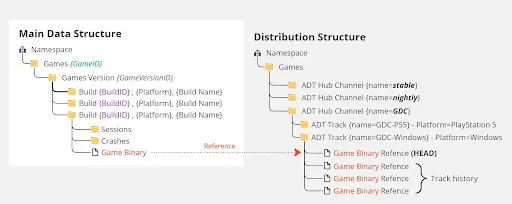
channelは、trackのグループです。複数のchannelを管理でき、各channelは異なる目的に使用できます(例:QA用、安定ビルド用、ナイトリービルド用など)。
channelには1つ以上のtrackを含めることができます。trackは、そのchannelの目的に対応する異なるプラットフォーム上のビルドを表します。trackは、ビルドにアップロードされたゲームバイナリを参照します。
trackは最新ビルドを管理するスタックと考えることができます(最上部はHEADと呼ばれます)。新しいビルドでtrackを更新すると、以前のビルドは履歴に追加されます。
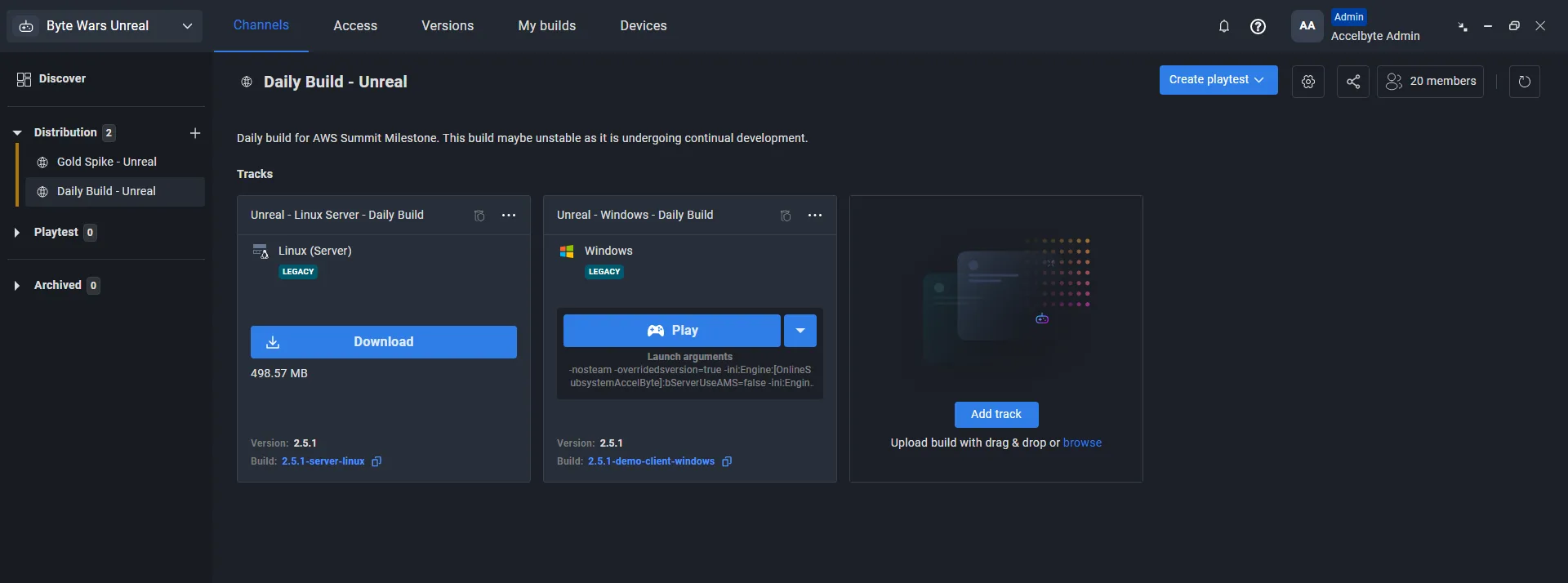
下の画像は、channelの例を示しています。この例では、channelはDaily Build - Unrealと呼ばれ、LinuxとWindowsの2つのtrackで構成されています。Windowsビルドは2.51-demo-client-windowsを指しています。
ChannelでのSmart Buildの使用例
channelとtrackを使用する場合、レガシーとSmart Buildの間に違いはありません。channelとtrackの作成方法については、Use tracks to organize channelsを参照してください。
レガシービルド配信とSmart Buildを並行して使用する
ビルドパイプラインが次のようになっていると仮定します:
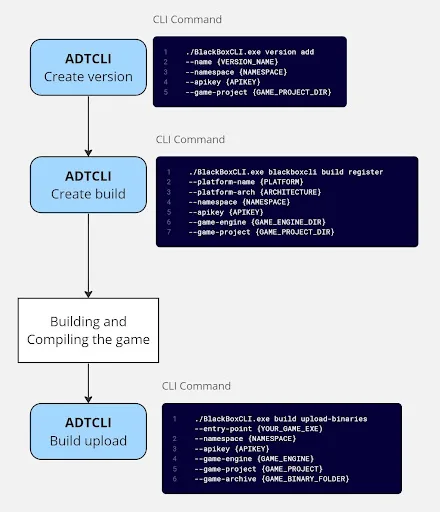
レガシービルドとSmart Buildを並行して動作させたい場合は、レガシービルドシステムへのアップロードが完了した後に別のビルドを作成する必要があります。
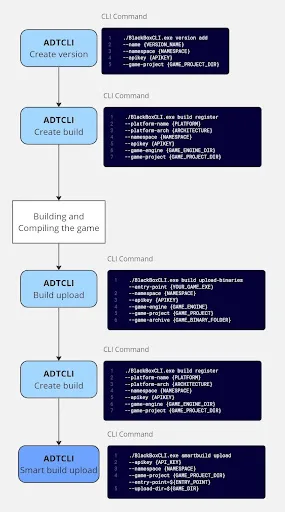
1つのビルドには1つのゲームバイナリしか含めることができないため、同じバージョンの下に、レガシー用とSmart Build用の2つのビルドを作成する必要があります。
別のビルドを作成するには、次の手順に従います:
-
CLIを使用して別のビルドを作成するには、次のコマンドを使用します:
./BlackBoxCLI.exe build register
--smartbuild
--platform-name {PLATFORM}
--platform-arch {ARCHITECTURE}
--namespace {NAMESPACE}
--apikey {APIKEY}
--game-engine {GAME_ENGINE_DIR}
--game-project {GAME_PROJECT_DIR} -
ビルドを作成したら、次のコマンドを使用して、Smart Buildを使用してゲームバイナリを新しく作成したビルドにアップロードします:
./BlackBoxCLI.exe smartbuild upload
--apikey {API_KEY}
--namespace {NAMESPACE}
--game-project {GAME_PROJECT_DIR} --entry-point=${ENTRY_POINT}
--upload-dir=${GAME_DIR} -
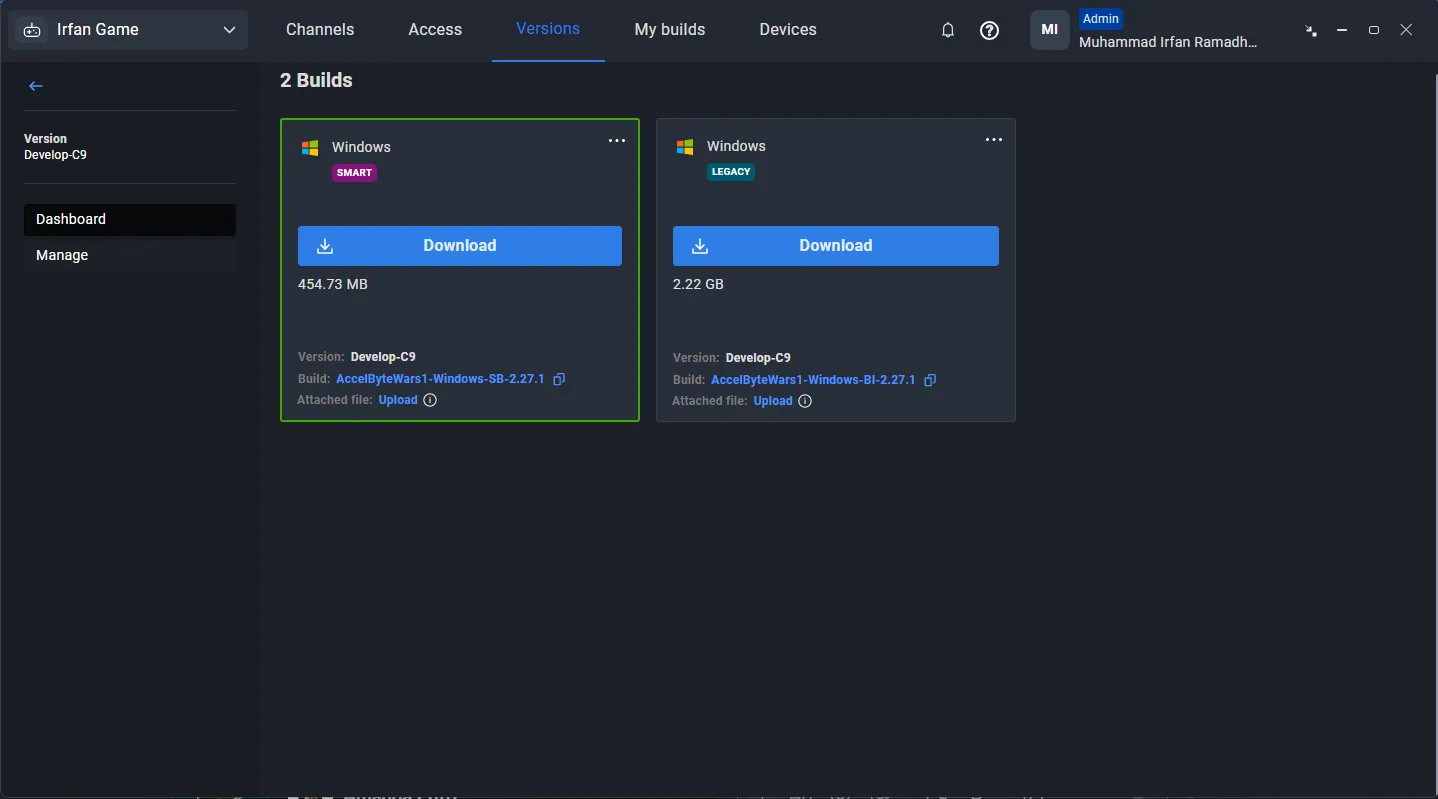
ADT Hubでアップロードを確認します。Versionsタブに移動します。アップロードが完了すると、同じバージョンの下に、レガシーを使用するビルドとSmart Buildを使用するビルドの2つが表示されます。