What's New 2026.3
Release date: April 9th, 2026
Component versions
The AccelByte Development Toolkit (ADT) 2026.3 main release contains the following component versions:
- ADT Hub v1.11.0
- ADT Web v1.36.0
- ADT SDK Unreal v2.33.0
Release Highlights
Labs Menu — Access Alpha Features Early
New
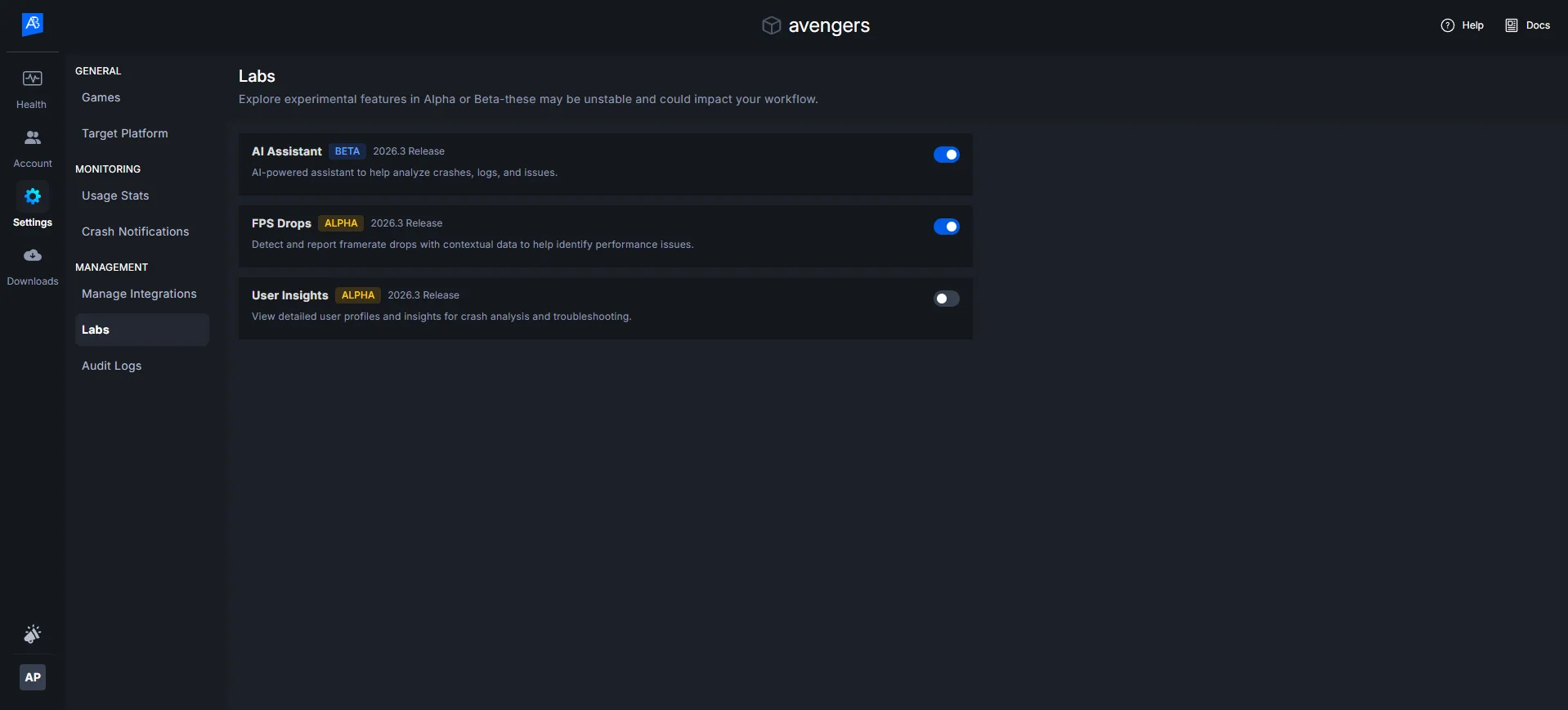
The Labs menu is now available in ADT Web, giving developers early access to experimental and alpha-stage features before they reach general availability. Labs is designed for developers who want to explore cutting-edge tooling, provide feedback, and shape the direction of upcoming features.
Alpha features in Labs are opt-in and disabled by default. They may change or be removed at any time based on user feedback.
What's New
-
A dedicated Labs section is now accessible from the ADT Web - Namespace settings navigation.
-
Developers can browse and individually enable or disable available alpha features per project.
-
Each Labs feature includes a short description and a feedback link to help the team iterate quickly.
-
More alpha features will continue to be added to Labs in future releases.
Framerate Drop Reporter — Alpha
Alpha Labs
Game developers now have a new tool to detect and investigate frame rate drop, non-fatal drops in frame rate that degrade player experience without causing a crash. The Framerate Drop Reporter automatically captures fps drop events during gameplay sessions and surfaces them alongside crash data in ADT.
Previously, fps drop were invisible to crash-oriented analytics and required manual profiling or player reports to discover. This feature closes that gap by giving developers a unified performance health view across all gameplay sessions.
Note: Framerate Drop Reporter is an Alpha feature. It can be enabled from the Labs menu. Currently supports Unreal Engine 5.0+ on Development builds (Windows). Production builds and console platforms are not yet supported.
What's New
-
The SDK automatically detects frame rate drop in real time on the GameThread with negligible performance overhead.
-
Each hitch event is captured with:
-
A video clip of the hitch moment
-
Thread profiling data at time of hitch
-
Player location and level name
-
-
Fps drop data is uploaded at session end and appears on the Session Flight Recorder timeline as hitch markers.
-
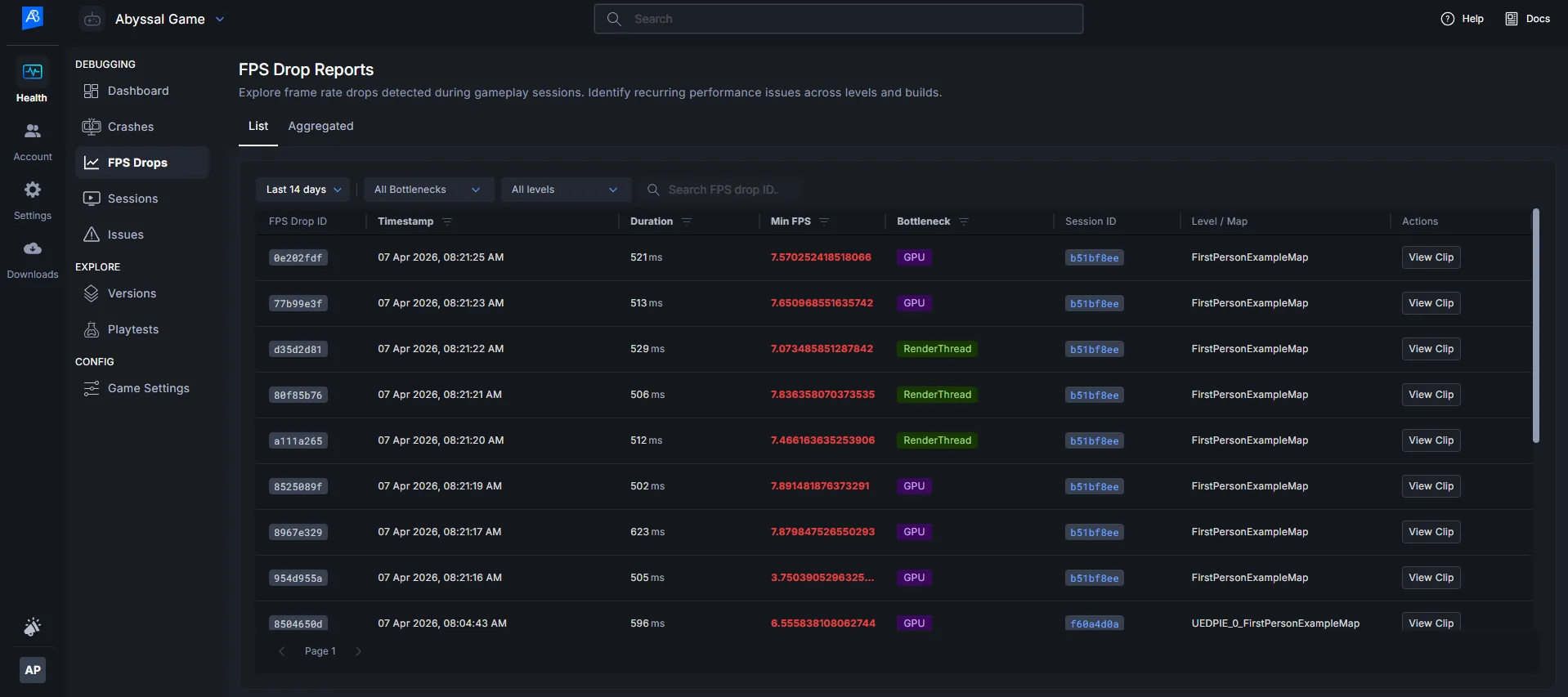
New Fps Drop List and Fps Drop Aggregated views in ADT Web allow developers to browse, filter, and aggregate hitches by level, bottleneck type, FPS range, build, and date.
-
FPS data follows the existing build retention policy.
-
Detection thresholds can be configured per project in ADT Web (admin-only setting, off by default).
What This Means for You
Developers and QA teams can now systematically identify and reproduce frame rate regressions across hardware tiers — without waiting for player complaints or running manual profiling sessions. Hitch data lives right next to your crash data, giving you a single place to monitor session health end-to-end.
How to Try It
-
Go to Labs in ADT Web or ADT Hub and enable Framerate Drop Reporter.
-
In Namespace Settings → Beta Features, toggle on Framerate Drop Reporter (admin only).
-
Integrate the latest UE SDK (UE 5.0+, Development build) into your project.
-
Run a gameplay session. Fps drop events will be detected automatically.
-
After the session ends, open the Session Flight Recorder to view fps drop markers on the timeline.
-
Use the Fps Drop List or Fps Drop Aggregated view to filter and analyze hitch data across sessions.
Bug Fixes and Improvements
No additional bug fixes or improvements in this release.
Known Issues
For the updated list of known issues in ADT components, along with their status and workarounds, refer to the ADT known issues list.