Configure advanced filter for content browsing
Overview
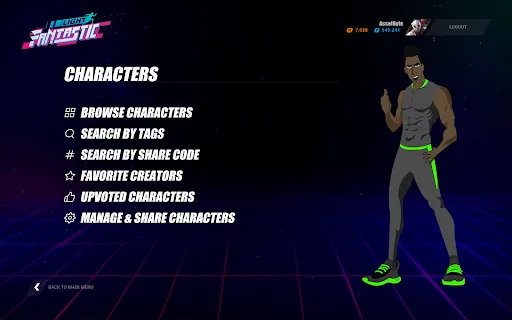
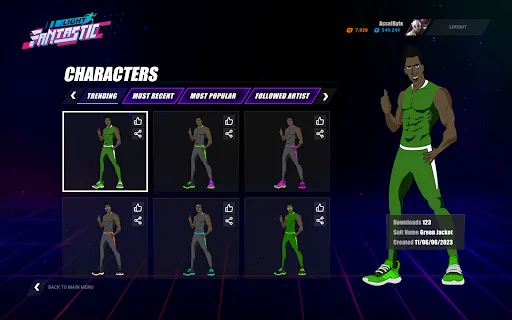
With so much content being created, either by developers as official content or by players as user-generated content (UGC), browsing content can become difficult and time-consuming. AccelByte Gaming Services (AGS) offers a way to let players choose and filter content based on their needs, so the player can choose content that reflects their personality, preferences, and style.
In this guide, you will learn how to implement tags, types, and subtypes to content, and also use them to filter content from the game client.
Goals
The goals of this guide are to explain how to:
- Configure predefined tags, types, and subtypes.
- Add tags, types, and subtypes to content.
- Implement content filtering.
Prerequisites
You will need access to:
- The AGS Admin Portal
- The AccelByte Unreal or Unity SDK
- The AccelByte UGC API documentation for further reference
To follow the AGS CLI steps, install the AGS CLI and sign in with an account that has access to these features. See Install and sign in. The examples use a Bash shell.
Configure content tags, types, and subtypes
You can create Types and Tags that can be used to categorize UGC. For example, a custom design for a car might have Vehicle as the Type and Body or Wheels as the Subtype. Tags could also include Car, Vehicle, or Body.
Configure predefined tags
- Admin Portal
- AGS CLI
-
In your game namespace, go to Online > UGC > Tags.
-
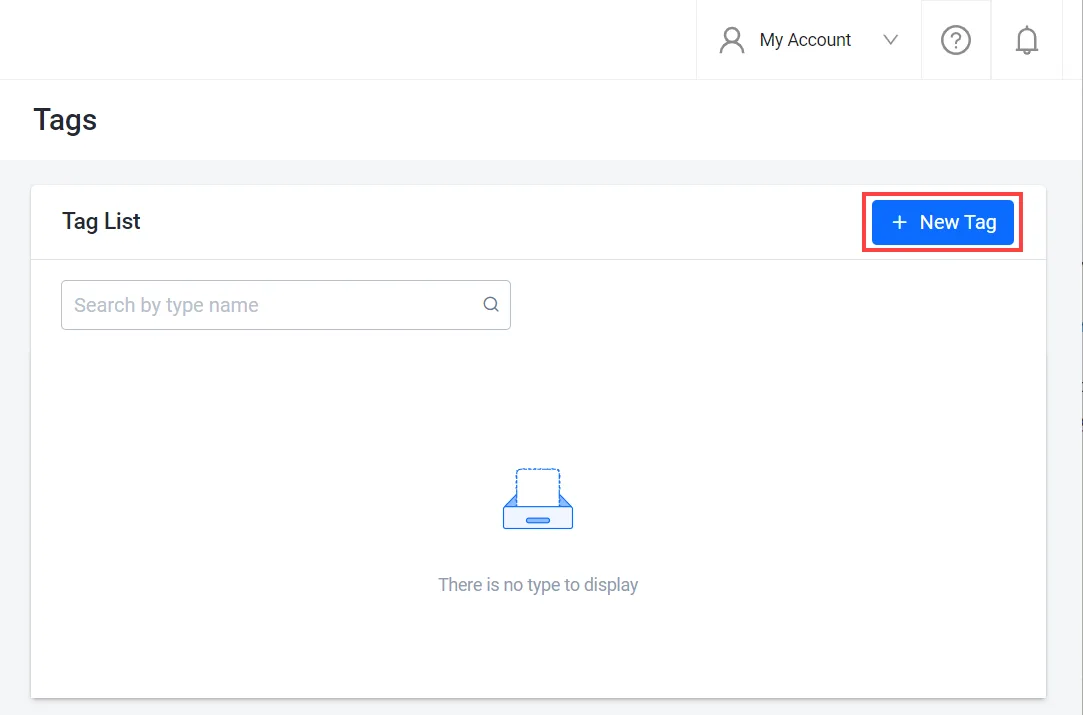
On the Tags page, click on the + New Tag button.
-
On the Add New Tag form, type in a name for the new tag and click Add.

The new tag is added to the tags list.

-
Create the tag. Replace
<YourNamespace>with your game namespace and<TagName>with a name for the tag:ags ugc tags create --namespace <YourNamespace> --json '{"tag": "<TagName>"}' -
To see the tags list, run:
ags ugc tags list --namespace <YourNamespace>
Configure predefined types
- Admin Portal
- AGS CLI
-
In your game namespace, go to Online > UGC > Types.
-
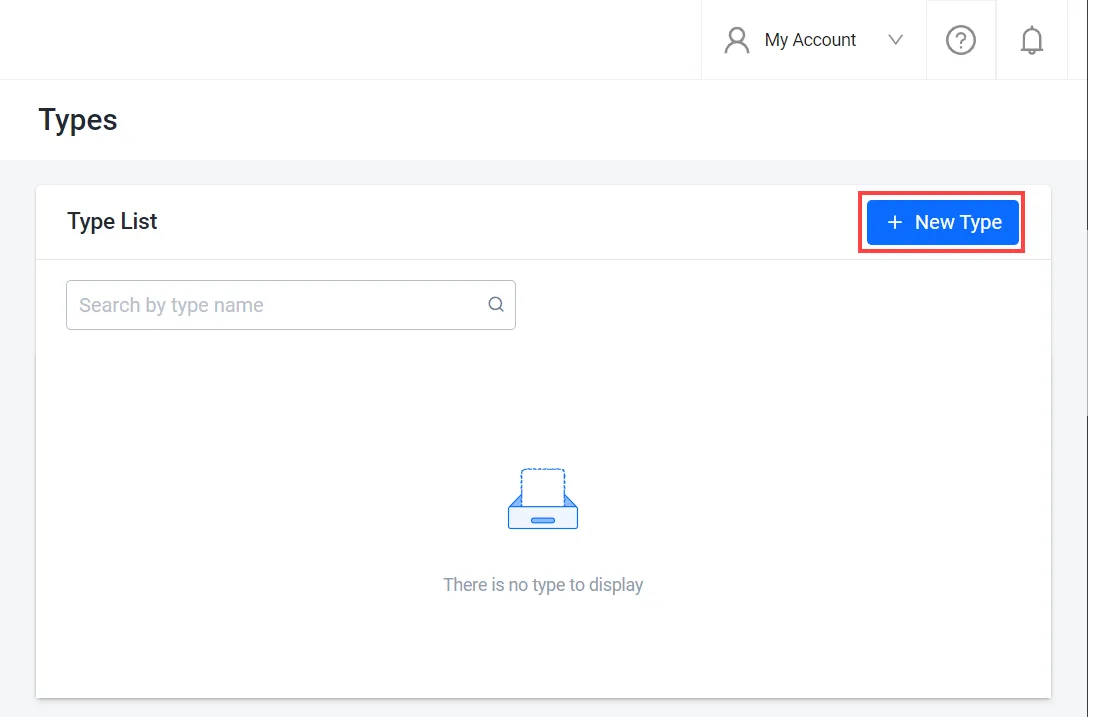
On the Types page, click on the + New Type button.
-
On the Add New Type form, type in a name for the new type and click Add. The new type is be added to the list.

-
You can also add a subtype by clicking View in the type's Action menu.
-
Create the type. Replace
<YourNamespace>with your game namespace and<TypeName>with a name for the type:ags ugc types create --namespace <YourNamespace> --json '{"type": "<TypeName>", "subtype": []}'The Admin Portal creates a type with an empty
subtypelist, the same as this command. To add subtypes, see Configure predefined subtypes.
Configure predefined subtypes
- Admin Portal
- AGS CLI
-
In your game namespace, go to Online > UGC > Types. The Types page appears.
-
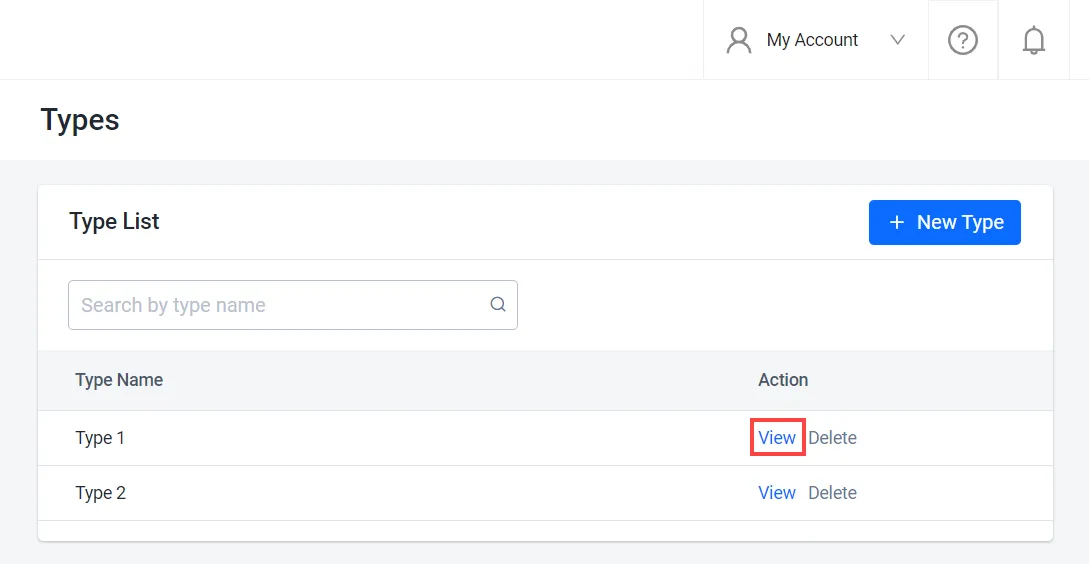
From the types list, find the type to which you want to add a subtype and click on the View option next to it.
-
On the details page of the type, click on the + New Subtype button.

-
On the Add New Subtype form, type in a name for the new subtype and click Add.

The new Subtype will be added to the list.

-
Find the ID of the type to which you want to add a subtype, and its current subtypes:
ags ugc types list --namespace <YourNamespace> --limit 100 --format jsonFor each type, the output shows its ID (
id), name (type), and subtypes (subtype). If you have more than 100 types, raise--limit. -
Update the type. In the
subtypelist, include the new subtype and every existing subtype of the type. Replace<TypeId>and<TypeName>with the type'sidandtype:ags ugc types update --namespace <YourNamespace> --type-id <TypeId> \
--json '{"type": "<TypeName>", "subtype": ["<NewSubtype>", "<ExistingSubtype1>", "<ExistingSubtype2>"]}'warningThe
subtypelist replaces all of the type's subtypes. If you leave out an existing subtype, the update removes it. The Admin Portal adds the new subtype to the existing list for you.
Update content tags, types, and subtypes
- Admin Portal
- AGS CLI
-
On the Admin Portal sidebar, go to Online > UGC > UGC Lookup.
-
On the UGC Lookup page, you can search for content using content name, ID, type, subtype, tags, share code, and user ID.
-
From the results, find and open the content you want to update.

-
On the content's details page, you can update the content as follows:
-
Change its type and subtype. Click on the edit (pencil) icon next to Type or Subtype fields.

On the Edit Type and Subtype form, change the values as needed and click Add to save your changes.

-
Add more tags. Click on the Add More option in the Tag field.

On the Add New Tag form, create the tag you want to add or select from the predefined tags list. Then, click Save.

-
-
Save the content to a file. Replace
<ContentId>with the ID of the content you want to update. Any file name works. This example usescontent.json:ags ugc content get --namespace <YourNamespace> --content-id <ContentId> --format json > content.json -
To see the predefined types and their subtypes, run:
ags ugc types list --namespace <YourNamespace> --limit 100 -
To see the predefined tags, run:
ags ugc tags list --namespace <YourNamespace> --limit 100To add a tag that isn't in the predefined list yet, create it first. See Configure predefined tags. The Admin Portal does this for you when you create a tag on the Add New Tag form.
-
In
content.json, change thetype,subType, andtagsfields as needed. Leave the other fields as they are. -
Send the updated content. Replace
<UserId>and<ChannelId>with theuserIdandchannelIdvalues fromcontent.json. For official content,userIdisofficial.ags ugc content update-user --namespace <YourNamespace> --user-id <UserId> \
--channel-id <ChannelId> --content-id <ContentId> --json @content.jsonwarningThis update overwrites the content's
type,subType,tags, andcustomAttributeswith the values in the request body, and clears any of them that you leave out. Send the whole saved file, as the Admin Portal does, so that the fields you didn't change keep their values.
Add tags, types, and subtypes to content using the Client SDK
You can use the following function to set the player content metadata, such as tags, types, and subtypes while creating the content:
- Unreal Engine
- Unity
- C# Extend SDK
- Go Extend SDK
- Java Extend SDK
- Python Extend SDK
FApiClientPtr ApiClient = AccelByteOnlineSubsystemPtr->GetApiClient();

FString ChannelId = "YourChannelId";
FAccelByteModelsCreateUGCRequestV2 UGCRequest = {};
UGCRequest.ContentType = "application/octet-stream";
UGCRequest.FileExtension = "bin";
UGCRequest.Name = "Custom sports body";
UGCRequest.Type = "Vehicle";
UGCRequest.SubType = "Body";
UGCRequest.Tags = { "Red", "Sporty"};

ApiClient->UGC.CreateV2Content(ChannelId, UGCRequest, THandler<FAccelByteModelsUGCCreateUGCResponseV2>::CreateLambda([](const FAccelByteModelsUGCCreateUGCResponseV2& Result)
{
    // Do something if CreateV2Content succeeds
}), FErrorHandler::CreateLambda([](int32 ErrorCode, const FString& ErrorMessage)
{
    // Do something if CreateV2Content fails
}));
string channelId = "YourChannelId";

CreateUGCRequestV2 createRequest = new CreateUGCRequestV2
{
    ContentType = "application/octet-stream",
    FileExtension = "bin",
    Name = "Custom sports body",
    Type = "Vehicle",
    Tags = new[] { "Red", "Sporty" },
    CustomAttributes = new Dictionary<string, object>()
};

UGC ugc = AccelByteSDK.GetClientRegistry().GetApi().GetUgc();

ugc.CreateContentV2(channelId, createRequest, result =>
{
    if (result.IsError)
    {
        // Do something if CreateContentV2 fails
        Debug.Log($"Error CreateContentV2, Error Code: {result.Error.Code} Error Message: {result.Error.Message}");
        return;
    }

    // Do something if CreateContentV2 succeeds
});
string channelId = "<YourUGCChannelId>";
string userId = "<user-id>";

var response = sdk.Ugc.PublicContentV2.PublicCreateContentV2Op
    .Execute(new ModelsContentRequestV2()
    {
        ContentType = "application/octet-stream",
        FileExtension = "bin",
        Name = "Custom sports body",
        Type = "Vehicle",
        Tags = new List<string>() { "Red", "Sporty" },
        CustomAttributes = new Dictionary<string, object>()
    }, channelId, sdk.Namespace, userId);
if (response != null)
{
    //do something when success
}
publicContentV2Service := &ugc.PublicContentV2Service{
    Client:          factory.NewUgcClient(&repository.ConfigRepositoryImpl{}),
    TokenRepository: &repository.TokenRepositoryImpl{},
}
contentName := "Custom sports body"
body := ugcclientmodels.ModelsContentRequestV2 {
    ContentType: "application/octet-stream",
    FileExtension: "bin",
    Name: &contentName,
    Type: "Vehicle",
    Tags: []string{"Red", "Sporty"},
    CustomAttributes: map[string]interface{}{},
}
channelId := "mychannelid"
namespace := "mygame"
userId := "myuserid"
input := &public_content_v2.PublicCreateContentV2Params{
    Body:      &body,
    ChannelID: channelId,
    Namespace: namespace,
    UserID:    userId,
}
result, err := publicContentV2Service.PublicCreateContentV2Short(input)
final PublicContentV2 publicContentV2Wrapper = new PublicContentV2(sdk);

String channelId = "<YourUGCChannelId>";
String userId = "<user-id>";
ModelsCreateContentResponseV2 response;
try {
    ModelsContentRequestV2 reqBody = ModelsContentRequestV2.builder()
        .contentType("application/octet-stream")
        .fileExtension("bin")
        .name("Custom sports body")
        .type("Vehicle")
            .tags(Arrays.asList("Red", "Sporty"))
            .customAttributes(Collections.emptyMap())
            .build();
    response = publicContentV2Wrapper.publicCreateContentV2(PublicCreateContentV2.builder()
        .namespace("<namespace>")
        .userId(userId)
        .channelId(channelId)
        .body(reqBody)
        .build());
} catch (Exception e) {
    // Do something when failed
    return;
}

if (response == null) {
    // Null response from server
} else {
    // Do something when success
}
import accelbyte_py_sdk.api.ugc as ugc_service
import accelbyte_py_sdk.api.ugc.models as ugc_models

result, error = ugc_service.public_create_content_v2(
    body=ugc_models.ModelsContentRequestV2()
        .with_content_type("application/octet-stream")
        .with_file_extension("bin")
        .with_name("Custom Sports Body")
        .with_type("Vehicle")
        .with_sub_type("Body")
        .with_tags(["Red", "Sporty"]),
    channel_id="YourChannelId",
    user_id="********************************",
    namespace=namespace,  # optional, gets the value from the global instance if unspecified
    sdk=sdk,  # optional, gets the global instance  if unspecified
)
if error:
    exit(error)
You can use the following function to update the player content metadata, such as tags, types, and subtypes:
- Unreal Engine
- Unity
- C# Extend SDK
- Go Extend SDK
- Java Extend SDK
- Python Extend SDK
FApiClientPtr ApiClient = AccelByteOnlineSubsystemPtr->GetApiClient();

FString ChannelId = "YourChannelId";
FString ContentId = "YourContentId";

FAccelByteModelsModifyUGCRequestV2 ModifyRequest = {};
ModifyRequest.Name = "Custom sports body";
ModifyRequest.Type = "Vehicle";
ModifyRequest.SubType = "Body";
ModifyRequest.Tags = { "Blue", "Sporty", "Body"};

ApiClient->UGC.ModifyV2Content(ChannelId, ContentId, ModifyRequest, THandler<FAccelByteModelsUGCModifyUGCResponseV2>::CreateLambda([](const FAccelByteModelsUGCModifyUGCResponseV2& Result)
{
    // Do something if ModifyV2Content succeeds
}), FErrorHandler::CreateLambda([](int32 ErrorCode, const FString& ErrorMessage)
{
    // Do something if ModifyV2Content fails
}));
string channelId = "YourChannelId";
string contentId = "YourContentId";

ModifyUGCRequestV2 ModifyRequest = new ModifyUGCRequestV2
{
    Name = "Custom sports body",
    Type = "Vehicle",
    SubType = "Body",
    Tags = new[] { "Blue", "Sporty", "Body" },
    CustomAttributes = new Dictionary<string, object>()
};

UGC ugc = AccelByteSDK.GetClientRegistry().GetApi().GetUgc();

ugc.ModifyContentV2(channelId, contentId, ModifyRequest, result =>
{
    if (result.IsError)
    {
        // Do something if ModifyContentV2 fails
        Debug.Log($"Error ModifyContentV2, Error Code: {result.Error.Code} Error Message: {result.Error.Message}");
        return;
    }

    // Do something if ModifyContentV2 succeeds
});
string channelId = "<YourUGCChannelId>";
string contentId = "<YourUGCContentId>";
string userId = "<user-id>";

var response = sdk.Ugc.PublicContentV2.PublicUpdateContentV2Op
    .Execute(new ModelsUpdateContentRequestV2()
    {
        Name = "Custom sports body",
        Type = "Vehicle",
        SubType = "Body",
        Tags = new List<string>() { "Blue", "Body", "Sporty" },
        CustomAttributes = new Dictionary<string, object>()
    }, channelId, contentId, sdk.Namespace, userId);
if (response != null)
{
    //do something when success
}
publicContentV2Service := &ugc.PublicContentV2Service{
    Client:          factory.NewUgcClient(&repository.ConfigRepositoryImpl{}),
    TokenRepository: &repository.TokenRepositoryImpl{},
}
body := ugcclientmodels.ModelsUpdateContentRequestV2 {
    Name: "Custom sports body",
    Type: "Vehicle",
    SubType: "Body",
    Tags: []string{"Blue","Body","Sporty"},
    CustomAttributes: map[string]interface{}{},
}
channelId := "mychannelid"
contentId := "mycontentid"
namespace := "mygame"
userId := "myuserid"
input := &public_content_v2.PublicUpdateContentV2Params{
    Body:      &body,
    ChannelID: channelId,
    ContentID: contentId,
    Namespace: namespace,
    UserID:    userId,
}
result, err := publicContentV2Service.PublicUpdateContentV2Short(input)
final PublicContentV2 publicContentV2Wrapper = new PublicContentV2(sdk);

String channelId = "<YourUGCChannelId>";
String contentId = "<YourUGCContentId>";
String userId = "<user-id>";
ModelsUpdateContentResponseV2 response;
try {
    ModelsUpdateContentRequestV2 reqBody = ModelsUpdateContentRequestV2.builder()
        .name("Custom sports body")
        .type("Vehicle")
        .subType("Body")
        .tags(Arrays.asList("Blue", "Body", "Sporty"))
        .customAttributes(Collections.emptyMap())
        .build();
    response = publicContentV2Wrapper.publicUpdateContentV2(PublicUpdateContentV2.builder()
    .namespace("<namespace>")
    .userId(userId)
    .channelId(channelId)
    .contentId(contentId)
    .body(reqBody)
      .build());
} catch (Exception e) {
    // Do something when failed
    return;
}

if (response == null) {
    // Null response from server
} else {
    // Do something when success
}
import accelbyte_py_sdk.api.ugc as ugc_service
import accelbyte_py_sdk.api.ugc.models as ugc_models

result, error = ugc_service.public_update_content_v2(
    body=ugc_models.ModelsUpdateContentRequestV2()
        .with_name("Custom Sports Body")
        .with_type("Vehicle")
        .with_sub_type("Body")
        .with_tags(["Blue", "Sporty", "Body"]),
    channel_id="YourChannelId",
    content_id="YourContentId",
    user_id="********************************",
    namespace=namespace,  # optional, gets the value from the global instance if unspecified
    sdk=sdk,  # optional, gets the global instance  if unspecified
)
if error:
    exit(error)
Content filtering
Content filtering is the process of finding, sorting, and displaying UGC based on various criteria, such as tags, keywords, types, etc. Content filtering also helps players to discover and enjoy UGC that matches their preferences, interests, and skill levels.
Search content by name
To filter contents using content name, use this function:
- Unreal Engine
- Unity
- C# Extend SDK
- Go Extend SDK
- Java Extend SDK
- Python Extend SDK
FApiClientPtr ApiClient = AccelByteOnlineSubsystemPtr->GetApiClient();

FAccelByteModelsUGCFilterRequest Filter = {};
Filter.Name = "Content Name";

ApiClient->UGC.SearchV2Contents(Filter,
    THandler<FAccelByteModelsUGCGetPaginatedUGCContentsResponse>::CreateLambda([](const FAccelByteModelsUGCGetPaginatedUGCContentsResponse& Result)
{
    // Do something if SearchV2Contents succeeds
}), FErrorHandler::CreateLambda([](int32 ErrorCode, const FString& ErrorMessage)
{
    // Do something if SearchV2Contents fails
}));
UGCGetContentFilterRequestV2 filterRequest = new UGCGetContentFilterRequestV2()
{
    Name = "Content Name",
    SubType = "Content Subtype",
    Tags = new[] { "UGC Tag1", "UGC Tag2" },
    Type = "Content Type"
};

UGC ugc = AccelByteSDK.GetClientRegistry().GetApi().GetUgc();

ugc.SearchContentsV2(filterRequest, result =>
{
    if (result.IsError)
    {
        // Do something if SearchContentsV2 fails
        Debug.Log($"Error SearchContentsV2, Error Code: {result.Error.Code} Error Message: {result.Error.Message}");
        return;
    }

    // Do something if SearchContentsV2 succeeds
});
var response = sdk.Ugc.PublicContentV2.PublicListContentV2Op
    .SetName("Content Name")
    .SetSubType("Content Subtype")
    .SetTags(new List<string>() { "UGC Tag1", "UGC Tag2" })
    .SetType("Content Type")
    .Execute(sdk.Namespace);
if (response != null)
{
    //do something when success
}
publicContentV2Service := &ugc.PublicContentV2Service{
    Client:          factory.NewUgcClient(&repository.ConfigRepositoryImpl{}),
    TokenRepository: &repository.TokenRepositoryImpl{},
}
namespace := "mygame"
name := "mycontentname"
subType := "mycontentsubtype"
tags := []string{"UGC Tag1", "UGC Tag2"}
type_ := "mycontenttype"
input := &public_content_v2.PublicListContentV2Params{
    Namespace:  namespace,
    Name:       &name,
    SubType:    &subType,
    Type:       &type_,
    Tags: tags,
}
result, err := publicContentV2Service.PublicListContentV2Short(input)
final PublicContentV2 publicContentV2Wrapper = new PublicContentV2(sdk);
ModelsPaginatedContentDownloadResponseV2 response;
try {
    response = publicContentV2Wrapper.publicListContentV2(PublicListContentV2.builder()
    .namespace("<namespace>")
    .name("Content Name")
    .subType("Content Subtype")
    .tags(Arrays.asList("UGC Tag1", "UGC Tag2"))
    .type("Content Type")
  .build());
} catch (Exception e) {
    // Do something when failed
    return;
}

if (response == null) {
    // Null response from server
} else {
    // Do something when success
}
import accelbyte_py_sdk.api.ugc as ugc_service

result, error = ugc_service.public_list_content_v2(
    name="Content Name",
    type_="Content Type",
    sub_type="Content Subtype",
    tags=["UGC Tag1", "UGC Tag2"],
    namespace=namespace,  # optional, gets the value from the global instance if unspecified
    sdk=sdk,  # optional, gets the global instance  if unspecified
)
if error:
    exit(error)
Use tags to filter content
Advanced tag filtering supports & as an AND operator, | as an OR operator, and parentheses () for priority. E.g:
tags=sporty
tags=sporty&red
tags=sporty|red
tags=sporty&red|classic
tags=sporty&(red|classic)
The precedence of the logical operator is AND > OR, so if there are no parentheses, the AND logical operator will be executed first.
Allowed characters for operand: alphanumeric, underscore _ and dash - \ Allowed characters for operator: & | ( ) \ The tags=sporty&red|classic also equals to: tags=sporty,red|classic and tags=sporty&tags=red|classic
You can use this function to filter the content using tags:
- Unreal Engine
- Unity
- C# Extend SDK
- Go Extend SDK
- Java Extend SDK
- Python Extend SDK
FApiClientPtr ApiClient = AccelByteOnlineSubsystemPtr->GetApiClient();

FAccelByteModelsUGCFilterRequest Filter = {};
Filter.Tags = { "Sporty", "Red|Classic" };

ApiClient->UGC.SearchV2Contents(Filter,
    THandler<FAccelByteModelsUGCGetPaginatedUGCContentsResponse>::CreateLambda([](const FAccelByteModelsUGCGetPaginatedUGCContentsResponse& Result)
{
    // Do something if SearchV2Contents succeeds
}), FErrorHandler::CreateLambda([](int32 ErrorCode, const FString& ErrorMessage)
{
    // Do something if SearchV2Contents fails
}));
UGCGetContentFilterRequestV2 filterRequest = new UGCGetContentFilterRequestV2()
{
    Name = "Content Name",
    SubType = "Content Subtype",
    Tags = new[] { "UGC Tag1", "UGC Tag2" },
    Type = "Content Type"
};

UGC ugc = AccelByteSDK.GetClientRegistry().GetApi().GetUgc();

ugc.SearchContentsV2(filterRequest, result =>
{
    if (result.IsError)
    {
        // Do something if SearchContentsV2 fails
        Debug.Log($"Error SearchContentsV2, Error Code: {result.Error.Code} Error Message: {result.Error.Message}");
        return;
    }

    // Do something if SearchV2Contents succeeds
});
var response = sdk.Ugc.PublicContentV2.PublicListContentV2Op
    .SetName("Content Name")
    .SetSubType("Content Subtype")
    .SetTags(new List<string>() { "UGC Tag1", "UGC Tag2" })
    .SetType("Content Type")
    .Execute(sdk.Namespace);
if (response != null)
{
    //do something when success
}
publicContentV2Service := &ugc.PublicContentV2Service{
    Client:          factory.NewUgcClient(&repository.ConfigRepositoryImpl{}),
    TokenRepository: &repository.TokenRepositoryImpl{},
}
namespace := "mygame"
name := "mycontentname"
subType := "mycontentsubtype"
tags := []string{"UGC Tag1", "UGC Tag2"}
type_ := "mycontenttype"
input := &public_content_v2.PublicListContentV2Params{
    Namespace:  namespace,
    Name:       &name,
    SubType:    &subType,
    Type:       &type_,
    Tags: tags,
}
result, err := publicContentV2Service.PublicListContentV2Short(input)
final PublicContentV2 publicContentV2Wrapper = new PublicContentV2(sdk);
ModelsPaginatedContentDownloadResponseV2 response;
try {
    response = publicContentV2Wrapper.publicListContentV2(PublicListContentV2.builder()
    .namespace("<namespace>")
    .name("Content Name")
    .subType("Content Subtype")
    .tags(Arrays.asList("UGC Tag1", "UGC Tag2"))
    .type("Content Type")
  .build());
} catch (Exception e) {
    // Do something when failed
    return;
}

if (response == null) {
    // Null response from server
} else {
    // Do something when success
}
import accelbyte_py_sdk.api.ugc as ugc_service

result, error = ugc_service.public_list_content_v2(
    tags=["Sporty", "Red|Classic"],
    namespace=namespace,  # optional, gets the value from the global instance if unspecified
    sdk=sdk,  # optional, gets the global instance  if unspecified
)
if error:
    exit(error)
Use types and subtypes to filter content
You can use this function to filter the content using types and subtypes:
- Unreal Engine
- Unity
- C# Extend SDK
- Go Extend SDK
- Java Extend SDK
- Python Extend SDK
FApiClientPtr ApiClient = AccelByteOnlineSubsystemPtr->GetApiClient();

FAccelByteModelsUGCFilterRequest Filter = {};
Filter.Type = "Content Type";
Filter.SubType = "Content Subtype";

int32 Limit = 1000;
int32 Offset = 0;

EAccelByteUGCContentSortBy SortBy = EAccelByteUGCContentSortBy::CREATED_TIME_DESC;

ApiClient->UGC.SearchV2Contents(Filter,
    THandler<FAccelByteModelsUGCGetPaginatedUGCContentsResponse>::CreateLambda([](const FAccelByteModelsUGCGetPaginatedUGCContentsResponse& Result)
{
    // Do something if SearchV2Contents succeeds
}), FErrorHandler::CreateLambda([](int32 ErrorCode, const FString& ErrorMessage)
{
    // Do something if SearchV2Contents fails
}), Limit, Offset, SortBy);
UGCGetContentFilterRequestV2 filterRequest = new UGCGetContentFilterRequestV2()
{
    Name = "Content Name",
    SubType = "Content Subtype",
    Tags = new[] { "UGC Tag1", "UGC Tag2" },
    Type = "Content Type"
};

UGC ugc = AccelByteSDK.GetClientRegistry().GetApi().GetUgc();

ugc.SearchContentsV2(filterRequest, result =>
{
    if (result.IsError)
    {
        // Do something if SearchContentsV2 fails
        Debug.Log($"Error SearchContentsV2, Error Code: {result.Error.Code} Error Message: {result.Error.Message}");
        return;
    }

    // Do something if SearchV2Contents succeeds
});
var response = sdk.Ugc.PublicContentV2.PublicListContentV2Op
    .SetName("Content Name")
    .SetSubType("Content Subtype")
    .SetTags(new List<string>() { "UGC Tag1", "UGC Tag2" })
    .SetType("Content Type")
    .Execute(sdk.Namespace);
if (response != null)
{
    //do something when success
}
publicContentV2Service := &ugc.PublicContentV2Service{
    Client:          factory.NewUgcClient(&repository.ConfigRepositoryImpl{}),
    TokenRepository: &repository.TokenRepositoryImpl{},
}
namespace := "mygame"
name := "mycontentname"
subType := "mycontentsubtype"
tags := []string{"UGC Tag1", "UGC Tag2"}
type_ := "mycontenttype"
input := &public_content_v2.PublicListContentV2Params{
    Namespace:  namespace,
    Name:       &name,
    SubType:    &subType,
    Type:       &type_,
    Tags: tags,
}
result, err := publicContentV2Service.PublicListContentV2Short(input)
final PublicContentV2 publicContentV2Wrapper = new PublicContentV2(sdk);
ModelsPaginatedContentDownloadResponseV2 response;
try {
    response = publicContentV2Wrapper.publicListContentV2(PublicListContentV2.builder()
    .namespace("<namespace>")
    .name("Content Name")
    .subType("Content Subtype")
    .tags(Arrays.asList("UGC Tag1", "UGC Tag2"))
    .type("Content Type")
  .build());
} catch (Exception e) {
    // Do something when failed
    return;
}

if (response == null) {
    // Null response from server
} else {
    // Do something when success
}
import accelbyte_py_sdk.api.ugc as ugc_service

result, error = ugc_service.public_list_content_v2(
    type_="Content Type",
    sub_type="Content Subtype",
    limit=1000,
    offset=0,
    sort_by="createdTime:desc",
    namespace=namespace,  # optional, gets the value from the global instance if unspecified
    sdk=sdk,  # optional, gets the global instance  if unspecified
)
if error:
    exit(error)
Sort the content
You can use the sorting field to customize how you view the UGC in the game. AGS supports sorting the list of content based on the like count, created time, download count, and content name.
The supported sorting options are as follows:
createdTime,createdTime:desc,createdTime:ascdownload,download:desc,download:asclike,like:desc,like:ascname,name:desc,name:asc
For example, if you want to see the most recent UGC, you can use createdTime:desc to sort by the creation date in descending order. If you want to see the most popular UGC, you can use like:desc to sort by the number of likes in descending order. If you want to see the UGC in alphabetical order, you can use name:asc to sort by the name in ascending order. You can also use download to sort by the number of downloads.
To sort the content, use this function:
- Unreal Engine
- Unity
- C# Extend SDK
- Go Extend SDK
- Java Extend SDK
- Python Extend SDK
FApiClientPtr ApiClient = AccelByteOnlineSubsystemPtr->GetApiClient();

FAccelByteModelsUGCFilterRequest Filter = {};
Filter.Name = "Content Name";
Filter.Type = "Content Type";
Filter.SubType = "Content Subtype";
Filter.Tags = { "Sporty", "Red|Brown" };

int32 Limit = 1000;
int32 Offset = 0;

EAccelByteUGCContentSortBy SortBy = EAccelByteUGCContentSortBy::CREATED_TIME_DESC;

ApiClient->UGC.SearchV2Contents(Filter,
    THandler<FAccelByteModelsUGCGetPaginatedUGCContentsResponse>::CreateLambda([](const FAccelByteModelsUGCGetPaginatedUGCContentsResponse& Result)
{
    // Do something if SearchV2Contents succeeds
}), FErrorHandler::CreateLambda([](int32 ErrorCode, const FString& ErrorMessage)
{
    // Do something if SearchV2Contents fails
}), Limit, Offset, SortBy);
int limit = 1000;
int offset = 0;

UGCContentSortBy sortBy = UGCContentSortBy.CreatedTimeDesc;

UGCGetContentFilterRequest filterRequest = new UGCGetContentFilterRequest()
{
	Name = "Content Name",
	Type = "Content Type",
	SubType = "Content Subtype",
	Tags = new[] { "Sporty", "Red|Brown" }
};

UGC ugc = AccelByteSDK.GetClientRegistry().GetApi().GetUgc();

ugc.SearchContentsV2(filterRequest, result =>
{
    if (result.IsError)
    {
        // Do something if SearchContentsV2 fails
        Debug.Log($"Error SearchContentsV2, Error Code: {result.Error.Code} Error Message: {result.Error.Message}");
        return;
    }

    // Do something if SearchContentsV2 succeeds
}, limit, offset, sortBy);
var response = sdk.Ugc.PublicContentV2.PublicListContentV2Op
    .SetName("Content Name")
    .SetSubType("Content Subtype")
    .SetTags(new List<string>() { "UGC Tag1", "UGC Tag2" })
    .SetType("Content Type")
    .SetSortBy("createdTime:desc")
    .SetOffset(0)
    .SetLimit(1000)
    .Execute(sdk.Namespace);
if (response != null)
{
    //do something when success
}
publicContentV2Service := &ugc.PublicContentV2Service{
    Client:          factory.NewUgcClient(&repository.ConfigRepositoryImpl{}),
    TokenRepository: &repository.TokenRepositoryImpl{},
}
namespace := "mygame"
name := "mycontentname"
subType := "mycontentsubtype"
tags := []string{"UGC Tag1", "UGC Tag2"}
type_ := "mycontenttype"
sortBy := "createdTime:desc"
input := &public_content_v2.PublicListContentV2Params{
    Namespace:  namespace,
    Name:       &name,
    SubType:    &subType,
    Type:       &type_,
    Tags: tags,
    SortBy: &sortBy,
}
result, err := publicContentV2Service.PublicListContentV2Short(input)
final PublicContentV2 publicContentV2Wrapper = new PublicContentV2(sdk);
ModelsPaginatedContentDownloadResponseV2 response;
try {
    response = publicContentV2Wrapper.publicListContentV2(PublicListContentV2.builder()
    .namespace("<namespace>")
    .name("Content Name")
    .subType("Content Subtype")
    .tags(Arrays.asList("UGC Tag1", "UGC Tag2"))
    .type("Content Type")
    .sortBy("createdTime:desc")
    .offset(0)
    .limit(1000)
  .build());
} catch (Exception e) {
    // Do something when failed
    return;
}

if (response == null) {
    // Null response from server
} else {
    // Do something when success
}
import accelbyte_py_sdk.api.ugc as ugc_service

result, error = ugc_service.public_list_content_v2(
    name="Content Name",
    type_="Content Type",
    sub_type="Content Subtype",
    tags=["Sporty", "Red|Brown"],
    limit=1000,
    offset=0,
    sort_by="createdTime:desc",
    namespace=namespace,  # optional, gets the value from the global instance if unspecified
    sdk=sdk,  # optional, gets the global instance  if unspecified
)
if error:
    exit(error)