コンテンツ閲覧のための高度なフィルターを設定する
注釈:本資料はAI技術を用いて翻訳されています。
概要
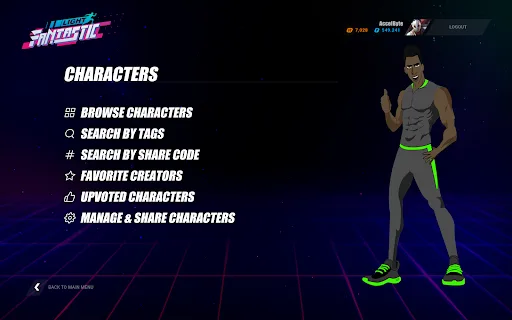
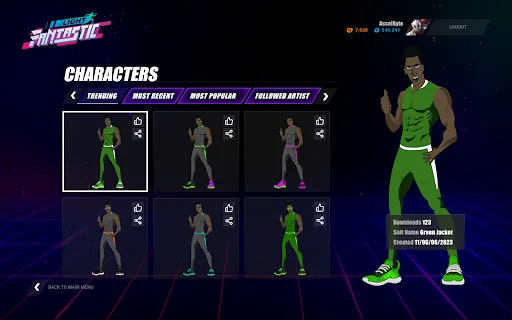
開発者による公式コンテンツ、あるいはプレイヤーによるユーザー生成コンテンツ (UGC) など、多くのコンテンツが作成される中で、コンテンツの閲覧は困難で時間のかかる作業になりがちです。AccelByte Gaming Services (AGS) では、プレイヤーが自分のニーズに合わせてコンテンツを選択・フィルタリングできる仕組みを提供しており、これによりプレイヤーは自分の個性、好み、スタイルを反映したコンテンツを選ぶことができます。
このガイドでは、コンテンツにタグ、タイプ、サブタイプを設定する方法と、それらを使ってゲームクライアントからコンテンツをフィルタリングする方法について説明します。
目標
このガイドの目標は、以下の方法を説明することです。
- 事前定義されたタグ、タイプ、サブタイプを設定する。
- コンテンツにタグ、タイプ、サブタイプを追加する。
- コンテンツフィルタリングを実装する。
前提条件
以下へのアクセスが必要です。
- AGS Admin Portal
- AccelByte Unreal または Unity SDK
- AccelByte UGC API ドキュメント(参考資料)
AGS CLI の手順に従うには、AGS CLI をインストールし、これらの機能にアクセスできるアカウントでサインインしてください。詳しくは、インストールとサインイン を参照してください。なお、例では Bash シェルを使用しています。
コンテンツのタグ、タイプ、サブタイプを設定する
UGC の分類に使用するタイプとタグを作成できます。例えば、車のカスタムデザインでは、タイプとしてVehicle、サブタイプとしてBodyやWheelsを設定できます。タグにはCar、Vehicle、Bodyなどを含めることができます。
事前定義されたタグを設定する
- Admin Portal
- AGS CLI
-
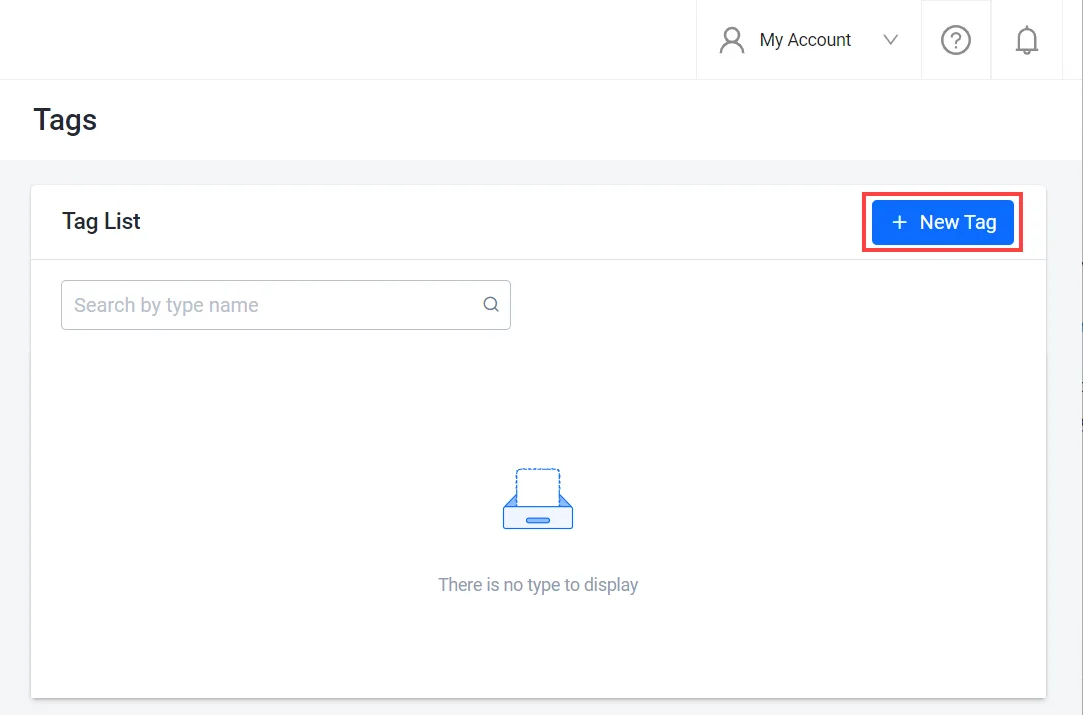
ゲームの名前空間で、Online > UGC > Tags に移動します。
-
Tags ページで、+ New Tag ボタンをクリックします。
-
Add New Tag フォームで、新しいタグの名前を入力し、Add をクリックします。

新しいタグがタグリストに追加されます。

-
タグを作成します。
<YourNamespace>をゲームの名前空間に、<TagName>をタグの名前に置き換えてください。ags ugc tags create --namespace <YourNamespace> --json '{"tag": "<TagName>"}' -
タグリストを確認するには、次を実行します。
ags ugc tags list --namespace <YourNamespace>
事前定義されたタイプを設定する
- Admin Portal
- AGS CLI
-
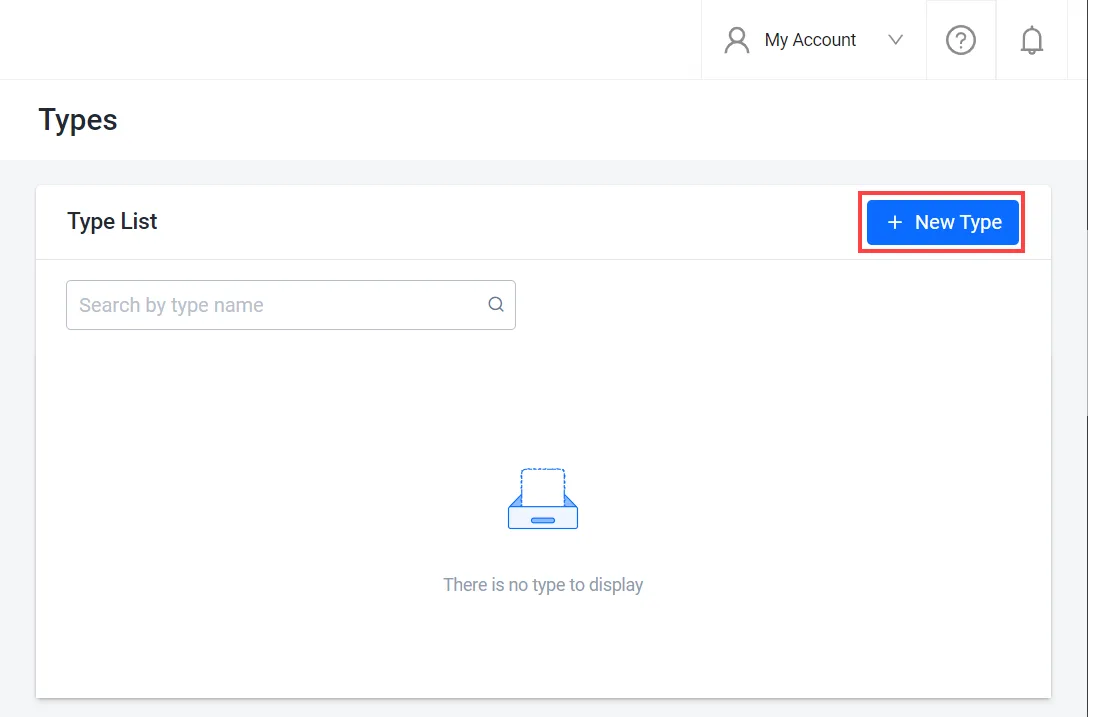
ゲームの名前空間で、Online > UGC > Types に移動します。
-
Types ページで、+ New Type ボタンをクリックします。
-
Add New Type フォームで、新しいタイプの名前を入力し、Add をクリックします。新しいタイプがリストに追加されます。

-
タイプの Action メニューにある View をクリックして、サブタイプを追加することもできます。
-
タイプを作成します。
<YourNamespace>をゲームの名前空間に、<TypeName>をタイプの名前に置き換えてください。ags ugc types create --namespace <YourNamespace> --json '{"type": "<TypeName>", "subtype": []}'Admin Portal でも、このコマンドと同様に、
subtypeリストが空のタイプが作成されます。サブタイプを追加するには、事前定義されたサブタイプを設定する を参照してください。
事前定義されたサブタイプを設定する
- Admin Portal
- AGS CLI
-
ゲームの名前空間で、Online > UGC > Types に移動します。Types ページが表示されます。
-
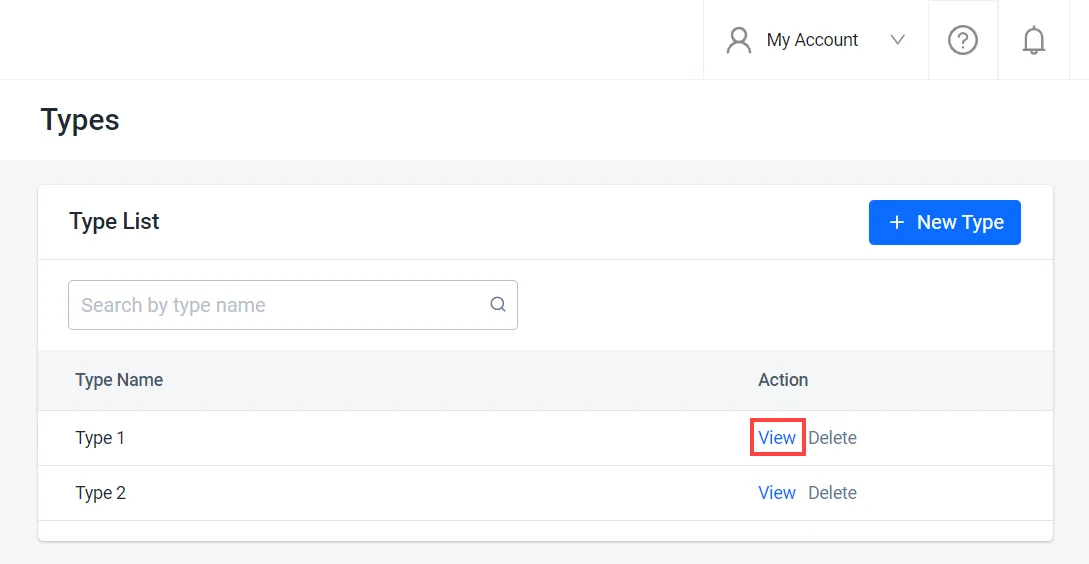
タイプのリストから、サブタイプを追加するタイプを見つけ、その横にある View オプションをクリックします。
-
タイプの詳細ページで、+ New Subtype ボタンをクリックします。

-
Add New Subtype フォームで、新しいサブタイプの名前を入力し、Add をクリックします。

新しい Subtype がリストに追加されます。

-
サブタイプを追加するタイプの ID と、現在のサブタイプを確認します。
ags ugc types list --namespace <YourNamespace> --limit 100 --format json出力には、タイプごとに ID (
id)、名前 (type)、サブタイプ (subtype) が表示されます。タイプが 100 個を超える場合は、--limitの値を増やしてください。 -
タイプを更新します。
subtypeリストには、新しいサブタイプと、そのタイプの既存のサブタイプをすべて含めてください。<TypeId>と<TypeName>を、タイプのidとtypeに置き換えてください。ags ugc types update --namespace <YourNamespace> --type-id <TypeId> \
--json '{"type": "<TypeName>", "subtype": ["<NewSubtype>", "<ExistingSubtype1>", "<ExistingSubtype2>"]}'警告subtypeリストの内容で、タイプのサブタイプがすべて置き換えられます。既存のサブタイプを省略すると、更新時にそのサブタイプは削除されます。Admin Portal では、新しいサブタイプが既存のリストに自動的に追加されます。
コンテンツのタグ、タイプ、サブタイプを更新する
- Admin Portal
- AGS CLI
-
Admin Portal のサイドバーで、Online > UGC > UGC Lookup に移動します。
-
UGC Lookup ページでは、コンテンツ名、ID、タイプ、サブタイプ、タグ、共有コード、ユーザー ID を使ってコンテンツを検索できます。
-
検索結果から、更新するコンテンツを見つけて開きます。

-
コンテンツの詳細ページで、以下のようにコンテンツを更新できます。
-
タイプとサブタイプを変更するには、Type または Subtype フィールドの横にある編集(鉛筆)アイコンをクリックします。

Edit Type and Subtype フォームで、必要に応じて値を変更し、Add をクリックして変更を保存します。

-
タグを追加するには、Tag フィールドの Add More オプションをクリックします。

Add New Tag フォームで、追加するタグを新規作成するか、事前定義されたタグリストから選択し、Save をクリックします。

-
-
コンテンツをファイルに保存します。
<ContentId>を更新するコンテンツの ID に置き換えてください。ファイル名は任意です。この例ではcontent.jsonを使用します。ags ugc content get --namespace <YourNamespace> --content-id <ContentId> --format json > content.json -
事前定義されたタイプとそのサブタイプを確認するには、次を実行します。
ags ugc types list --namespace <YourNamespace> --limit 100 -
事前定義されたタグを確認するには、次を実行します。
ags ugc tags list --namespace <YourNamespace> --limit 100事前定義されたリストにないタグを追加する場合は、先にそのタグを作成してください。事前定義されたタグを設定する を参照してください。Admin Portal では、Add New Tag フォームでタグを作成すると、この処理が自動的に行われます。
-
content.jsonで、必要に応じてtype、subType、tagsフィールドを変更します。その他のフィールドはそのままにしてください。 -
更新したコンテンツを送信します。
<UserId>と<ChannelId>を、content.jsonのuserIdとchannelIdの値に置き換えてください。公式コンテンツの場合、userIdはofficialです。ags ugc content update-user --namespace <YourNamespace> --user-id <UserId> \
--channel-id <ChannelId> --content-id <ContentId> --json @content.json警告この更新では、コンテンツの
type、subType、tags、customAttributesがリクエストボディの値で上書きされ、省略したフィールドはクリアされます。変更しないフィールドの値を保持するため、Admin Portal と同様に、保存したファイル全体を送信してください。
クライアント SDK を使ってコンテンツにタグ、タイプ、サブタイプを追加する
以下の関数を使用すると、コンテンツの作成時にタグ、タイプ、サブタイプなどのプレイヤーコンテンツのメタデータを設定できます。
- Unreal Engine
- Unity
- C# Extend SDK
- Go Extend SDK
- Java Extend SDK
- Python Extend SDK
FApiClientPtr ApiClient = AccelByteOnlineSubsystemPtr->GetApiClient();

FString ChannelId = "YourChannelId";
FAccelByteModelsCreateUGCRequestV2 UGCRequest = {};
UGCRequest.ContentType = "application/octet-stream";
UGCRequest.FileExtension = "bin";
UGCRequest.Name = "Custom sports body";
UGCRequest.Type = "Vehicle";
UGCRequest.SubType = "Body";
UGCRequest.Tags = { "Red", "Sporty"};

ApiClient->UGC.CreateV2Content(ChannelId, UGCRequest, THandler<FAccelByteModelsUGCCreateUGCResponseV2>::CreateLambda([](const FAccelByteModelsUGCCreateUGCResponseV2& Result)
{
    // Do something if CreateV2Content succeeds
}), FErrorHandler::CreateLambda([](int32 ErrorCode, const FString& ErrorMessage)
{
    // Do something if CreateV2Content fails
}));
string channelId = "YourChannelId";

CreateUGCRequestV2 createRequest = new CreateUGCRequestV2
{
    ContentType = "application/octet-stream",
    FileExtension = "bin",
    Name = "Custom sports body",
    Type = "Vehicle",
    Tags = new[] { "Red", "Sporty" },
    CustomAttributes = new Dictionary<string, object>()
};

UGC ugc = AccelByteSDK.GetClientRegistry().GetApi().GetUgc();

ugc.CreateContentV2(channelId, createRequest, result =>
{
    if (result.IsError)
    {
        // Do something if CreateContentV2 fails
        Debug.Log($"Error CreateContentV2, Error Code: {result.Error.Code} Error Message: {result.Error.Message}");
        return;
    }

    // Do something if CreateContentV2 succeeds
});
string channelId = "<YourUGCChannelId>";
string userId = "<user-id>";

var response = sdk.Ugc.PublicContentV2.PublicCreateContentV2Op
    .Execute(new ModelsContentRequestV2()
    {
        ContentType = "application/octet-stream",
        FileExtension = "bin",
        Name = "Custom sports body",
        Type = "Vehicle",
        Tags = new List<string>() { "Red", "Sporty" },
        CustomAttributes = new Dictionary<string, object>()
    }, channelId, sdk.Namespace, userId);
if (response != null)
{
    //do something when success
}
publicContentV2Service := &ugc.PublicContentV2Service{
    Client:          factory.NewUgcClient(&repository.ConfigRepositoryImpl{}),
    TokenRepository: &repository.TokenRepositoryImpl{},
}
contentName := "Custom sports body"
body := ugcclientmodels.ModelsContentRequestV2 {
    ContentType: "application/octet-stream",
    FileExtension: "bin",
    Name: &contentName,
    Type: "Vehicle",
    Tags: []string{"Red", "Sporty"},
    CustomAttributes: map[string]interface{}{},
}
channelId := "mychannelid"
namespace := "mygame"
userId := "myuserid"
input := &public_content_v2.PublicCreateContentV2Params{
    Body:      &body,
    ChannelID: channelId,
    Namespace: namespace,
    UserID:    userId,
}
result, err := publicContentV2Service.PublicCreateContentV2Short(input)
final PublicContentV2 publicContentV2Wrapper = new PublicContentV2(sdk);

String channelId = "<YourUGCChannelId>";
String userId = "<user-id>";
ModelsCreateContentResponseV2 response;
try {
    ModelsContentRequestV2 reqBody = ModelsContentRequestV2.builder()
        .contentType("application/octet-stream")
        .fileExtension("bin")
        .name("Custom sports body")
        .type("Vehicle")
            .tags(Arrays.asList("Red", "Sporty"))
            .customAttributes(Collections.emptyMap())
            .build();
    response = publicContentV2Wrapper.publicCreateContentV2(PublicCreateContentV2.builder()
        .namespace("<namespace>")
        .userId(userId)
        .channelId(channelId)
        .body(reqBody)
        .build());
} catch (Exception e) {
    // Do something when failed
    return;
}

if (response == null) {
    // Null response from server
} else {
    // Do something when success
}
import accelbyte_py_sdk.api.ugc as ugc_service
import accelbyte_py_sdk.api.ugc.models as ugc_models

result, error = ugc_service.public_create_content_v2(
    body=ugc_models.ModelsContentRequestV2()
        .with_content_type("application/octet-stream")
        .with_file_extension("bin")
        .with_name("Custom Sports Body")
        .with_type("Vehicle")
        .with_sub_type("Body")
        .with_tags(["Red", "Sporty"]),
    channel_id="YourChannelId",
    user_id="********************************",
    namespace=namespace,  # optional, gets the value from the global instance if unspecified
    sdk=sdk,  # optional, gets the global instance  if unspecified
)
if error:
    exit(error)
以下の関数を使用すると、タグ、タイプ、サブタイプなどのプレイヤーコンテンツのメタデータを更新できます。
- Unreal Engine
- Unity
- C# Extend SDK
- Go Extend SDK
- Java Extend SDK
- Python Extend SDK
FApiClientPtr ApiClient = AccelByteOnlineSubsystemPtr->GetApiClient();

FString ChannelId = "YourChannelId";
FString ContentId = "YourContentId";

FAccelByteModelsModifyUGCRequestV2 ModifyRequest = {};
ModifyRequest.Name = "Custom sports body";
ModifyRequest.Type = "Vehicle";
ModifyRequest.SubType = "Body";
ModifyRequest.Tags = { "Blue", "Sporty", "Body"};

ApiClient->UGC.ModifyV2Content(ChannelId, ContentId, ModifyRequest, THandler<FAccelByteModelsUGCModifyUGCResponseV2>::CreateLambda([](const FAccelByteModelsUGCModifyUGCResponseV2& Result)
{
    // Do something if ModifyV2Content succeeds
}), FErrorHandler::CreateLambda([](int32 ErrorCode, const FString& ErrorMessage)
{
    // Do something if ModifyV2Content fails
}));
string channelId = "YourChannelId";
string contentId = "YourContentId";

ModifyUGCRequestV2 ModifyRequest = new ModifyUGCRequestV2
{
    Name = "Custom sports body",
    Type = "Vehicle",
    SubType = "Body",
    Tags = new[] { "Blue", "Sporty", "Body" },
    CustomAttributes = new Dictionary<string, object>()
};

UGC ugc = AccelByteSDK.GetClientRegistry().GetApi().GetUgc();

ugc.ModifyContentV2(channelId, contentId, ModifyRequest, result =>
{
    if (result.IsError)
    {
        // Do something if ModifyContentV2 fails
        Debug.Log($"Error ModifyContentV2, Error Code: {result.Error.Code} Error Message: {result.Error.Message}");
        return;
    }

    // Do something if ModifyContentV2 succeeds
});
string channelId = "<YourUGCChannelId>";
string contentId = "<YourUGCContentId>";
string userId = "<user-id>";

var response = sdk.Ugc.PublicContentV2.PublicUpdateContentV2Op
    .Execute(new ModelsUpdateContentRequestV2()
    {
        Name = "Custom sports body",
        Type = "Vehicle",
        SubType = "Body",
        Tags = new List<string>() { "Blue", "Body", "Sporty" },
        CustomAttributes = new Dictionary<string, object>()
    }, channelId, contentId, sdk.Namespace, userId);
if (response != null)
{
    //do something when success
}
publicContentV2Service := &ugc.PublicContentV2Service{
    Client:          factory.NewUgcClient(&repository.ConfigRepositoryImpl{}),
    TokenRepository: &repository.TokenRepositoryImpl{},
}
body := ugcclientmodels.ModelsUpdateContentRequestV2 {
    Name: "Custom sports body",
    Type: "Vehicle",
    SubType: "Body",
    Tags: []string{"Blue","Body","Sporty"},
    CustomAttributes: map[string]interface{}{},
}
channelId := "mychannelid"
contentId := "mycontentid"
namespace := "mygame"
userId := "myuserid"
input := &public_content_v2.PublicUpdateContentV2Params{
    Body:      &body,
    ChannelID: channelId,
    ContentID: contentId,
    Namespace: namespace,
    UserID:    userId,
}
result, err := publicContentV2Service.PublicUpdateContentV2Short(input)
final PublicContentV2 publicContentV2Wrapper = new PublicContentV2(sdk);

String channelId = "<YourUGCChannelId>";
String contentId = "<YourUGCContentId>";
String userId = "<user-id>";
ModelsUpdateContentResponseV2 response;
try {
    ModelsUpdateContentRequestV2 reqBody = ModelsUpdateContentRequestV2.builder()
        .name("Custom sports body")
        .type("Vehicle")
        .subType("Body")
        .tags(Arrays.asList("Blue", "Body", "Sporty"))
        .customAttributes(Collections.emptyMap())
        .build();
    response = publicContentV2Wrapper.publicUpdateContentV2(PublicUpdateContentV2.builder()
    .namespace("<namespace>")
    .userId(userId)
    .channelId(channelId)
    .contentId(contentId)
    .body(reqBody)
      .build());
} catch (Exception e) {
    // Do something when failed
    return;
}

if (response == null) {
    // Null response from server
} else {
    // Do something when success
}
import accelbyte_py_sdk.api.ugc as ugc_service
import accelbyte_py_sdk.api.ugc.models as ugc_models

result, error = ugc_service.public_update_content_v2(
    body=ugc_models.ModelsUpdateContentRequestV2()
        .with_name("Custom Sports Body")
        .with_type("Vehicle")
        .with_sub_type("Body")
        .with_tags(["Blue", "Sporty", "Body"]),
    channel_id="YourChannelId",
    content_id="YourContentId",
    user_id="********************************",
    namespace=namespace,  # optional, gets the value from the global instance if unspecified
    sdk=sdk,  # optional, gets the global instance  if unspecified
)
if error:
    exit(error)
コンテンツフィルタリング
コンテンツフィルタリングとは、タグ、キーワード、タイプなどのさまざまな条件に基づいて UGC を検索、並べ替え、表示するプロセスです。コンテンツフィルタリングにより、プレイヤーは自分の好み、興味、スキルレベルに合った UGC を見つけて楽しむことができます。
コンテンツ名でコンテンツを検索する
コンテンツ名を使ってコンテンツをフィルタリングするには、次の関数を使用します。
- Unreal Engine
- Unity
- C# Extend SDK
- Go Extend SDK
- Java Extend SDK
- Python Extend SDK
FApiClientPtr ApiClient = AccelByteOnlineSubsystemPtr->GetApiClient();

FAccelByteModelsUGCFilterRequest Filter = {};
Filter.Name = "Content Name";

ApiClient->UGC.SearchV2Contents(Filter,
    THandler<FAccelByteModelsUGCGetPaginatedUGCContentsResponse>::CreateLambda([](const FAccelByteModelsUGCGetPaginatedUGCContentsResponse& Result)
{
    // Do something if SearchV2Contents succeeds
}), FErrorHandler::CreateLambda([](int32 ErrorCode, const FString& ErrorMessage)
{
    // Do something if SearchV2Contents fails
}));
UGCGetContentFilterRequestV2 filterRequest = new UGCGetContentFilterRequestV2()
{
    Name = "Content Name",
    SubType = "Content Subtype",
    Tags = new[] { "UGC Tag1", "UGC Tag2" },
    Type = "Content Type"
};

UGC ugc = AccelByteSDK.GetClientRegistry().GetApi().GetUgc();

ugc.SearchContentsV2(filterRequest, result =>
{
    if (result.IsError)
    {
        // Do something if SearchContentsV2 fails
        Debug.Log($"Error SearchContentsV2, Error Code: {result.Error.Code} Error Message: {result.Error.Message}");
        return;
    }

    // Do something if SearchContentsV2 succeeds
});
var response = sdk.Ugc.PublicContentV2.PublicListContentV2Op
    .SetName("Content Name")
    .SetSubType("Content Subtype")
    .SetTags(new List<string>() { "UGC Tag1", "UGC Tag2" })
    .SetType("Content Type")
    .Execute(sdk.Namespace);
if (response != null)
{
    //do something when success
}
publicContentV2Service := &ugc.PublicContentV2Service{
    Client:          factory.NewUgcClient(&repository.ConfigRepositoryImpl{}),
    TokenRepository: &repository.TokenRepositoryImpl{},
}
namespace := "mygame"
name := "mycontentname"
subType := "mycontentsubtype"
tags := []string{"UGC Tag1", "UGC Tag2"}
type_ := "mycontenttype"
input := &public_content_v2.PublicListContentV2Params{
    Namespace:  namespace,
    Name:       &name,
    SubType:    &subType,
    Type:       &type_,
    Tags: tags,
}
result, err := publicContentV2Service.PublicListContentV2Short(input)
final PublicContentV2 publicContentV2Wrapper = new PublicContentV2(sdk);
ModelsPaginatedContentDownloadResponseV2 response;
try {
    response = publicContentV2Wrapper.publicListContentV2(PublicListContentV2.builder()
    .namespace("<namespace>")
    .name("Content Name")
    .subType("Content Subtype")
    .tags(Arrays.asList("UGC Tag1", "UGC Tag2"))
    .type("Content Type")
  .build());
} catch (Exception e) {
    // Do something when failed
    return;
}

if (response == null) {
    // Null response from server
} else {
    // Do something when success
}
import accelbyte_py_sdk.api.ugc as ugc_service

result, error = ugc_service.public_list_content_v2(
    name="Content Name",
    type_="Content Type",
    sub_type="Content Subtype",
    tags=["UGC Tag1", "UGC Tag2"],
    namespace=namespace,  # optional, gets the value from the global instance if unspecified
    sdk=sdk,  # optional, gets the global instance  if unspecified
)
if error:
    exit(error)
タグを使ってコンテンツをフィルタリングする
高度なタグフィルタリングでは、AND 演算子として &、OR 演算子として |、優先順位を示すために括弧 () を使用できます。例:
tags=sporty
tags=sporty&red
tags=sporty|red
tags=sporty&red|classic
tags=sporty&(red|classic)
論理演算子の優先順位は AND > OR です。そのため、括弧がない場合は AND 演算子が先に評価されます。
オペランドで使用できる文字: 英数字、アンダースコア _、ダッシュ -
演算子で使用できる文字: & | ( )
tags=sporty&red|classic は、tags=sporty,red|classic および tags=sporty&tags=red|classic と等価です。
タグを使ってコンテンツをフィルタリングするには、次の関数を使用します。
- Unreal Engine
- Unity
- C# Extend SDK
- Go Extend SDK
- Java Extend SDK
- Python Extend SDK
FApiClientPtr ApiClient = AccelByteOnlineSubsystemPtr->GetApiClient();

FAccelByteModelsUGCFilterRequest Filter = {};
Filter.Tags = { "Sporty", "Red|Classic" };

ApiClient->UGC.SearchV2Contents(Filter,
    THandler<FAccelByteModelsUGCGetPaginatedUGCContentsResponse>::CreateLambda([](const FAccelByteModelsUGCGetPaginatedUGCContentsResponse& Result)
{
    // Do something if SearchV2Contents succeeds
}), FErrorHandler::CreateLambda([](int32 ErrorCode, const FString& ErrorMessage)
{
    // Do something if SearchV2Contents fails
}));
UGCGetContentFilterRequestV2 filterRequest = new UGCGetContentFilterRequestV2()
{
    Name = "Content Name",
    SubType = "Content Subtype",
    Tags = new[] { "UGC Tag1", "UGC Tag2" },
    Type = "Content Type"
};

UGC ugc = AccelByteSDK.GetClientRegistry().GetApi().GetUgc();

ugc.SearchContentsV2(filterRequest, result =>
{
    if (result.IsError)
    {
        // Do something if SearchContentsV2 fails
        Debug.Log($"Error SearchContentsV2, Error Code: {result.Error.Code} Error Message: {result.Error.Message}");
        return;
    }

    // Do something if SearchV2Contents succeeds
});
var response = sdk.Ugc.PublicContentV2.PublicListContentV2Op
    .SetName("Content Name")
    .SetSubType("Content Subtype")
    .SetTags(new List<string>() { "UGC Tag1", "UGC Tag2" })
    .SetType("Content Type")
    .Execute(sdk.Namespace);
if (response != null)
{
    //do something when success
}
publicContentV2Service := &ugc.PublicContentV2Service{
    Client:          factory.NewUgcClient(&repository.ConfigRepositoryImpl{}),
    TokenRepository: &repository.TokenRepositoryImpl{},
}
namespace := "mygame"
name := "mycontentname"
subType := "mycontentsubtype"
tags := []string{"UGC Tag1", "UGC Tag2"}
type_ := "mycontenttype"
input := &public_content_v2.PublicListContentV2Params{
    Namespace:  namespace,
    Name:       &name,
    SubType:    &subType,
    Type:       &type_,
    Tags: tags,
}
result, err := publicContentV2Service.PublicListContentV2Short(input)
final PublicContentV2 publicContentV2Wrapper = new PublicContentV2(sdk);
ModelsPaginatedContentDownloadResponseV2 response;
try {
    response = publicContentV2Wrapper.publicListContentV2(PublicListContentV2.builder()
    .namespace("<namespace>")
    .name("Content Name")
    .subType("Content Subtype")
    .tags(Arrays.asList("UGC Tag1", "UGC Tag2"))
    .type("Content Type")
  .build());
} catch (Exception e) {
    // Do something when failed
    return;
}

if (response == null) {
    // Null response from server
} else {
    // Do something when success
}
import accelbyte_py_sdk.api.ugc as ugc_service

result, error = ugc_service.public_list_content_v2(
    tags=["Sporty", "Red|Classic"],
    namespace=namespace,  # optional, gets the value from the global instance if unspecified
    sdk=sdk,  # optional, gets the global instance  if unspecified
)
if error:
    exit(error)
タイプとサブタイプを使ってコンテンツをフィルタリングする
タイプとサブタイプを使ってコンテンツをフィルタリングするには、次の関数を使用します。
- Unreal Engine
- Unity
- C# Extend SDK
- Go Extend SDK
- Java Extend SDK
- Python Extend SDK
FApiClientPtr ApiClient = AccelByteOnlineSubsystemPtr->GetApiClient();

FAccelByteModelsUGCFilterRequest Filter = {};
Filter.Type = "Content Type";
Filter.SubType = "Content Subtype";

int32 Limit = 1000;
int32 Offset = 0;

EAccelByteUGCContentSortBy SortBy = EAccelByteUGCContentSortBy::CREATED_TIME_DESC;

ApiClient->UGC.SearchV2Contents(Filter,
    THandler<FAccelByteModelsUGCGetPaginatedUGCContentsResponse>::CreateLambda([](const FAccelByteModelsUGCGetPaginatedUGCContentsResponse& Result)
{
    // Do something if SearchV2Contents succeeds
}), FErrorHandler::CreateLambda([](int32 ErrorCode, const FString& ErrorMessage)
{
    // Do something if SearchV2Contents fails
}), Limit, Offset, SortBy);
UGCGetContentFilterRequestV2 filterRequest = new UGCGetContentFilterRequestV2()
{
    Name = "Content Name",
    SubType = "Content Subtype",
    Tags = new[] { "UGC Tag1", "UGC Tag2" },
    Type = "Content Type"
};

UGC ugc = AccelByteSDK.GetClientRegistry().GetApi().GetUgc();

ugc.SearchContentsV2(filterRequest, result =>
{
    if (result.IsError)
    {
        // Do something if SearchContentsV2 fails
        Debug.Log($"Error SearchContentsV2, Error Code: {result.Error.Code} Error Message: {result.Error.Message}");
        return;
    }

    // Do something if SearchV2Contents succeeds
});
var response = sdk.Ugc.PublicContentV2.PublicListContentV2Op
    .SetName("Content Name")
    .SetSubType("Content Subtype")
    .SetTags(new List<string>() { "UGC Tag1", "UGC Tag2" })
    .SetType("Content Type")
    .Execute(sdk.Namespace);
if (response != null)
{
    //do something when success
}
publicContentV2Service := &ugc.PublicContentV2Service{
    Client:          factory.NewUgcClient(&repository.ConfigRepositoryImpl{}),
    TokenRepository: &repository.TokenRepositoryImpl{},
}
namespace := "mygame"
name := "mycontentname"
subType := "mycontentsubtype"
tags := []string{"UGC Tag1", "UGC Tag2"}
type_ := "mycontenttype"
input := &public_content_v2.PublicListContentV2Params{
    Namespace:  namespace,
    Name:       &name,
    SubType:    &subType,
    Type:       &type_,
    Tags: tags,
}
result, err := publicContentV2Service.PublicListContentV2Short(input)
final PublicContentV2 publicContentV2Wrapper = new PublicContentV2(sdk);
ModelsPaginatedContentDownloadResponseV2 response;
try {
    response = publicContentV2Wrapper.publicListContentV2(PublicListContentV2.builder()
    .namespace("<namespace>")
    .name("Content Name")
    .subType("Content Subtype")
    .tags(Arrays.asList("UGC Tag1", "UGC Tag2"))
    .type("Content Type")
  .build());
} catch (Exception e) {
    // Do something when failed
    return;
}

if (response == null) {
    // Null response from server
} else {
    // Do something when success
}
import accelbyte_py_sdk.api.ugc as ugc_service

result, error = ugc_service.public_list_content_v2(
    type_="Content Type",
    sub_type="Content Subtype",
    limit=1000,
    offset=0,
    sort_by="createdTime:desc",
    namespace=namespace,  # optional, gets the value from the global instance if unspecified
    sdk=sdk,  # optional, gets the global instance  if unspecified
)
if error:
    exit(error)
コンテンツを並べ替える
並べ替えフィールドを使用して、ゲーム内で UGC を表示する方法をカスタマイズできます。AGS では、いいね数、作成日時、ダウンロード数、コンテンツ名に基づいてコンテンツリストを並べ替えることができます。
サポートされている並べ替えオプションは以下のとおりです。
createdTime、createdTime:desc、createdTime:ascdownload、download:desc、download:asclike、like:desc、like:ascname、name:desc、name:asc
例えば、最新の UGC を確認したい場合は createdTime:desc を使用して作成日を降順で並べ替えることができます。最も人気のある UGC を確認したい場合は like:desc を使用していいね数を降順で並べ替えることができます。UGC をアルファベット順に表示したい場合は name:asc を使用して名前を昇順で並べ替えることができます。また、download を使用してダウンロード数で並べ替えることもできます。
コンテンツを並べ替えるには、次の関数を使用します。
- Unreal Engine
- Unity
- C# Extend SDK
- Go Extend SDK
- Java Extend SDK
- Python Extend SDK
FApiClientPtr ApiClient = AccelByteOnlineSubsystemPtr->GetApiClient();

FAccelByteModelsUGCFilterRequest Filter = {};
Filter.Name = "Content Name";
Filter.Type = "Content Type";
Filter.SubType = "Content Subtype";
Filter.Tags = { "Sporty", "Red|Brown" };

int32 Limit = 1000;
int32 Offset = 0;

EAccelByteUGCContentSortBy SortBy = EAccelByteUGCContentSortBy::CREATED_TIME_DESC;

ApiClient->UGC.SearchV2Contents(Filter,
    THandler<FAccelByteModelsUGCGetPaginatedUGCContentsResponse>::CreateLambda([](const FAccelByteModelsUGCGetPaginatedUGCContentsResponse& Result)
{
    // Do something if SearchV2Contents succeeds
}), FErrorHandler::CreateLambda([](int32 ErrorCode, const FString& ErrorMessage)
{
    // Do something if SearchV2Contents fails
}), Limit, Offset, SortBy);
int limit = 1000;
int offset = 0;

UGCContentSortBy sortBy = UGCContentSortBy.CreatedTimeDesc;

UGCGetContentFilterRequest filterRequest = new UGCGetContentFilterRequest()
{
	Name = "Content Name",
	Type = "Content Type",
	SubType = "Content Subtype",
	Tags = new[] { "Sporty", "Red|Brown" }
};

UGC ugc = AccelByteSDK.GetClientRegistry().GetApi().GetUgc();

ugc.SearchContentsV2(filterRequest, result =>
{
    if (result.IsError)
    {
        // Do something if SearchContentsV2 fails
        Debug.Log($"Error SearchContentsV2, Error Code: {result.Error.Code} Error Message: {result.Error.Message}");
        return;
    }

    // Do something if SearchContentsV2 succeeds
}, limit, offset, sortBy);
var response = sdk.Ugc.PublicContentV2.PublicListContentV2Op
    .SetName("Content Name")
    .SetSubType("Content Subtype")
    .SetTags(new List<string>() { "UGC Tag1", "UGC Tag2" })
    .SetType("Content Type")
    .SetSortBy("createdTime:desc")
    .SetOffset(0)
    .SetLimit(1000)
    .Execute(sdk.Namespace);
if (response != null)
{
    //do something when success
}
publicContentV2Service := &ugc.PublicContentV2Service{
    Client:          factory.NewUgcClient(&repository.ConfigRepositoryImpl{}),
    TokenRepository: &repository.TokenRepositoryImpl{},
}
namespace := "mygame"
name := "mycontentname"
subType := "mycontentsubtype"
tags := []string{"UGC Tag1", "UGC Tag2"}
type_ := "mycontenttype"
sortBy := "createdTime:desc"
input := &public_content_v2.PublicListContentV2Params{
    Namespace:  namespace,
    Name:       &name,
    SubType:    &subType,
    Type:       &type_,
    Tags: tags,
    SortBy: &sortBy,
}
result, err := publicContentV2Service.PublicListContentV2Short(input)
final PublicContentV2 publicContentV2Wrapper = new PublicContentV2(sdk);
ModelsPaginatedContentDownloadResponseV2 response;
try {
    response = publicContentV2Wrapper.publicListContentV2(PublicListContentV2.builder()
    .namespace("<namespace>")
    .name("Content Name")
    .subType("Content Subtype")
    .tags(Arrays.asList("UGC Tag1", "UGC Tag2"))
    .type("Content Type")
    .sortBy("createdTime:desc")
    .offset(0)
    .limit(1000)
  .build());
} catch (Exception e) {
    // Do something when failed
    return;
}

if (response == null) {
    // Null response from server
} else {
    // Do something when success
}
import accelbyte_py_sdk.api.ugc as ugc_service

result, error = ugc_service.public_list_content_v2(
    name="Content Name",
    type_="Content Type",
    sub_type="Content Subtype",
    tags=["Sporty", "Red|Brown"],
    limit=1000,
    offset=0,
    sort_by="createdTime:desc",
    namespace=namespace,  # optional, gets the value from the global instance if unspecified
    sdk=sdk,  # optional, gets the global instance  if unspecified
)
if error:
    exit(error)