Manage UGC official in-game content
注釈:本資料はAI技術を用いて翻訳されています。
概要
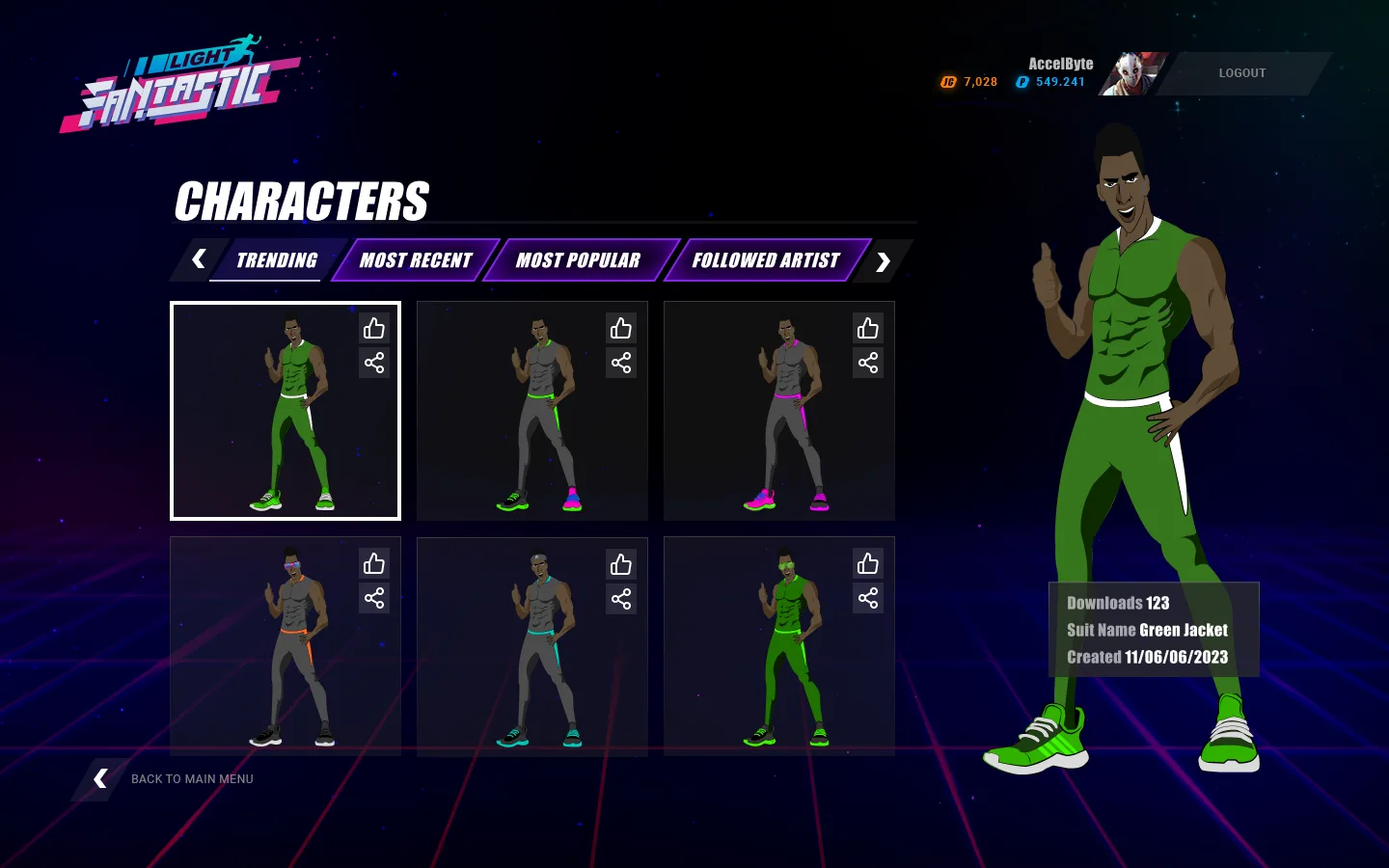
UGCは、既存のプレイヤーのエンゲージメント、リテンション、ロイヤルティを高めるだけでなく、新規プレイヤーを引き込むための強力な手段になります。またUGCは、キャラクターのカスタマイズ、武器の新たな要素、多彩なレベルなど、さまざまな公式インゲームコンテンツを提供することで、プレイヤーの好みやプレイスタイルに合った豊かで多様な体験を実現できます。
公式インゲームコンテンツとは、開発者または公式コンテンツクリエイターによって作成されたコンテンツです。公式インゲームコンテンツは、プレイヤーと開発者の両方にとって次のような多くの利点があります。
- コンテンツは開発者によってテストおよび検証されているため、品質、一貫性、互換性が確保されます。
- 開発者のベストプラクティスや事例から学べるため、プレイヤーに対してガイダンス、サポート、フィードバックを提供できます。
- 開発者はプレイヤー向けにコンテンツを作成するスキルや専門知識を示せるため、開発者の評判、信頼性、権威性が高まります。
この記事では、次の方法について説明します。
- AccelByte Gaming Services(AGS)Admin PortalまたはAGS CLIを使用して公式インゲームコンテンツを作成、表示、変更、削除する方法
- AGS SDKを使用してゲームクライアントに公式インゲームコンテンツを表示する方法
前提条件
次のものへのアクセスが必要です。
- AGS Admin Portal
- AGS UnrealまたはUnity SDK
- 参照用のAGS UGC API documentation
AGS CLIの手順を実行するには、AGS CLI をインストールし、これらの機能へのアクセス権を持つアカウントでサインインしてください。Install and sign in を参照してください。なお、例ではBashシェルを使用しています。
公式インゲームコンテンツを作成する
公式インゲームコンテンツは、開発者または公式コンテンツクリエイターによって作成されます。公式インゲームコンテンツには、プレイヤーへのガイダンス、サポート、フィードバックの提供など、プレイヤーと開発者の両方にとって多くの利点があります。もう1つの利点は、管理者クリエイターの評判、信頼性、創造性を高められることです。Admin Portalから公式コンテンツを作成する手順は2つあります。まず、コンテンツを保存するためのチャンネルを作成し、その後にコンテンツを作成します。
公式インゲームコンテンツを保存するチャンネルを作成する
UGCサービスは、チャンネルに基づいて公式コンテンツを管理します。チャンネルは、公式コンテンツを分類するために使用される汎用エンティティです。チャンネルを使用して、地域、言語、ビルドバージョン、パッチ、コンテンツカテゴリ、またはゲームのシナリオに必要なその他のケースでコンテンツをグループ化できます。公式コンテンツをチャンネルに保存する場合は、Admin Portalを使用してチャンネルを作成および管理できます。
公式インゲームコンテンツを保存するUGCチャンネルを作成するには、次の手順に従います。
- Admin Portal
- AGS CLI
-
Admin Portalのサイドバーで、Online > UGC > Content Creatorsに移動します。

-
Creatorsページで、Officialタブを開きます。
-
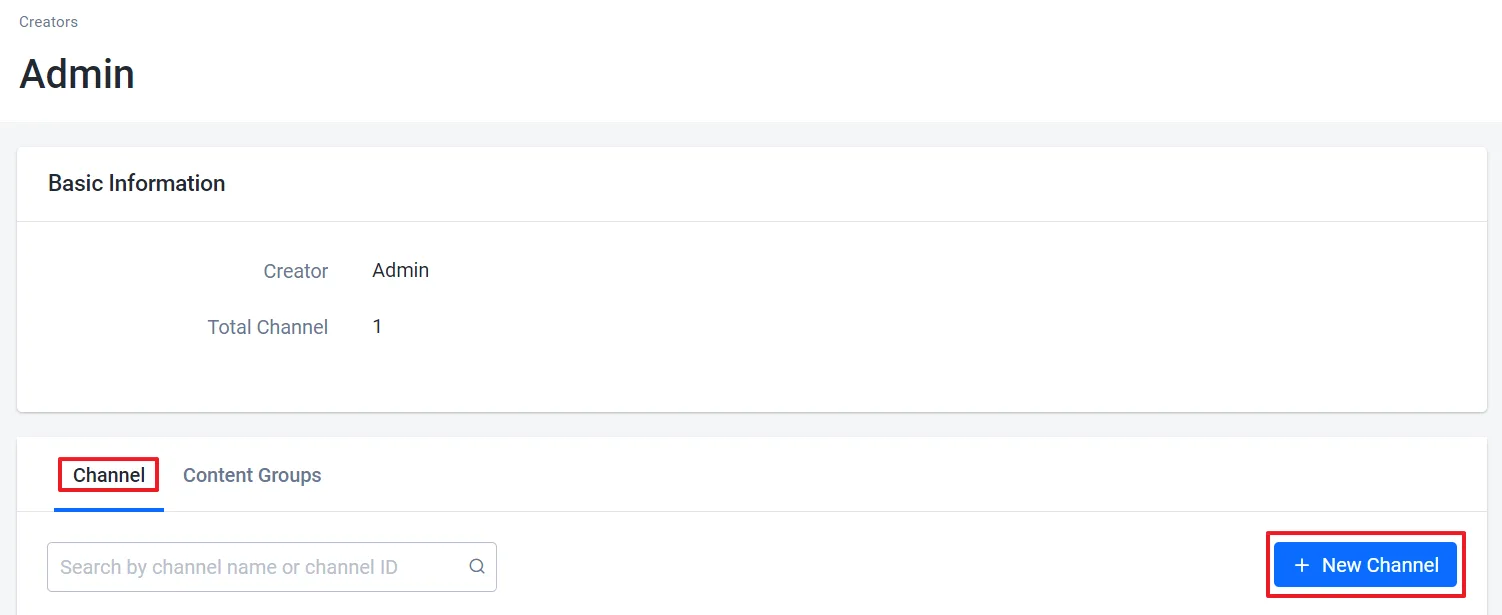
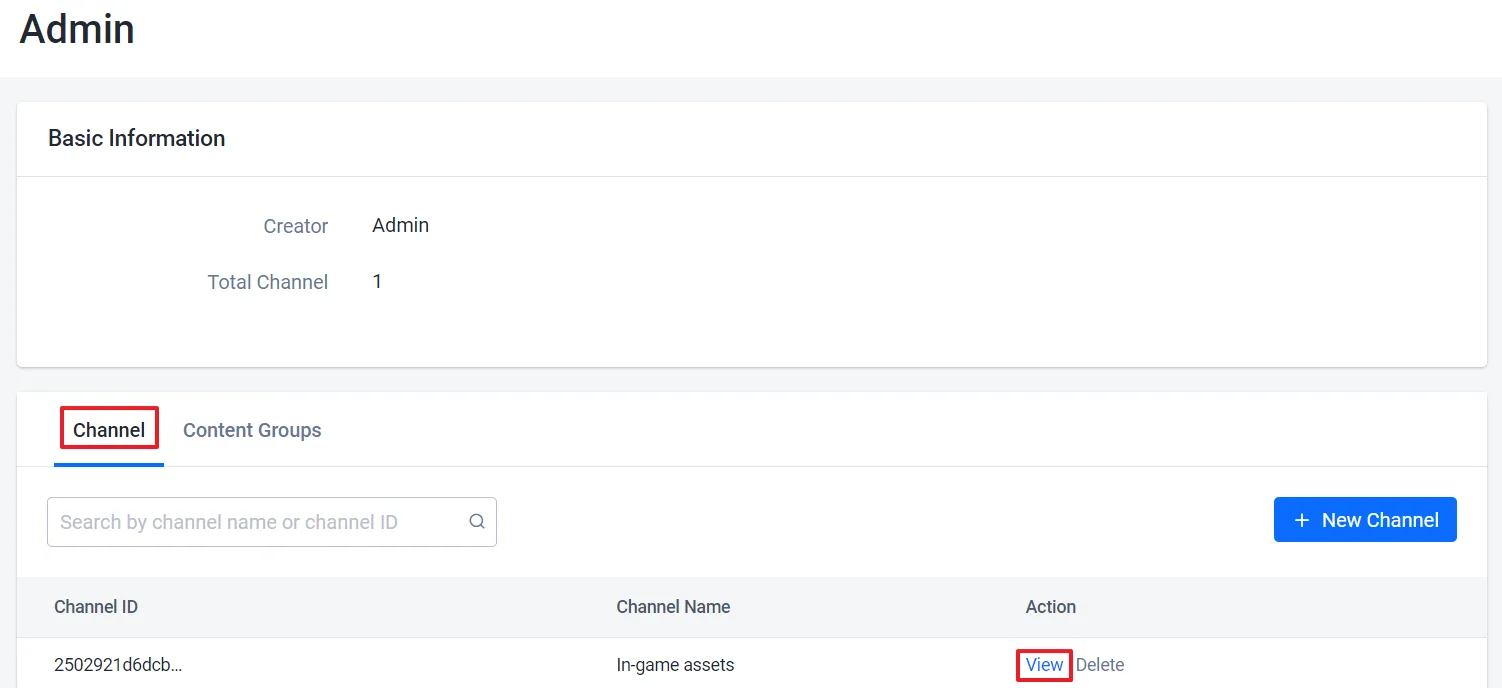
クリエイターのリストからAdminクリエイターを見つけ、その横にあるViewボタンをクリックします。クリエイターの詳細ページが表示されます。

-
Channelセクションで、+ New Channelボタンをクリックします。
-
Add New Channelフォームで、新しいチャンネルの名前を入力し、Addをクリックします。

次のコマンドを実行します。<ChannelName> を新しいチャンネルの名前に置き換えてください。
ags ugc channels create --namespace <YourNamespace> --json '{"name": "<ChannelName>"}'
コマンドを実行すると、新しいチャンネルが出力されます。出力の id が、チャンネルにコンテンツを追加する際に使用するチャンネルIDです。
UGCチャンネルに公式インゲームコンテンツを追加する
UGCサービスで公式インゲームコンテンツを作成する場合は、アイテムに適用したすべてのカスタマイズオプションを含むファイルを作成する必要があります。このファイルには、公式インゲームコンテンツに関する情報が保存されます。
公式インゲームコンテンツをUGCチャンネルに追加するには、次の手順に従います。
- Admin Portal
- AGS CLI
-
Admin Portalのサイドバーで、Online > UGC > Content Creatorsに移動します。
-
Creatorsページで、Officialタブを開きます。
-
クリエイターのリストから、使用したいチャンネルを持つクリエイターを見つけ、その横にあるViewボタンをクリックします。クリエイターの詳細ページが表示されます。
-
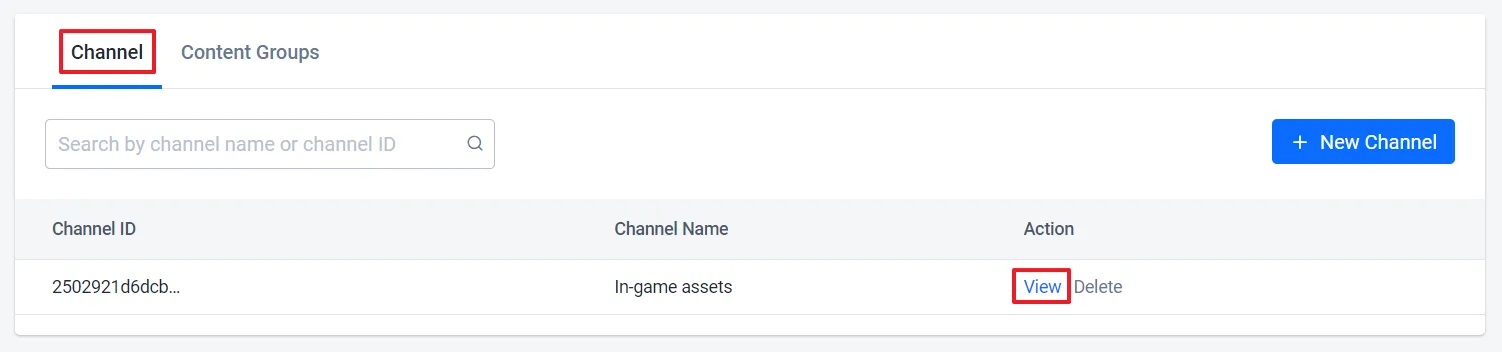
Channelsセクションで、更新したいチャンネルを見つけ、その横にあるViewボタンをクリックします。
-
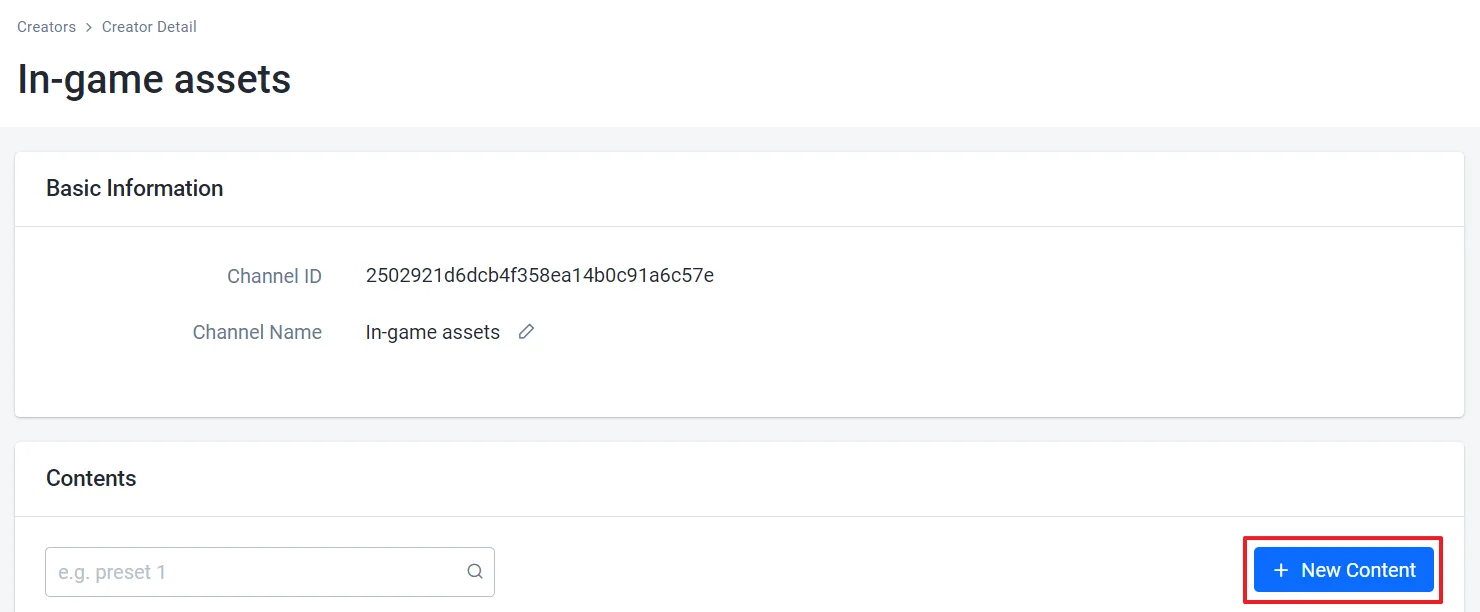
チャンネルの詳細ページで、+ New Contentボタンをクリックします。
-
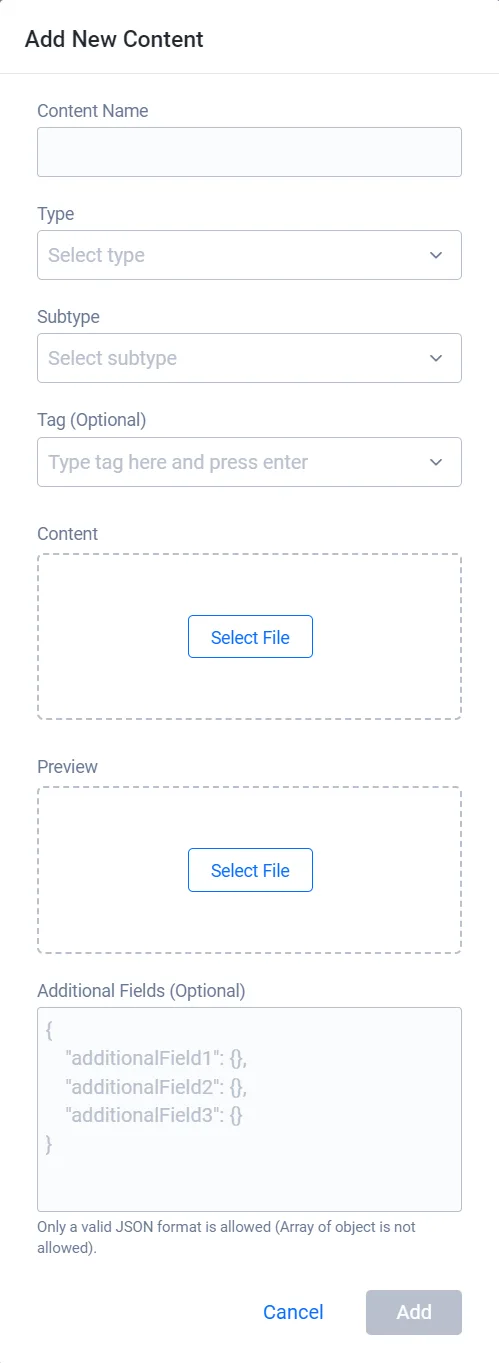
Add new contentフォームで、必要な情報を入力します。
- 新しいコンテンツの名前を入力します。
- コンテンツのタイプとサブタイプを指定します。
- コンテンツファイルを追加します。
- コンテンツのプレビューを追加します。
- (オプション)タグや追加フィールドを追加して、新しいコンテンツの詳細を提供します。
-
Addをクリックします。コンテンツが作成されると、そのコンテンツをゲーム内に表示し、プレイヤーが利用できるようにできます。
-
使用したいチャンネルのIDを確認します。このコマンドはデフォルトで20件のチャンネルを返します。さらに表示するには、
--limitを追加します。ags ugc channels list --namespace <YourNamespace> -
使用できるコンテンツタイプとサブタイプを確認します。出力の各
typeのsubtypeに、そのタイプのサブタイプが一覧表示されます。ags ugc types list --namespace <YourNamespace> -
コンテンツの詳細を含むJSONファイルを作成します。ファイル名は任意です。この例では
content.jsonを使用します。{
"name": "<ContentName>",
"type": "<ContentType>",
"subType": "<ContentSubtype>",
"fileExtension": "<FileExtension>",
"contentType": "<MimeType>",
"tags": [],
"customAttributes": {}
}typeとsubType:手順2で確認したタイプと、そのタイプのサブタイプのいずれかを指定します。fileExtension:コンテンツファイルの拡張子。小文字で、ドットを付けずに指定します(例:zip)。contentType:コンテンツファイルのMIMEタイプ(例:application/zip)。Admin Portalでは、選択したファイルから自動的に取得されます。不明な場合はapplication/octet-streamを使用してください。tags(オプション):コンテンツに付けるタグを指定します。既存のタグを確認するには、ags ugc tags list --namespace <YourNamespace>を実行します。customAttributes(オプション):Admin Portalの Additional Fields に相当する値を、JSONオブジェクトとして指定します。
-
コンテンツを作成します。
@の後に、JSONファイルへのパスを指定します。ags ugc content create --namespace <YourNamespace> --channel-id <ChannelId> --json @content.jsonコマンドを実行すると、
idを含む新しいコンテンツが出力されます。 -
コンテンツファイルをアップロードします。AGS CLIにはUGCファイルをアップロードするコマンドがないため、Admin Portalを使用してください。コンテンツの詳細ページを開き、Change Content をクリックします。
公式インゲームコンテンツを変更する
UGCコンテンツを作成した後、公式インゲームコンテンツファイルをより魅力的で分かりやすくする1つの方法は、ゲーム内での見え方を示すスクリーンショットを追加することです。スクリーンショットは、コンテンツファイルで作成した視覚効果や詳細を捉えることができます。
UGCチャンネル内の公式インゲームコンテンツを更新するには、次の手順に従います。
- Admin Portal
- AGS CLI
-
Admin Portalのサイドバーで、Online > UGC > Content Creatorsに移動します。
-
Creatorsページで、Officialタブを開きます。
-
クリエイターのリストから、使用したいチャンネルを持つクリエイターを見つけ、その横にあるViewボタンをクリックします。クリエイターの詳細ページが表示されます。
-
Channelsセクションで、更新したいコンテンツを含むチャンネルを見つけ、その横にあるViewボタンをクリックします。
-
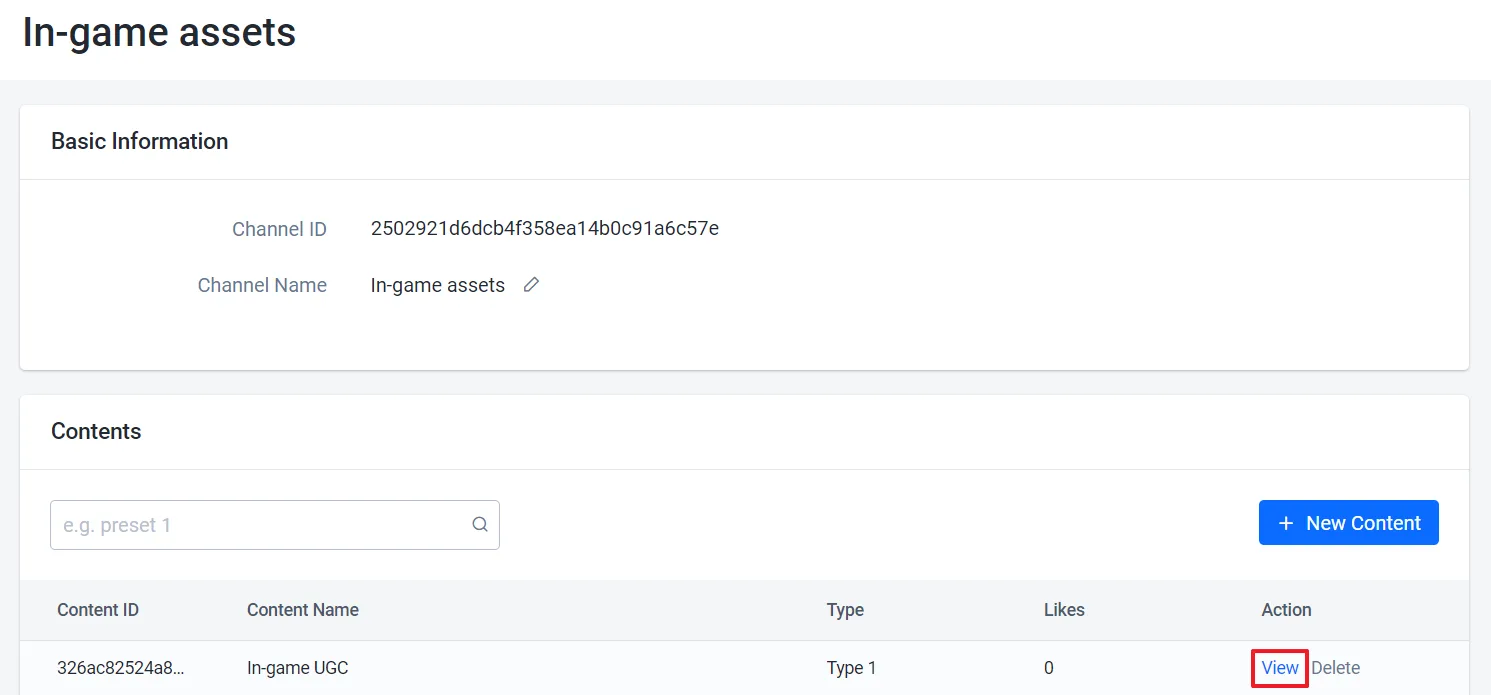
コンテンツのリストから、更新したいコンテンツを見つけます。
-
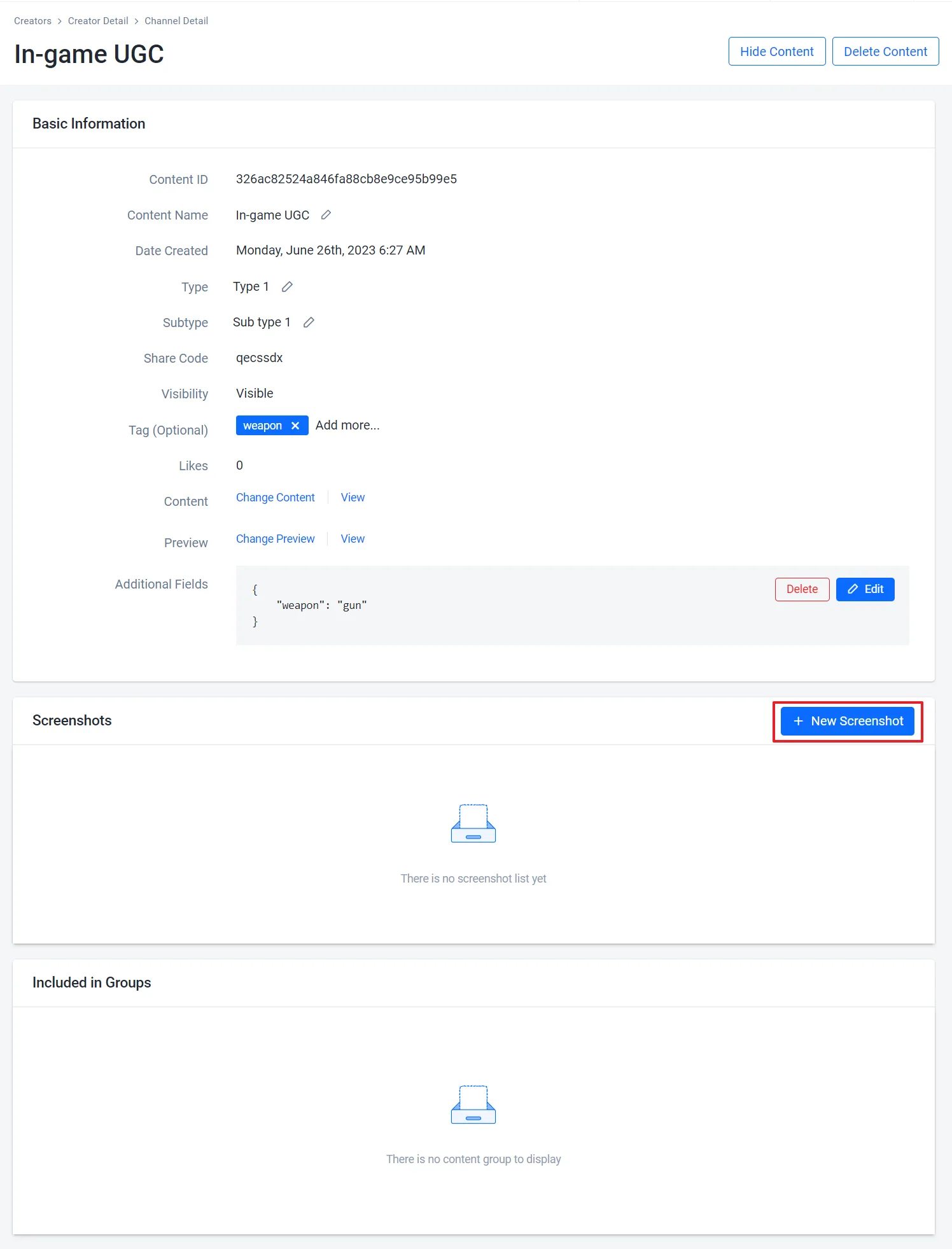
必要に応じてコンテンツを更新します。基本情報を編集したり、新しいスクリーンショットをアップロードしたりできます。
-
更新したいコンテンツのIDを確認します。
<ChannelId>をコンテンツが属するチャンネルのIDに置き換えてください。チャンネルIDを確認するには、ags ugc channels list --namespace <YourNamespace>を実行します。ags ugc content list-channel --namespace <YourNamespace> --channel-id <ChannelId> -
コンテンツの現在の設定をファイルに保存します。
<ContentId>を手順1で確認したコンテンツのidに置き換えてください。ags ugc content get --namespace <YourNamespace> --content-id <ContentId> --format json > content.json -
content.jsonで、変更したいフィールド(name、type、subType、tags、またはcustomAttributes)を編集します。その他のフィールドは更新時に無視されるため、そのままで構いません。警告更新のたびに、
type、subType、tags、customAttributesはファイル内の値で置き換えられます。これらのフィールドのいずれかを削除すると、更新によってその値はクリアされます。 -
ファイルを送信します。
@の後に、JSONファイルへのパスを指定します。ags ugc content update --namespace <YourNamespace> --channel-id <ChannelId> --content-id <ContentId> \
--json @content.json
コンテンツファイルやスクリーンショットを変更するには、Admin Portalを使用してください。AGS CLIにはUGCファイルをアップロードするコマンドがありません。
公式インゲームコンテンツを表示する
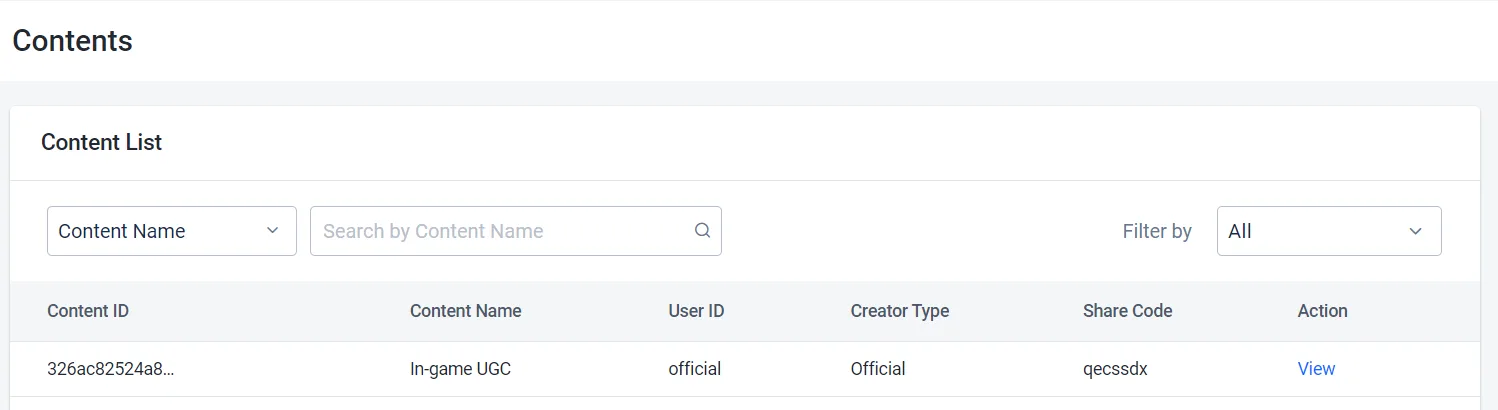
UGCの公式インゲームコンテンツを作成すると、コンテンツの結果が自動生成され、管理者のクリエイターはAdmin Portalを通じてその結果を確認できます。また、作成したコンテンツをゲーム内に表示し、プレイヤーがゲームからそれを表示または使用できるようにすることもできます。
UGCの公式インゲームコンテンツを表示するには、次の手順に従います。
- Admin Portal
- AGS CLI
-
Admin Portalのサイドバーで、Online > UGC > UGC Lookupに移動します。
-
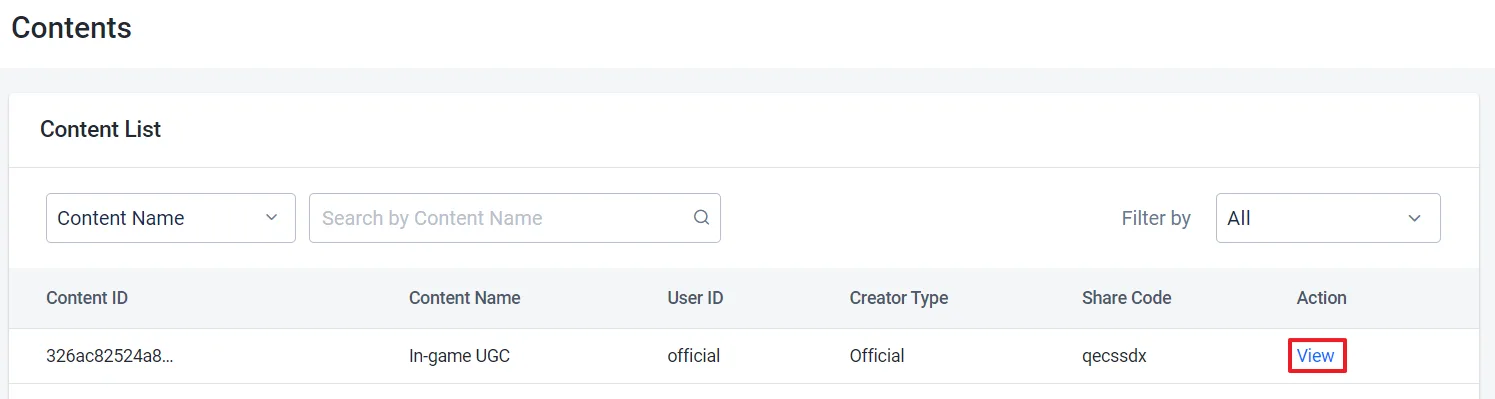
UGC Lookupページで、コンテンツ名、ID、タイプ、サブタイプ、タグ、シェアコード、ユーザーIDを使用して、UGCの公式インゲームコンテンツを検索できます。

-
検索結果から、表示したいコンテンツを見つけて開きます。
-
公式インゲームコンテンツを検索します。この例では、コンテンツ名で検索します。
--type、--sub-type、--tagsで絞り込むこともできます。フィルターを指定しない場合は、すべての公式コンテンツが一覧表示されます。ags ugc content list --namespace <YourNamespace> --is-official true --name '<ContentName>' -
目的のコンテンツを表示します。
<ContentId>を検索結果のidに置き換えてください。ags ugc content get --namespace <YourNamespace> --content-id <ContentId>代わりにシェアコードでコンテンツを検索するには、次のコマンドを実行します。
ags ugc content get-by-share-code --namespace <YourNamespace> --share-code <ShareCode>
Client SDKを使用してシェアコードで公式インゲームコンテンツを表示する
この例では、シェアコードを使用して公式インゲームコンテンツを取得する方法を示します。
- Unreal Engine
- Unity
- C# Extend SDK
- Go Extend SDK
- Java Extend SDK
- Python Extend SDK
FApiClientPtr ApiClient = AccelByteOnlineSubsystemPtr->GetApiClient();

FString ShareCode = "YourUGCShareCode";

ApiClient->UGC.GetV2ContentByShareCode(ShareCode, THandler<FAccelByteModelsUGCContentResponseV2>::CreateLambda([](const FAccelByteModelsUGCContentResponseV2& Result)
{
    // Do something if GetV2ContentByShareCode succeeds
}), FErrorHandler::CreateLambda([](int32 ErrorCode, const FString& ErrorMessage)
{
    // Do something if GetV2ContentByShareCode fails
}));
string shareCode = "YourUGCShareCode";

UGC ugc = AccelByteSDK.GetClientRegistry().GetApi().GetUgc();

ugc.GetContentByShareCodeV2(shareCode, result =>
{
    if (result.IsError)
    {
        // Do something if GetContentByShareCodeV2 fails
        Debug.Log($"Error GetContentByShareCodeV2, Error Code: {result.Error.Code} Error Message: {result.Error.Message}");
        return;
    }

    // Do something if GetContentByShareCodeV2 succeeds
});
string shareCode = "<YourUGCShareCode>";

var response = sdk.Ugc.PublicContentV2.PublicGetContentByShareCodeV2Op
    .Execute(sdk.Namespace, shareCode);
if (response != null)
{
    // Do something if successful
}
publicContentV2Service := &ugc.PublicContentV2Service{
    Client:          factory.NewUgcClient(&repository.ConfigRepositoryImpl{}),
    TokenRepository: &repository.TokenRepositoryImpl{},
}
namespace := "mygame"
shareCode := "mysharecode"
input := &public_content_v2.PublicGetContentByShareCodeV2Params{
    Namespace: namespace,
    ShareCode: shareCode,
}
result, err := publicContentV2Service.PublicGetContentByShareCodeV2Short(input)
final PublicContentV2 publicContentV2Wrapper = new PublicContentV2(sdk);

String shareCode = "<YourUGCShareCode>";
ModelsContentDownloadResponseV2 response;
try {
  response = publicContentV2Wrapper.publicGetContentByShareCodeV2(PublicGetContentByShareCodeV2.builder()
    .namespace("<namespace>")
    .shareCode(shareCode)
    .build());
} catch (Exception e) {
  // Do something if an error occurs
  return;
}

if (response == null) {
    // Null response from server
} else {
    // Do something if successful
}
import accelbyte_py_sdk.api.ugc as ugc_service

result, error = ugc_service.public_get_content_by_share_code_v2(
    share_code="YourUGCShareCode",
    namespace=namespace,  # optional, gets the value from the global instance if unspecified
    sdk=sdk,  # optional, gets the global instance  if unspecified
)
if error:
    exit(error)
Client SDKを使用して公式インゲームコンテンツのリストを表示する
この例では、公式インゲームコンテンツのリストを取得する方法を示します。
公式インゲームコンテンツのリストを取得する
- Unreal Engine
- Unity
- C# Extend SDK
- Go Extend SDK
- Java Extend SDK
- Python Extend SDK
FApiClientPtr ApiClient = AccelByteOnlineSubsystemPtr->GetApiClient();

FString ContentName = "Content Name";
FString CreatorName = "Creator Name";
FString Type = "Content Type";
FString Subtype = "Content Subtype";
TArray<FString> Tags = { "UGC Tag1", "UGC Tag2" };
bool bIsOfficial = true;
FString UserId = "Player User Id";

int32 Limit = 1000;
int32 Offset = 0;

EAccelByteUgcSortBy SortBy = EAccelByteUgcSortBy::DATE;
EAccelByteUgcOrderBy OrderBy = EAccelByteUgcOrderBy::DESC;
ApiClient->UGC.SearchContents(ContentName, CreatorName, Type, Subtype, Tags, bIsOfficial, UserId,
	THandler<FAccelByteModelsUGCSearchContentsPagingResponse>::CreateLambda([](const FAccelByteModelsUGCSearchContentsPagingResponse& Result)
{
	// Do something if SearchContents succeeds
}), FErrorHandler::CreateLambda([](int32 ErrorCode, const FString& ErrorMessage)
{
	// Do something if SearchContents fails
}), SortBy, OrderBy, Limit, Offset);
SearchContentRequest filterRequest = new SearchContentRequest()
{
    name = "Content Name",
    type = "Content Type",
    subtype = "Content Subtype",
    tags = new[] { "UGC Tag1", "UGC Tag2" },
    limit = 1000,
    offset = 0,
    sortBy = UGCSortBy.DATE,
    orderBy = UGCOrderBy.DESC,
    isOfficial = true
};

UGC ugc = AccelByteSDK.GetClientRegistry().GetApi().GetUgc();

ugc.SearchContent(filterRequest, result =>
{
    if (result.IsError)
    {
        // Do something if SearchContent fails
        Debug.Log($"Error SearchContent, Error Code: {result.Error.Code} Error Message: {result.Error.Message}");
        return;
    }

    // Do something if SearchContent succeeds
});
var response = sdk.Ugc.PublicContentLegacy.PublicSearchContentOp
    .SetName("<content-name>")
    .SetCreator("<creator-name>")
    .SetSubtype("<content-subtype")
    .SetTags(new List<string>()
    {
        "UGC Tag1",
        "UGC Tag2"
    })
    .SetLimit(100)
    .SetOffset(0)
    .SetSortby("date")
    .SetOrderby("desc")
    .SetIsofficial("true")
    .Execute(sdk.Namespace);
if (response != null)
{
    // Do something if successful
}
publicContentLegacyService := &ugc.PublicContentLegacyService{
    Client:          factory.NewUgcClient(&repository.ConfigRepositoryImpl{}),
    TokenRepository: &repository.TokenRepositoryImpl{},
}
namespace := "mygame"
creator := "mycreator"
isofficial := "true"
limit := int64(100)
name := "mycontentname"
offset := int64(0)
orderby := "desc"
sortby := "date"
subtype := "mycontentsubtype"
tags := []string{ "UGC Tag1", "UGC Tag2" }
type_, _ := cmd.Flags().GetString("type")
userId, _ := cmd.Flags().GetString("userId")
input := &public_content_legacy.PublicSearchContentParams{
    Namespace:  namespace,
    Creator:    &creator,
    Isofficial: &isofficial,
    Limit:      &limit,
    Name:       &name,
    Offset:     &offset,
    Orderby:    &orderby,
    Sortby:     &sortby,
    Subtype:    &subtype,
    Tags:       tags,
    Type:       &type_,
    UserID:     &userId,
}
result, err := publicContentLegacyService.PublicSearchContentShort(input)
PublicContentLegacy oublicContentLegacyWrapper = new PublicContentLegacy(sdk);
ModelsPaginatedContentDownloadResponse response;
try {
    response = oublicContentLegacyWrapper.publicSearchContent(PublicSearchContent.builder()
        .namespace("<namespace>")
        .name("<content-name>")
        .creator("<creator-name>")
        .subtype("<content-subtype")
        .tags(List.of("UGC Tag1", "UGC Tag2"))
        .limit(100)
        .offset(0)
        .sortby("date")
        .orderby("desc")
        .isofficial("true")
        .build());
} catch (Exception e) {
    // Do something if an error occurs
    return;
}

if (response == null) {
    // Null response from server
} else {
    // Do something when report succeeds
}
import accelbyte_py_sdk.api.ugc as ugc_service

result, error = ugc_service.public_search_content(
    name="Content Name",
    creator="Creator Name",
    type_="Content Type",
    subtype="Content Subtype",
    tags=["UGC Tag1", "UGC Tag2"],
    isofficial="true",
    user_id="********************************",
    sortby="date",
    orderby="desc",
    limit=1000,
    offset=0,
    namespace=namespace,  # optional, gets the value from the global instance if unspecified
    sdk=sdk,  # optional, gets the global instance  if unspecified
)
if error:
    exit(error)
Client SDKを使用してコンテンツIDで公式インゲームコンテンツを表示する
この例では、コンテンツIDを使用して公式インゲームコンテンツを取得する方法を示します。
- Unreal Engine
- Unity
- C# Extend SDK
- Go Extend SDK
- Java Extend SDK
- Python Extend SDK
FApiClientPtr ApiClient = AccelByteOnlineSubsystemPtr->GetApiClient();

FString ContentId = "YourUGCContentId";

ApiClient->UGC.GetV2ContentByContentId(ContentId, THandler<FAccelByteModelsUGCContentResponseV2>::CreateLambda([](const FAccelByteModelsUGCContentResponseV2& Result)
{
    // Do something if GetV2ContentByContentId succeeds
}), FErrorHandler::CreateLambda([](int32 ErrorCode, const FString& ErrorMessage)
{
    // Do something if GetV2ContentByContentId fails
}));
string contentId = "YourUGCContentId";

UGC ugc = AccelByteSDK.GetClientRegistry().GetApi().GetUgc();

ugc.GetContentByContentIdV2(contentId, result =>
{
    if (result.IsError)
    {
        // Do something if GetContentByContentIdV2 fails
        Debug.Log($"Error GetContentByContentIdV2, Error Code: {result.Error.Code} Error Message: {result.Error.Message}");
        return;
    }

    // Do something if GetContentByContentIdV2 succeeds
});
string contentId = "<YourUGCContentId>";

var response = sdk.Ugc.PublicContentV2.PublicGetContentByIDV2Op
    .Execute(contentId, sdk.Namespace);
if (response != null)
{
    // Do something if successful
}
publicContentV2Service := &ugc.PublicContentV2Service{
    Client:          factory.NewUgcClient(&repository.ConfigRepositoryImpl{}),
    TokenRepository: &repository.TokenRepositoryImpl{},
}
contentId := "mycontentid"
namespace := "mygame"
input := &public_content_v2.PublicGetContentByIDV2Params{
    ContentID: contentId,
    Namespace: namespace,
}
result, err := publicContentV2Service.PublicGetContentByIDV2Short(input)
final PublicContentV2 publicContentV2Wrapper = new PublicContentV2(sdk);

String contentId = "<YourUGCContentId>";
ModelsContentDownloadResponseV2 response;
try {
    response = publicContentV2Wrapper.publicGetContentByIDV2(PublicGetContentByIDV2.builder()
        .namespace("<namespace>")
        .contentId(contentId)
        .build());
} catch (Exception e) {
    // Do something if an error occurs
    return;
}

if (response == null) {
    // Null response from server
} else {
    // Do something if successful
}
import accelbyte_py_sdk.api.ugc as ugc_service

result, error = ugc_service.public_get_content_by_idv2(
    content_id="YourUGCContentId",
    namespace=namespace,  # optional, gets the value from the global instance if unspecified
    sdk=sdk,  # optional, gets the global instance  if unspecified
)
if error:
    exit(error)
Client SDKを使用して公式チャンネルを通じた公式インゲームコンテンツのリストを表示する
この例では、公式チャンネルを通じて公式インゲームコンテンツのリストを取得する方法を示します。
- Unreal Engine
- Unity
- C# Extend SDK
- Go Extend SDK
- Java Extend SDK
- Python Extend SDK
FApiClientPtr ApiClient = AccelByteOnlineSubsystemPtr->GetApiClient();

FString ChannelId = "YourUGCChannelId";

ApiClient->UGC.SearchV2ContentsSpecificToChannel(ChannelId, THandler<FAccelByteModelsUGCSearchContentsPagingResponseV2>::CreateLambda([](const FAccelByteModelsUGCSearchContentsPagingResponseV2& Result)
{
    // Do something if SearchV2ContentsSpecificToChannel succeeds
}), FErrorHandler::CreateLambda([](int32 ErrorCode, const FString& ErrorMessage)
{
    // Do something if SearchV2ContentsSpecificToChannel fails
}));
string channelId = "YourUGCChannelId";

UGC ugc = AccelByteSDK.GetClientRegistry().GetApi().GetUgc();

ugc.SearchContentsSpecificToChannelV2(channelId, result =>
{
    if (result.IsError)
    {
        // Do something if SearchContentsSpecificToChannelV2 fails
        Debug.Log($"Error SearchContentsSpecificToChannelV2, Error Code: {result.Error.Code} Error Message: {result.Error.Message}");
        return;
    }

    // Do something if SearchContentsSpecificToChannelV2 succeeds
});
string channelId = "<YourUGCChannelId>";

var response = sdk.Ugc.PublicContentV2.PublicGetContentByChannelIDV2Op
    .Execute(channelId, sdk.Namespace);
if (response != null)
{
    // Do something if successful
}
publicContentV2Service := &ugc.PublicContentV2Service{
    Client:          factory.NewUgcClient(&repository.ConfigRepositoryImpl{}),
    TokenRepository: &repository.TokenRepositoryImpl{},
}
channelId := "myChannelId"
namespace := "mygame"
input := &public_content_v2.PublicGetContentByChannelIDV2Params{
    ChannelID: channelId,
    Namespace: namespace,
}
result, err := publicContentV2Service.PublicGetContentByChannelIDV2Short(input)
final PublicContentV2 publicContentV2Wrapper = new PublicContentV2(sdk);

String channelId = "<YourUGCChannelId>";
ModelsPaginatedContentDownloadResponseV2 response;
try {
    response = publicContentV2Wrapper.publicGetContentByChannelIDV2(PublicGetContentByChannelIDV2.builder()
    .namespace("<namespace>")
    .channelId(channelId)
    .build());
} catch (Exception e) {
    // Do something if an error occurs
    return;
}

if (response == null) {
    // Null response from server
} else {
    // Do something if successful
}
import accelbyte_py_sdk.api.ugc as ugc_service

result, error = ugc_service.public_get_content_by_channel_idv2(
    content_id="YourUGCChannelId",
    namespace=namespace,  # optional, gets the value from the global instance if unspecified
    sdk=sdk,  # optional, gets the global instance  if unspecified
)
if error:
    exit(error)
公式インゲームコンテンツを削除する
- Admin Portal
- AGS CLI
-
Admin Portalのサイドバーで、Online > UGC > Content Creatorsに移動します。
-
Creatorsページで、Officialタブを開きます。
-
クリエイターのリストから、更新したいチャンネルを持つクリエイターを見つけ、その横にあるViewボタンをクリックします。クリエイターの詳細ページが表示されます。
-
Channelsセクションで、削除したいコンテンツを含むチャンネルを見つけ、その横にあるViewボタンをクリックします。
-
コンテンツのリストから、削除したいコンテンツを見つけ、その横にあるViewボタンをクリックします。
-
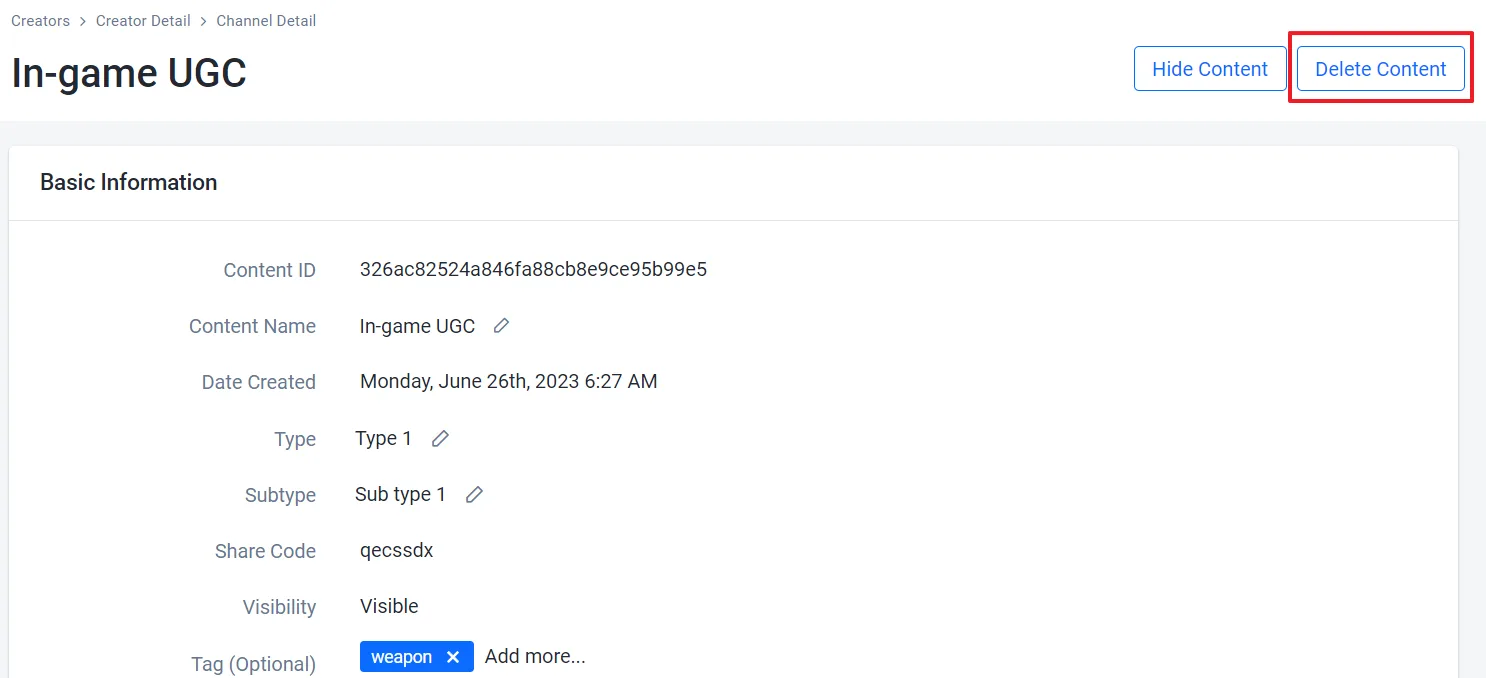
コンテンツの詳細ページで、Delete Contentボタンをクリックします。
-
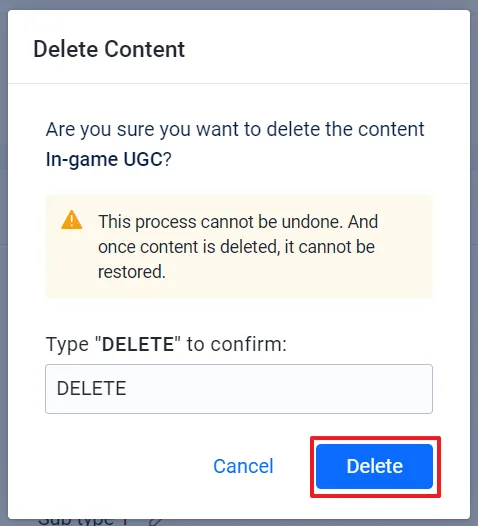
確認メッセージでDELETEと入力し、Deleteボタンをクリックします。コンテンツはチャンネルのコンテンツリストから即座に削除されます。
-
削除したいコンテンツのIDを確認します。
<ChannelId>をコンテンツが属するチャンネルのIDに置き換えてください。チャンネルIDを確認するには、ags ugc channels list --namespace <YourNamespace>を実行します。ags ugc content list-channel --namespace <YourNamespace> --channel-id <ChannelId> -
コンテンツを削除します。
<ContentId>を手順1で確認したコンテンツのidに置き換えてください。AGS CLIは、コンテンツを削除する前に確認を求めます。ags ugc content delete --namespace <YourNamespace> --channel-id <ChannelId> --content-id <ContentId>
次のステップ
UGCチャンネルのインゲームコンテンツに割り当てられるコンテンツタグ、タイプ、サブタイプを作成します。詳細については、Configure content tags, types, and subtypesを参照してください。