アカウントをバンし制限する
注釈:本資料はAI技術を用いて翻訳されています。
はじめに
ユーザーバン機能を使用すると、ゲームまたはゲーム内の特定の機能へのユーザーアクセスを制限できます。AccelByte Gaming Services (AGS) Admin Portal でプレイヤーをバンしたり、既存のバンを解除したりできます。
AGSでは、以下のバン方法を適用できます。
- アカウントバン: バンされたプレイヤーのアクセストークンを取り消します。
- 機能バン: 特定のゲーム内機能のアクセストークンを無効化します。
- デバイスバン: 固有のIDを使用して、特定のデバイスからゲームへのアクセスを制限します。
すべてのバンアクションは既存のアクセストークンを取り消します。
- アカウントバンの場合、refresh_token も取り消されます。これは、ユーザーが認証情報または refresh_token を使用してログインできないことを意味します。
- 機能バンの場合、refresh_token は引き続き有効です。これは、ユーザーが refresh_token を使用してすぐにログインできることを意味します。
- バンがゲーム名前空間に対するものである場合、そのゲーム名前空間にのみ影響します。
- バンがパブリッシャー名前空間に対するものである場合、パブリッシャーとゲーム名前空間の両方に影響します。
前提条件
-
Admin Portalへのアクセス権があることを確認してください。
-
Private Cloudでは、以下の権限があることを確認してください。
用途 権限 アクション プレイヤーをバンする ADMIN:NAMESPACE:{namespace}:USER:{userId}:BANCREATEプレイヤーのバンを有効または無効にする ADMIN:NAMESPACE:{namespace}:USER:{userId}:BANUPDATEバンタイプと理由を取得する ADMIN:BANREAD
バンのスコープ
- パブリッシャー名前空間レベルでプレイヤーをバンすると、その中のすべての名前空間にバンが適用されます。
Shared Cloudティアでは、これはスタジオ名前空間に適用されます。これはPrivate Cloudティアのパブリッシャー名前空間と同じ機能を持ちます。
- ゲーム名前空間レベルでプレイヤーをバンすると、バンは特定のゲーム名前空間にのみ適用されます。
アカウントでプレイヤーをバンする
-
Admin Portal のサイドバーで、Lookup Users に移動します。
-
対応する認証情報を使用して、バンしたいプレイヤーを検索します。
-
Action の View をクリックしてアカウントを開きます。ユーザーアカウントの詳細が表示されます。
-
Bans をクリックし、次に Add Ban をクリックして選択したユーザーをバンします。

Add Ban 設定が表示されます。
ユーザーバンの詳細を追加する
-
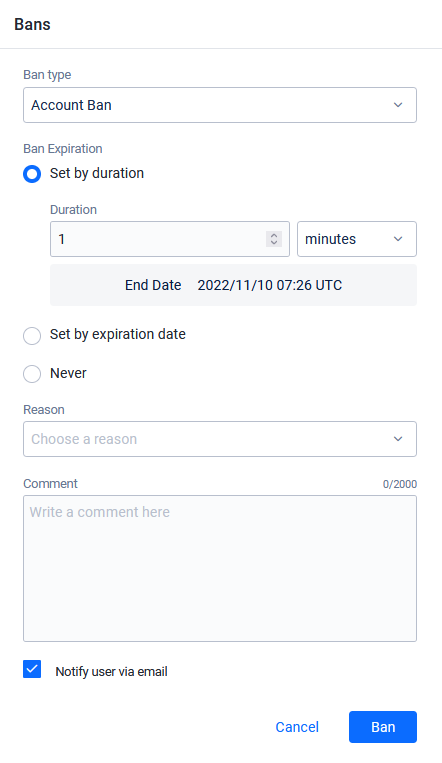
Ban Type を選択します。
機能バンの詳細
Feature Ban を選択した場合、制限したい機能を選択する必要があります。プレイヤーがバンされる可能性のある機能のリストは、次の表にあります。
機能制限 説明 CHAT_SENDプレイヤーはメッセージの送信がバンされます CHAT_ALLプレイヤーはメッセージの送信と受信の両方がバンされます ORDER_AND_PAYMENTプレイヤーはゲーム内での購入がバンされます STATISTICSプレイヤーの統計は記録されません LEADERBOARDプレイヤーはリーダーボードに表示されません MATCHMAKINGプレイヤーはマッチメイキングがバンされます -
Ban Expiration で、次のいずれかを選択します:
-
Set by duration: プレイヤーをバンする分、時間、または日数を入力します。バンはこの期間後に期限切れになります。
-
Set by expiration date: バンを期限切れにする日時を入力します。
-
Never: 永久バンを設定します。
-
-
Reason で、バンの理由を選択します。
理由の詳細
次の表は、バンに使用できる理由を示しています:
理由 説明 VIOLENCEプレイヤーは暴力的なコンテンツを投稿したためバンされます HARASSMENTプレイヤーは他のプレイヤーに嫌がらせをしたためバンされます HATEFUL_CONDUCTプレイヤーは他のプレイヤーに対して憎悪的な行動をしたためバンされます OFFENSIVE_USERNAMEプレイヤーは不快なユーザー名を持っているためバンされます IMPERSONATIONプレイヤーは他のプレイヤーになりすましたためバンされます MALICIOUS_CONTENTプレイヤーはスパム、詐欺などの悪意のあるコンテンツを投稿したためバンされます SEXUALLY_SUGGESTIVEプレイヤーは性的に露骨または示唆的なコンテンツを投稿したためバンされます SEXUAL_VIOLENCEプレイヤーは性的に暴力的な行動をしたり、他のプレイヤーを搾取したためバンされます EXTREME_VIOLENCEプレイヤーはゴアなどの極端に暴力的なコンテンツのためバンされます UNDERAGE_USERプレイヤーは未成年であるためバンされます CHEATINGプレイヤーはチートをしたためバンされます TOS_VIOLATIONプレイヤーは利用規約に違反したためバンされます -
バンに関する関連情報を含めるコメントを入力します。
-
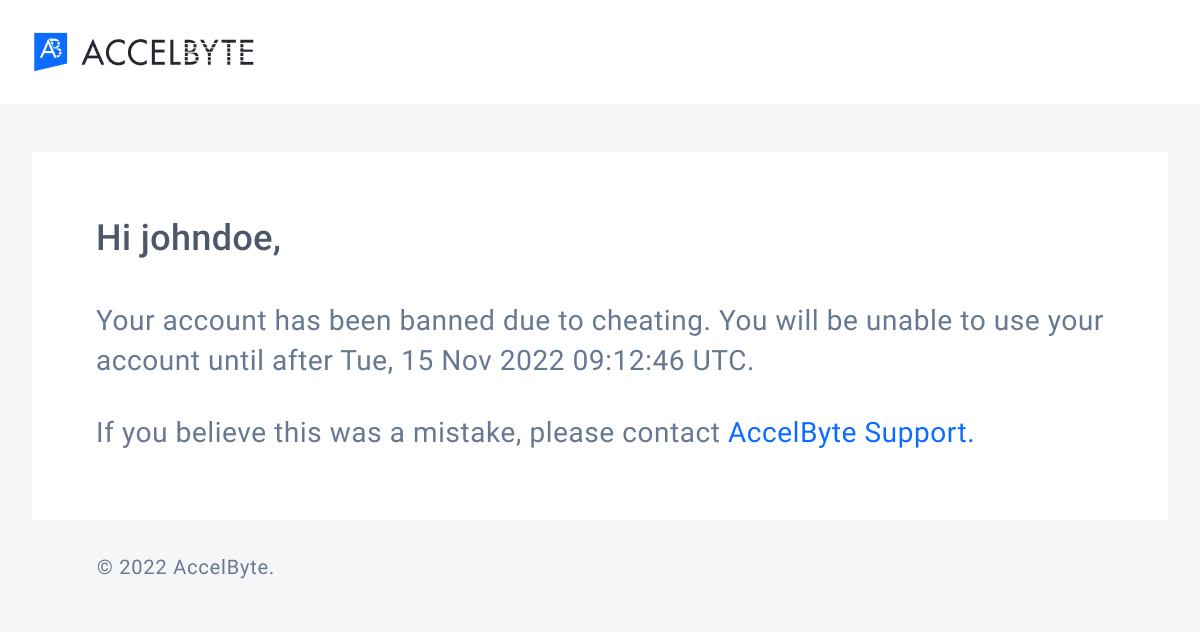
Notify user via email チェックボックスを選択して、メールでプレイヤーにバン通知を送信します。
importantサードパーティの認証情報を使用してゲームにログインするプレイヤーは、Admin Portal にヘッドレスアカウントのみを持っている場合があります。これは、アカウントに関連付けられたメールアドレスがないことを意味します。ゲーム (またはプラットフォーム) でアカウントを登録したプレイヤー、またはゲームでメールアドレスを登録してヘッドレスアカウントをアップグレードしたプレイヤーのみが、バンされた場合にメール通知を受け取ることができます。詳細については、アカウントの仕組みを参照してください。
-
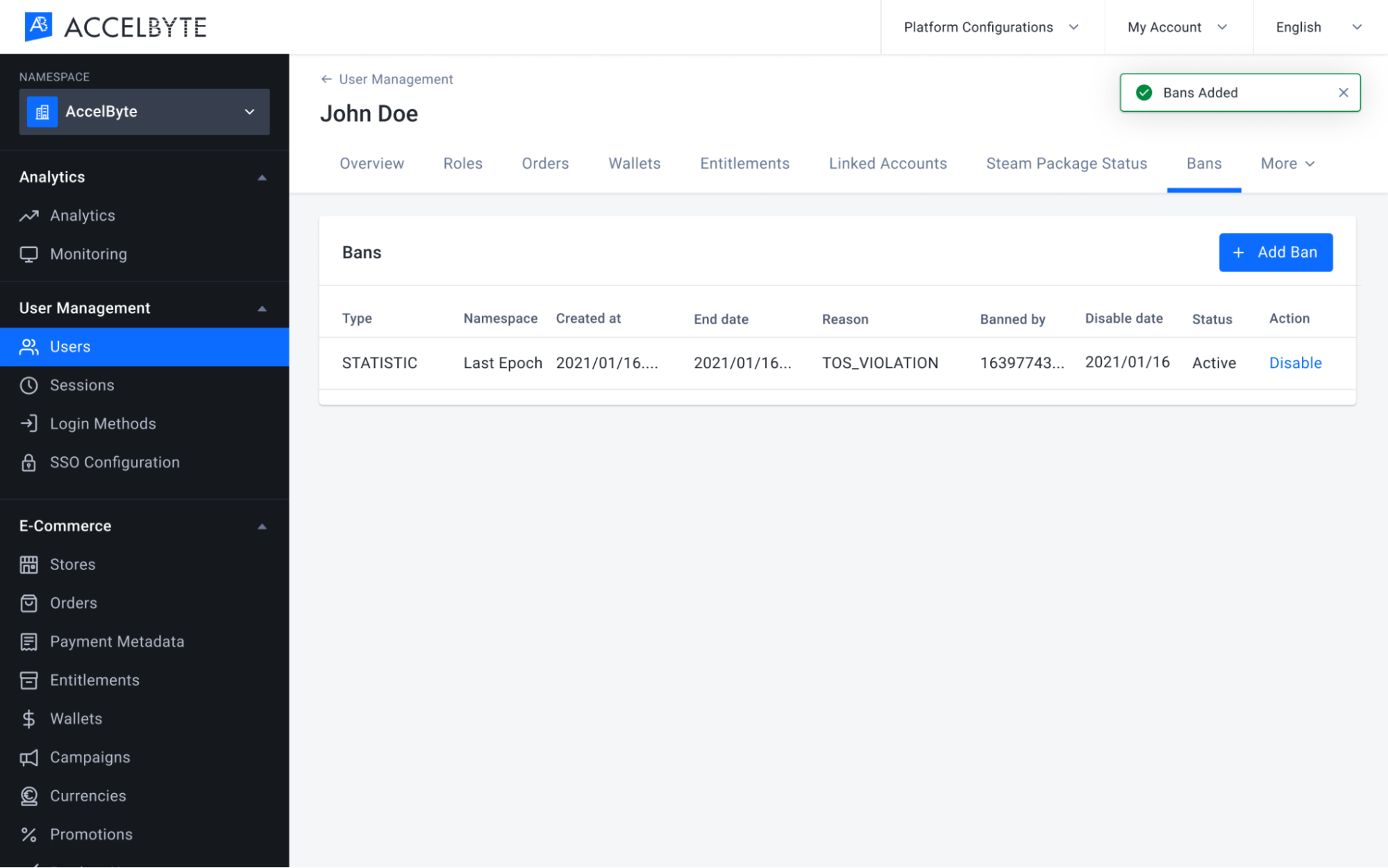
Ban をクリックします。新しいバンが Bans リストに表示されます。
デバイスでプレイヤーをバンする
デバイスバン機能はゲーム名前空間でのみ利用できます。
デバイスバン機能は、AGS Shared Cloudではまだサポートされていません。
-
Admin Portal のサイドバーで、Lookup Users に移動します。
-
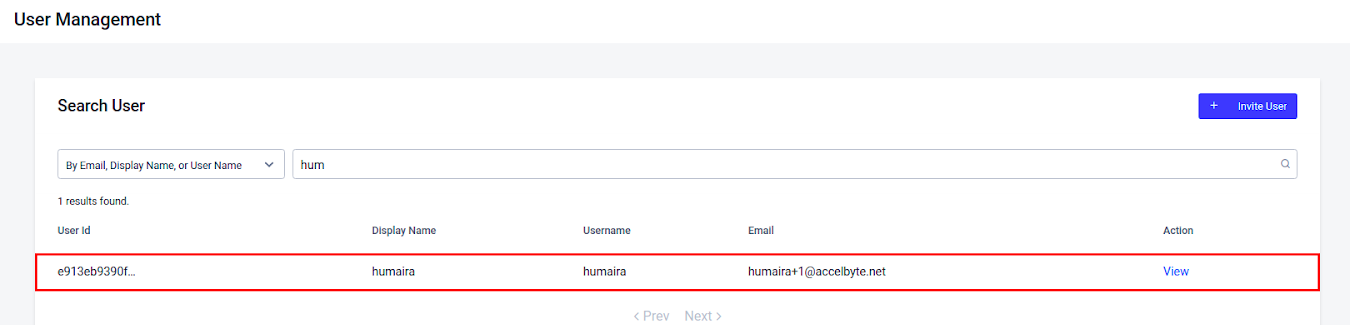
認証情報を使用して、バンしたいプレイヤーを検索します。検索結果が表示されます。

-
Action の View をクリックしてアカウントを開きます。ユーザーアカウントの詳細が表示されます。
-
Bans をクリックし、次に Add Ban をクリックして選択したユーザーをバンします。Add Ban 設定が表示されます。

デバイスバンの詳細を追加する
-
Ban type で、Device Ban を選択します。
-
Device ID で、バンしたいデバイスを選択します。このプレイヤーがログインに使用したデバイスのリストがこのメニューに表示されます。
-
Ban Expiration で、次のいずれかを選択します:
- Set by duration: プレイヤーをバンする分、時間、または日数を入力します。バンはこの期間後に期限切れになります。
- Set by expiration date: バンを期限切れにする日時を入力します。
- Never: 永久バンを設定します。
-
Reason で、バンの理由のドロップダウンリストから理由を選択します。
-
バンに関する関連情報を含める Comment を入力します。
-
Ban をクリックします。バンが Bans リストに表示されます。
バンを有効および無効にする
プレイヤーの期限切れまたは無効になったバンを再度有効化したり、プレイヤーの既存のバンを解除したりできます。以下の手順に従います。
-
Admin Portal のサイドバーで、Lookup Users に移動します。
-
ユーザーアカウントを検索して、アカウントの編集履歴を表示します。検索結果が表示されます。
-
リストを参照して探しているアカウントを見つけ、アカウントリストの Action 列の View をクリックして開きます。
-
Bans をクリックして、選択したユーザーをバンします。プレイヤーに適用されたすべてのバンが表示されます。
-
選択したバンの Action 列の下にある Disable をクリックしてバンを無効にするか、Action 列の下にある Enable をクリックして選択したバンを有効にします。
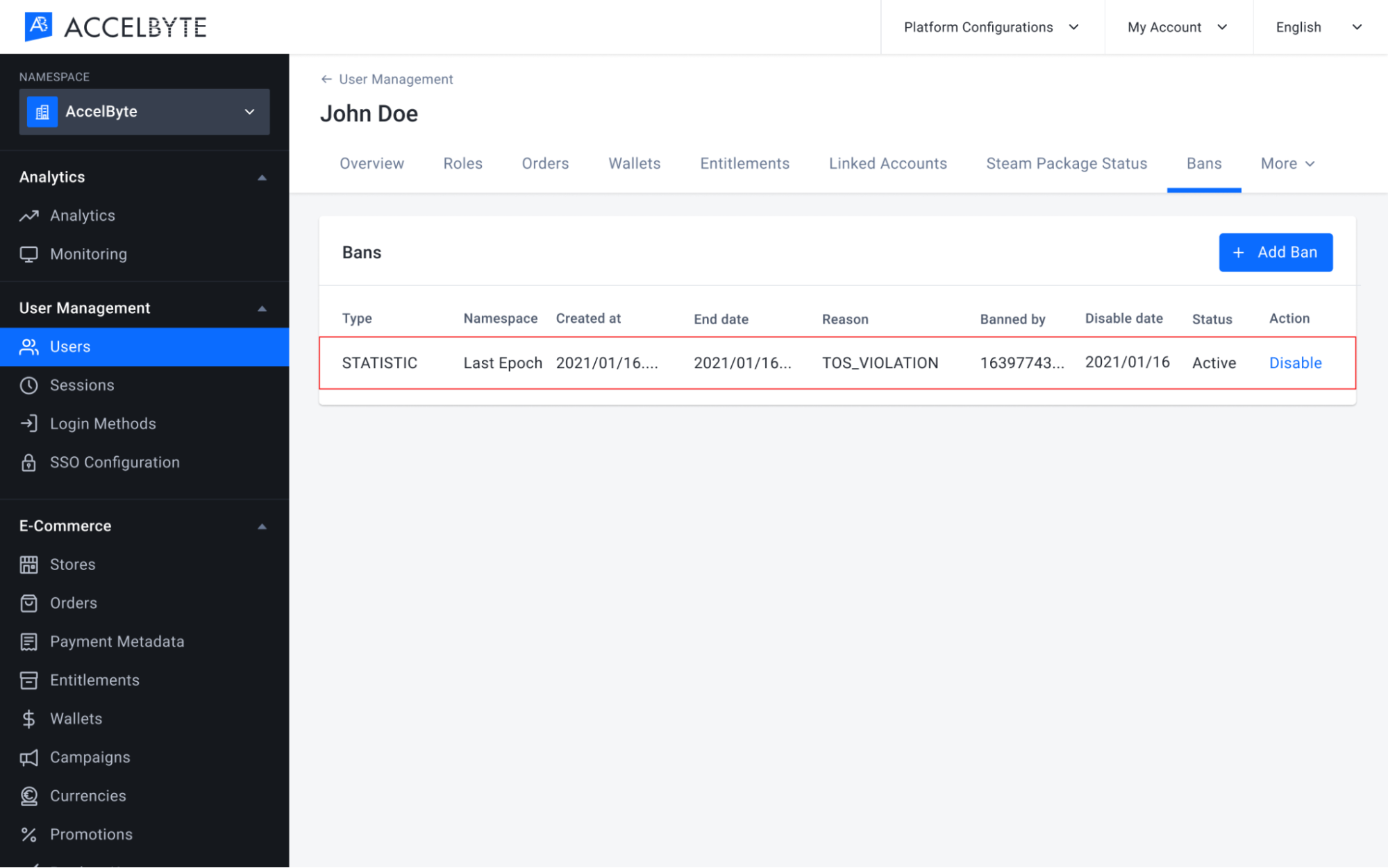
-
Disable Ban 確認メッセージが表示されます。Enable または Disable をクリックして、プレイヤーをバンまたはバン解除します。

-
バンを無効にすると、プレイヤーはバンされていたゲームまたは機能にアクセスできるようになります。プレイヤーのバンを有効にすると、プレイヤーはゲームまたは特定の機能へのアクセスがバンされます。
プレイヤーをバンまたはバン解除する
次のサーバーサイドコードを使用してプレイヤーをバンします。
- Unity
- C# Extend SDK
- Go Extend SDK
- Java Extend SDK
- Python Extend SDK
string playerUserID = "exampleuserid2434";
BanType banType = BanType.LOGIN;
BanReason banReason = BanReason.CHEATING;
var banEndDate = System.DateTime.UtcNow.AddDays(value: 365);
banEndDate = banEndDate.AddDays(365);
string comment = "This player was caught cheating";
bool notifyUserEmail = false;
string banId = string.Empty;

AccelByteSDK.GetServerRegistry().GetApi().GetUserAccount().BanUser(playerUserID, banType, banReason, banEndDate, comment, notifyUserEmail, result =>
{
    if (!result.IsError)
    {
        Debug.Log("Success. The player is banned.");
    }
    else
    {
        Debug.Log("Failed to ban the player. Error : " + result.Error.ToString());
    }
});
string userId = "<user id>";

//ban for 1 year
string endDate = DateTime.Now.AddYears(1).ToString("o");

var response = sdk.Iam.Users.AdminBanUserV3Op
    .Execute(new ModelBanCreateRequest()
    {
        Ban = "LOGIN",
        Reason = "CHEATING",
        Comment = "This player caught cheating",
        SkipNotif = true,
        EndDate = endDate
    }, sdk.Namespace, userId);
if (response != null)
{
    string banId = response.BanId!;
    //do something when success
}
usersService := &iam.UsersService{
    Client:          factory.NewIamClient(&repository.ConfigRepositoryImpl{}),
    TokenRepository: &repository.TokenRepositoryImpl{},
}
userId := "exampleuserid2434"
ban := "LOGIN"
reason := "CHEATING"
endDate := "2024-12-31T00:00:00"
comment := "This player caught cheating"
skipNotif := true
input := &users.AdminBanUserV3Params{
    Body:      &iamclientmodels.ModelBanCreateRequest {
        Ban: &ban,
        Reason: &reason,
        EndDate: &endDate,
        Comment: &comment,
        SkipNotif: &skipNotif,
    },
    Namespace: namespace,
    UserID:    userId,
}
result, err := usersService.AdminBanUserV3Short(input)
Users usersWrapper = new Users(sdk);

String userId = "<user id>";
//ban for 1 year
LocalDateTime now = LocalDateTime.now();
LocalDateTime nextYear = now.plusYears(1);
String endDate = nextYear.format(DateTimeFormatter.ISO_LOCAL_DATE_TIME);

ModelBanCreateRequest body = ModelBanCreateRequest.builder()
    .ban("LOGIN")
    .reason("CHEATING")
    .comment("This player caught cheating")
    .skipNotif(true)
    .endDate(endDate)
    .build();
ModelUserBanResponseV3 response;
try {
    response = usersWrapper.adminBanUserV3(AdminBanUserV3.builder()
        .namespace("<namespace>")
        .userId(userId)
        .body(body)
        .build());
} catch (Exception e) {
    // Do something when failed
    return;
}

if (response == null) {
    // Null response from server
} else {
    // Do something when successful
}
result, error = iam_service.admin_ban_user_v3(
    body=iam_models.ModelBanCreateRequest()
        .with_ban("LOGIN")
        .with_comment("This player was caught cheating.")
        .with_end_date("2030-12-31T00:00:00.000Z")
        .with_reason("CHEATING")
        .with_skip_notif(False),
    user_id=user_id,
    namespace=namespace,  # optional, gets the value from the global instance if unspecified
    sdk=sdk,  # optional, gets the global instance  if unspecified
)
if error:
    exit(error)
banId を使用してプレイヤーのバンを解除できます。
- Unity
- C# Extend SDK
- Go Extend SDK
- Java Extend SDK
- Python Extend SDK
AccelByteSDK.GetServerRegistry().GetApi().GetUserAccount().ChangeUserBanStatus(
    userId: playerUserID,
    banId: banId,
    enabled: false,
    (result) =>
    {
        if (result.IsError)
        {
            Debug.Log("Success. Player is unbanned.");
        }
        else
        {
            Debug.Log("Failed to un-ban the player. Error : " + result.Error.ToString());
        }
    }
);
string userId = "<user id>";
string banId = "<ban id>";

var response = sdk.Iam.Users.AdminUpdateUserBanV3Op
    .Execute(new ModelBanUpdateRequest()
    {
        Enabled = false,
        SkipNotif = false
    }, banId, sdk.Namespace, userId);
if (response != null)
{
    //do something when success
}
usersService := &iam.UsersService{
    Client:          factory.NewIamClient(&repository.ConfigRepositoryImpl{}),
    TokenRepository: &repository.TokenRepositoryImpl{},
}
input := &users.AdminUpdateUserBanV3Params{
    Body:      &iamclientmodels.ModelBanUpdateRequest{
        Enabled: &enabled,
    },
    BanID:     banId,
    Namespace: namespace,
    UserID:    userId,
}
result, err := usersService.AdminUpdateUserBanV3Short(input)
Users usersWrapper = new Users(sdk);

String userId = "<user id>";
String banId = "<ban id>";
ModelBanUpdateRequest body = ModelBanUpdateRequest.builder()
    .enabled(false)
    .skipNotif(false)
    .build();
ModelUserBanResponseV3 response;
try {
    response = usersWrapper.adminUpdateUserBanV3(AdminUpdateUserBanV3.builder()
            .namespace("<namespace>")
            .userId(userId)
            .banId(banId)
            .body(body)
            .build());
} catch (Exception e) {
    // Do something when failed
    return;
}

if (response == null) {
    // Null response from server
} else {
    // Do something when successful
}
result, error = iam_service.admin_update_user_ban_v3(
    body=iam_models.ModelBanUpdateRequest()
    .with_enabled(False)
    .with_skip_notif(False),
    ban_id="BanId",
    user_id=user_id,
    namespace=namespace,  # optional, gets the value from the global instance if unspecified
    sdk=sdk,  # optional, gets the global instance  if unspecified
)
if error:
    exit(error)
バン通知
以下のコードを使用して、クライアント側でバン通知を実装します。この方法を使用すると、プレイヤーにバンされたことと理由を通知できます。
- Unity
- C# Extend SDK
- Go Extend SDK
- Java Extend SDK
- Python Extend SDK
AccelByteSDK.GetClientRegistry().GetApi().GetLobby().UserBannedNotification += result =>
{
    Debug.Log("You have been banned. Reason: " + result.Value.reason);
};
LobbyService lobby = new LobbyService(sdk.Configuration);
lobby.RedirectAllReceivedMessagesToMessageReceivedEvent = true;
lobby.OnMessageReceived = (message) =>
{
    if (message.MessageType == "userBannedNotification")
    {
        //do something here
    }
};

//connect and listen to lobby websocket
await lobby.Connect(true);
connMgr := &integration.ConnectionManagerImpl{}
connection, errcon := connectionutils.NewWebsocketConnection(configRepo, tokenRepo, func(dataByte []byte) {

    msg := decodeWSMessage(string(dataByte))

    if v, ok := msg["type"]; ok {
        msgType = v
    }
    switch msgType {
    case model.TypeNotificationMessage:
    }
})
if errcon != nil {
    logrus.Error(errcon)

    return
}

connMgr.Save(connection)

lobbyService := &service.LobbyServiceWebsocket{
    ConfigRepository:  configRepo,
    TokenRepository:   tokenRepo,
    ConnectionManager: connMgr,
}
err := lobbyService.UserBannedNotification()
if err != nil {
    logrus.Error(err)

    return
}
import static net.accelbyte.sdk.core.util.Helper.parseWSM;
import static net.accelbyte.sdk.core.util.Helper.getWSMType;

final WebSocketListener listener =
    new WebSocketListener() {
        @Override
        public void onMessage(@NotNull WebSocket webSocket, @NotNull String text) {
            final Map<String, String> message = parseWSM(text);
            final String messageType = getWSMType(message);
            if (messageType.equals("userBannedNotification")) {
                // Do something here
            }
        }
    };

final int RECONNECT_DELAY_MS = 60000;  // 1m (0 to disable)
final int MAX_NUM_RECONNECT_ATTEMPTS = 10; // -1 for unlimited reconnect attempts (RECONNECT_DELAY_MS must be > 0 to enable)

final int PING_INTERVAL_MS = 30000;  // 30s (0 to disable)

final LobbyWebSocketClient ws =
        LobbyWebSocketClient.create(
            new DefaultConfigRepository(), DefaultTokenRepository.getInstance(), listener, RECONNECT_DELAY_MS, MAX_NUM_RECONNECT_ATTEMPTS, PING_INTERVAL_MS);

ws.connect();
import accelbyte_py_sdk.api.lobby.wss_models import lobby_wss_models

async def on_receive(message: str):
    wsm, error = lobby_wss_models.parse_wsm(message)
    if not error:
        if wsm.get_type() == "userBannedNotification":
            print(f"You have been banned.")

# ws_client = WebsocketsWSClient(...)

ws_client.listeners.append(on_receive)

await ws_client.connect()

# do something

await ws_client.disconnect()
Refer to Manually connect to the Lobby on how to connect to lobby using Python Extend SDK.