アカウントをバンし制限する
注釈:本資料はAI技術を用いて翻訳されています。
概要
ユーザーバン機能を使用すると、ゲームまたはゲーム内の特定の機能へのユーザーのアクセスを制限できます。AccelByte Gaming Services (AGS) Admin Portal でプレイヤーをバンしたり、既存のバンを解除したりできます。これらの操作は AGS CLI でも実行できます。
AGS では、次のバン方法を適用できます。
- アカウントバン: バンされたプレイヤーのアクセストークンを無効化します。
- 機能バン: ゲーム内の特定の機能に対するアクセストークンを無効化します。
- デバイスバン: 一意の ID を使用して、特定のデバイスからのゲームへのアクセスを制限します。
すべてのバン処理は、既存のアクセストークンを無効化します。
- アカウントバンの場合、refresh_token も無効化されます。つまり、ユーザーは自分の認証情報や refresh_token を使ってログインできなくなります。
- 機能バンの場合、refresh_token は有効なままです。つまり、ユーザーは refresh_token を使って即座にログインできます。
- バンがゲームネームスペースに対して設定されている場合、そのゲームネームスペースのみに影響します。
- バンがパブリッシャーネームスペースに対して設定されている場合、パブリッシャーネームスペースとゲームネームスペースの両方に影響します。
前提条件
-
Admin Portal へのアクセス権があることを確認してください。
-
Private Cloud の場合、次の権限があることを確認してください。
用途 権限 アクション プレイヤーをバンする ADMIN:NAMESPACE:{namespace}:BAN:USER:{userId}CREATEプレイヤーのバンを有効化または無効化する ADMIN:NAMESPACE:{namespace}:BAN:USER:{userId}UPDATEバンタイプと理由を取得する ADMIN:BANREADプレイヤーのデバイスとデバイスバンを表示する ADMIN:NAMESPACE:{namespace}:DEVICEREADデバイスをバンする ADMIN:NAMESPACE:{namespace}:DEVICECREATEデバイスバンを有効化または無効化する ADMIN:NAMESPACE:{namespace}:DEVICEUPDATE -
AGS CLI の手順に従う場合は、AGS CLI をインストールし、上記の権限を持つアカウントでサインインしてください。詳細については、インストールとサインインを参照してください。例では Bash シェルを使用しています。
バンの範囲
- パブリッシャーネームスペースレベルでプレイヤーをバンすると、そのバンはその中に含まれるすべてのネームスペースに適用されます。
Public Cloud ティアでは、これはスタジオネームスペースに適用されます。これは Private Cloud ティアのパブリッシャーネームスペースと同じ機能を持ちます。
- ゲームネームスペースレベルでプレイヤーをバンすると、そのバンは特定のゲームネームスペースにのみ適用されます。
アカウントでプレイヤーをバンする
- Admin Portal
- AGS CLI
-
Admin Portal のサイドバーで、Foundations > Users に移動します。
-
対応する認証情報を使用して、バンしたいプレイヤーを検索します。
-
Action の View をクリックしてアカウントを開きます。ユーザーアカウントの詳細が表示されます。
-
Bans をクリックし、次に Add Ban をクリックして選択したユーザーをバンします。

Add Ban の設定が表示されます。
プレイヤーの userId を確認します。ユーザーを検索するを参照してください。
ユーザーバンの詳細を追加する
- Admin Portal
- AGS CLI
-
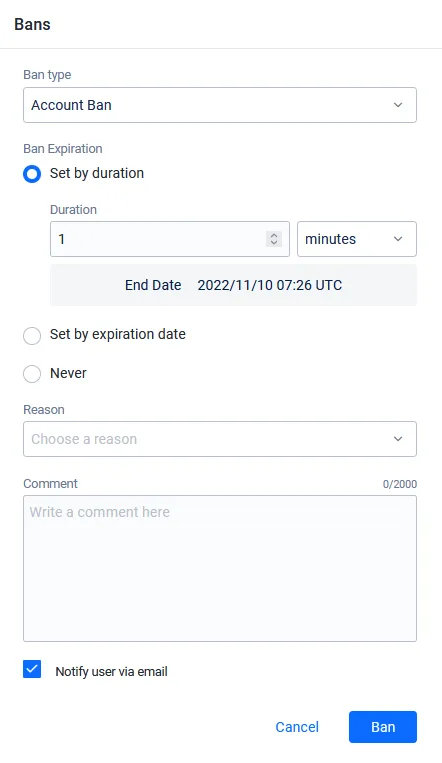
Ban Type を選択します。
Feature Ban Details
Feature Ban を選択した場合、制限したい機能を選択する必要があります。プレイヤーをバンできる機能の一覧は、次の表のとおりです。
機能制限 説明 CHAT_SENDプレイヤーはメッセージの送信を禁止されます CHAT_ALLプレイヤーはメッセージの送受信の両方を禁止されます ORDER_AND_PAYMENTプレイヤーはゲーム内での購入を禁止されます STATISTICSプレイヤーの統計情報は記録されません LEADERBOARDプレイヤーはどのリーダーボードにも表示されません MATCHMAKINGプレイヤーはマッチメイキングを禁止されます -
Ban Expiration で、次のいずれかを選択します。
-
Set by duration: プレイヤーをバンする期間を分、時間、または日数で入力します。この期間が過ぎるとバンは失効します。
-
Set by expiration date: バンを失効させたい日時を入力します。
-
Never: 永久バンを設定します。
-
-
Reason で、バンの理由を選択します。
Reason Details
バンで選択できる理由の一覧は、次の表のとおりです。
理由 説明 VIOLENCE暴力的なコンテンツを投稿したためバンされます HARASSMENT他のプレイヤーへのハラスメントを行ったためバンされます HATEFUL_CONDUCT他のプレイヤーに対して憎悪的な行動をしたためバンされます OFFENSIVE_USERNAME不適切なユーザー名を使用したためバンされます IMPERSONATION他のプレイヤーになりすましたためバンされます MALICIOUS_CONTENTスパムや詐欺などの悪意のあるコンテンツを投稿したためバンされます SEXUALLY_SUGGESTIVE性的に露骨、または示唆的なコンテンツを投稿したためバンされます SEXUAL_VIOLENCE性的暴力的な行動、または他のプレイヤーを利用する行為をしたためバンされます EXTREME_VIOLENCE残虐表現などの極端に暴力的なコンテンツを投稿したためバンされます UNDERAGE_USER未成年であるためバンされます CHEATING不正行為を行ったためバンされます TOS_VIOLATION利用規約に違反したためバンされます -
バンに関する関連情報を含むコメントを入力します。
-
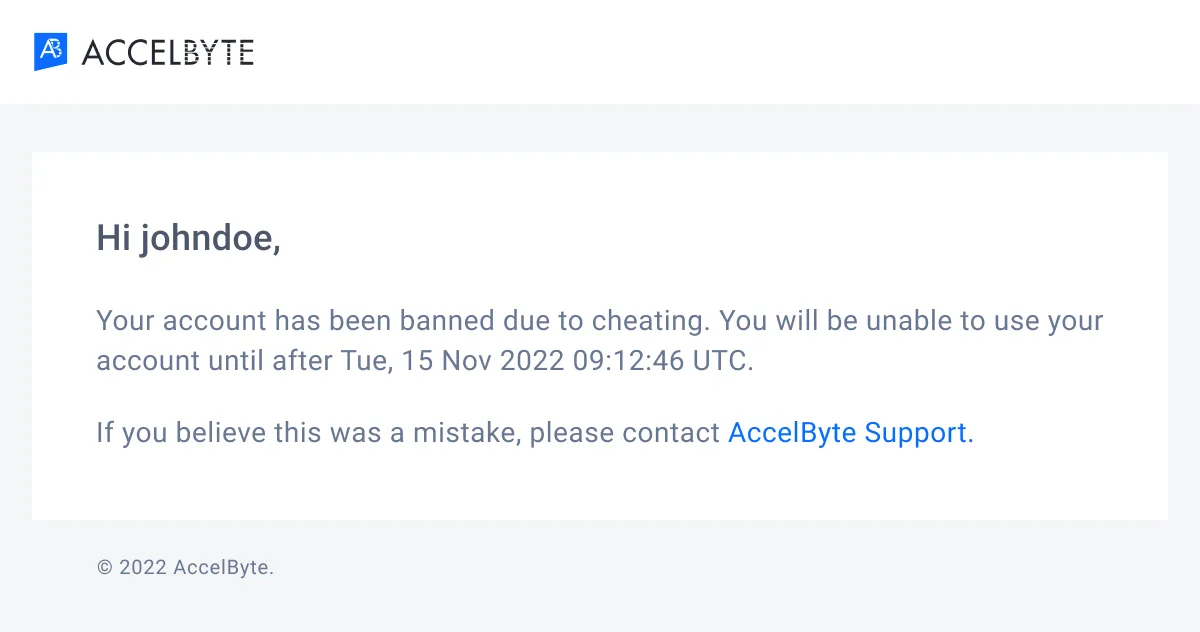
Notify user via email チェックボックスを選択すると、メールでプレイヤーにバン通知が送信されます。
importantサードパーティの認証情報を使用してゲームにログインするプレイヤーは、Admin Portal 上でヘッドレスアカウントのみを持っている場合があります。つまり、そのアカウントには関連するメールアドレスがありません。ゲーム(またはプラットフォーム)にアカウントを登録済みのプレイヤー、またはゲーム内でメールアドレスを登録してヘッドレスアカウントをアップグレードしたプレイヤーのみが、バンされた際にメール通知を受け取ることができます。詳細については、アカウントの仕組みを参照してください。
-
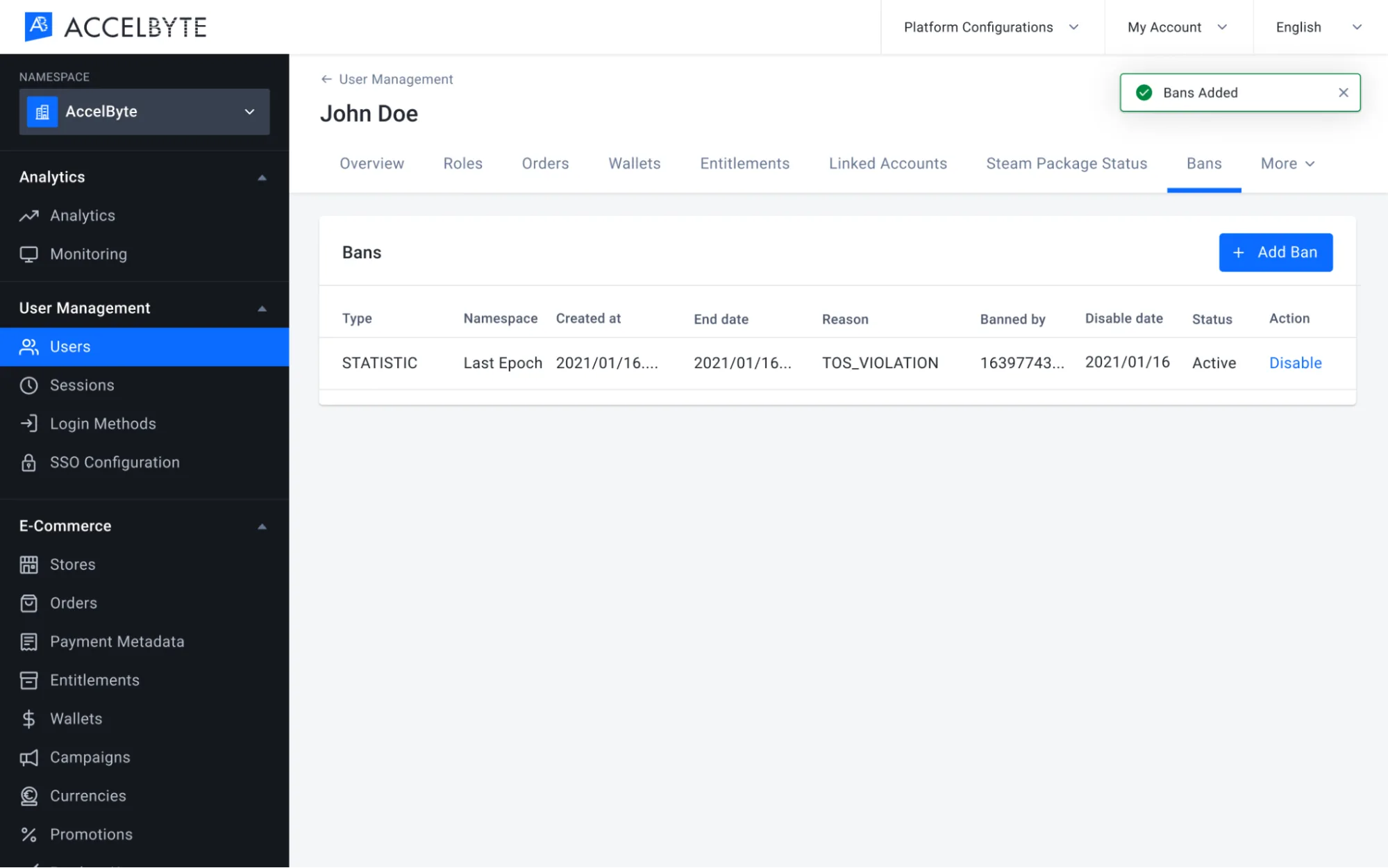
Ban をクリックします。新しいバンが Bans リストに表示されます。
-
適用するバンを確認します。各エントリの
typeはアカウントバンか機能バンかを示し、banは送信する値(LOGINやCHAT_SENDなど)です。ags iam bans list-types --namespace <YourNamespace> -
バンの理由を確認します。
CHEATINGなどのreasonをコピーします。ags iam bans list-reasons -
バンの詳細を記述した JSON ファイルを作成します。ファイル名は任意です。この例では
ban.jsonを使用します。{
"ban": "<Ban>",
"reason": "<Reason>",
"endDate": "<EndDate>",
"comment": "<Comment>",
"skipNotif": false
}ban: 手順 1 で確認したbanの値。reason: 手順 2 で確認したreasonの値。endDate: バンが失効する日時。ISO 8601 形式の UTC 日時で指定します(例:2026-12-31T00:00:00Z)。無期限のバンにする場合は、Admin Portal で Never を選択したときに使用される日付である2099-12-31T00:00:00Zを指定します。skipNotif:falseに設定すると、Notify user via email を選択した場合と同様に、プレイヤーにバン通知メールが送信されます。メールを送信しない場合はtrueに設定します。
-
プレイヤーをバンします。
@の後に JSON ファイルのパスを指定します。ags iam users ban --namespace <YourNamespace> --user-id <UserId> --json @ban.json
デバイスでプレイヤーをバンする
デバイスバン機能は、ゲームネームスペースでのみ使用できます。
デバイスバン機能は、AGS Public Cloud ではまだサポートされていません。
- Admin Portal
- AGS CLI
-
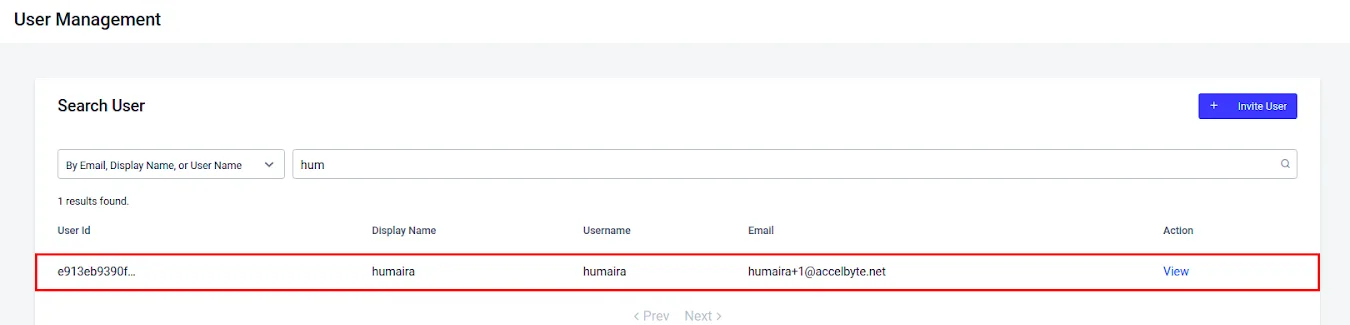
Admin Portal のサイドバーで、Foundations > Users に移動します。
-
バンしたいプレイヤーを認証情報で検索します。検索結果が表示されます。

-
Action の View をクリックしてアカウントを開きます。ユーザーアカウントの詳細が表示されます。
-
Bans をクリックし、次に Add Ban をクリックして選択したユーザーをバンします。Add Ban の設定が表示されます。

プレイヤーの userId を確認します。ユーザーを検索するを参照してください。
デバイスバンの詳細を追加する
- Admin Portal
- AGS CLI
-
Ban type で Device Ban を選択します。
-
Device ID で、バンしたいデバイスを選択します。このメニューには、このプレイヤーがログインに使用したデバイスの一覧が表示されます。
-
Ban Expiration で、次のいずれかを選択します。
- Set by duration: プレイヤーをバンする期間を分、時間、または日数で入力します。この期間が過ぎるとバンは失効します。
- Set by expiration date: バンを失効させたい日時を入力します。
- Never: 永久バンを設定します。
-
Reason で、ドロップダウンリストからバンの理由を選択します。
-
Comment に、バンに関する関連情報を入力します。
-
Ban をクリックします。バンが Bans リストに表示されます。
-
プレイヤーがログインに使用したデバイスを一覧表示します。バンしたいデバイスの
deviceId、deviceType、extをコピーします。ags iam devices list --namespace <YourGameNamespace> --user-id <UserId> -
バンの理由を確認します。
CHEATINGなどのreasonをコピーします。ags iam bans list-reasons -
バンの詳細を記述した JSON ファイルを作成します。ファイル名は任意です。この例では
device-ban.jsonを使用します。{
"deviceId": "<DeviceId>",
"deviceType": "<DeviceType>",
"ext": {},
"reason": "<Reason>",
"endDate": "<EndDate>",
"comment": "<Comment>",
"enabled": true
}deviceId、deviceType、ext: 手順 1 で確認したデバイスの値。デバイスにextがない場合は{}のままにします。reason: 手順 2 で確認したreasonの値。endDate: バンが失効する日時。ISO 8601 形式の UTC 日時で指定します(例:2026-12-31T00:00:00Z)。無期限のバンにする場合は、Admin Portal で Never を選択したときに使用される日付である2099-12-31T00:00:00Zを指定します。
-
デバイスをバンします。
@の後に JSON ファイルのパスを指定します。ags iam devices ban --namespace <YourGameNamespace> --json @device-ban.json
バンの有効化と無効化
プレイヤーの失効または無効化されたバンを再度有効にしたり、既存のバンを解除したりできます。これを行うには、次の手順に従います。
- Admin Portal
- AGS CLI
-
Admin Portal のサイドバーで、Foundations > Users に移動します。
-
ユーザーアカウントを検索して、アカウントの編集履歴を表示します。検索結果が表示されます。
-
リストを閲覧して探しているアカウントを見つけ、アカウント一覧の Action 列にある View をクリックして開きます。
-
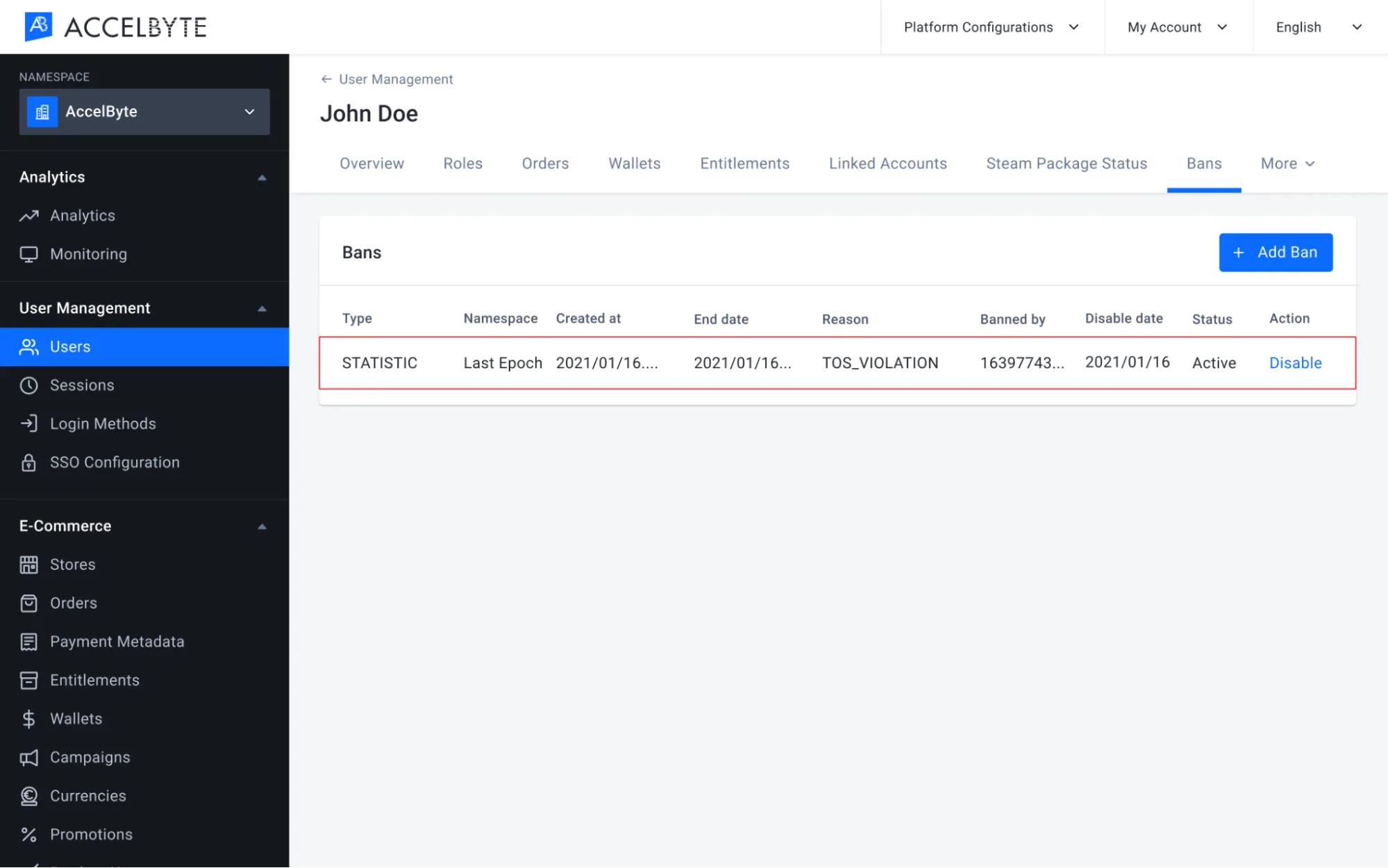
Bans をクリックして選択したユーザーをバンします。そのプレイヤーに対して過去に適用されたすべてのバンが表示されます。
-
選択したバンの Action 列の Disable をクリックしてバンを無効化するか、Action 列の Enable をクリックして選択したバンを有効化します。
-
Disable Ban の確認メッセージが表示されます。Enable または Disable をクリックして、プレイヤーをバンまたはバン解除します。

-
バンを無効化すると、プレイヤーはバンされていたゲームまたは機能にアクセスできるようになります。プレイヤーのバンを有効化すると、そのプレイヤーはゲームまたは特定の機能へのアクセスを再び禁止されます。
-
プレイヤーの
userIdを確認します。ユーザーを検索するを参照してください。 -
プレイヤーのバンを一覧表示します。
enabledフィールドで、各バンが有効かどうかを確認できます。-
アカウントバンと機能バンの場合は、バンの
banIdをコピーします。ags iam users list-bans --namespace <YourNamespace> --user-id <UserId> -
デバイスバンの場合は、バンの
idをコピーします。ags iam devices list-banned-user --namespace <YourGameNamespace> --user-id <UserId>
-
-
バンを有効化または無効化します。バンを有効化するには
enabledをtrueに、無効化するにはfalseに設定します。-
アカウントバンまたは機能バンの場合は、
<BanId>を手順 2 のbanIdに置き換えます。skipNotifをfalseに設定すると、Notify user via email を選択した場合と同様に、プレイヤーにメールが送信されます。メールを送信しない場合はtrueに設定します。ags iam users update-ban --namespace <YourNamespace> --user-id <UserId> --ban-id <BanId> \
--json '{"enabled": false, "skipNotif": false}' -
デバイスバンの場合は、
<BanId>を手順 2 のidに置き換えます。ags iam devices update-banned --namespace <YourGameNamespace> --ban-id <BanId> --json '{"enabled": false}'
-
プレイヤーをバンおよびバン解除する
次のサーバーサイドコードを使用して、プレイヤーをバンします。
- Unity
- C# Extend SDK
- Go Extend SDK
- Java Extend SDK
- Python Extend SDK
string playerUserID = "exampleuserid2434";
BanType banType = BanType.LOGIN;
BanReason banReason = BanReason.CHEATING;
var banEndDate = System.DateTime.UtcNow.AddDays(value: 365);
banEndDate = banEndDate.AddDays(365);
string comment = "This player was caught cheating";
bool notifyUserEmail = false;
string banId = string.Empty;

AccelByteSDK.GetServerRegistry().GetApi().GetUserAccount().BanUser(playerUserID, banType, banReason, banEndDate, comment, notifyUserEmail, result =>
{
    if (!result.IsError)
    {
        Debug.Log("Success. The player is banned.");
    }
    else
    {
        Debug.Log("Failed to ban the player. Error : " + result.Error.ToString());
    }
});
string userId = "<user id>";

//ban for 1 year
string endDate = DateTime.Now.AddYears(1).ToString("o");

var response = sdk.Iam.Users.AdminBanUserV3Op
    .Execute(new ModelBanCreateRequest()
    {
        Ban = "LOGIN",
        Reason = "CHEATING",
        Comment = "This player caught cheating",
        SkipNotif = true,
        EndDate = endDate
    }, sdk.Namespace, userId);
if (response != null)
{
    string banId = response.BanId!;
    //do something when success
}
usersService := &iam.UsersService{
    Client:          factory.NewIamClient(&repository.ConfigRepositoryImpl{}),
    TokenRepository: &repository.TokenRepositoryImpl{},
}
userId := "exampleuserid2434"
ban := "LOGIN"
reason := "CHEATING"
endDate := "2024-12-31T00:00:00"
comment := "This player caught cheating"
skipNotif := true
input := &users.AdminBanUserV3Params{
    Body:      &iamclientmodels.ModelBanCreateRequest {
        Ban: &ban,
        Reason: &reason,
        EndDate: &endDate,
        Comment: &comment,
        SkipNotif: &skipNotif,
    },
    Namespace: namespace,
    UserID:    userId,
}
result, err := usersService.AdminBanUserV3Short(input)
Users usersWrapper = new Users(sdk);

String userId = "<user id>";
//ban for 1 year
LocalDateTime now = LocalDateTime.now();
LocalDateTime nextYear = now.plusYears(1);
String endDate = nextYear.format(DateTimeFormatter.ISO_LOCAL_DATE_TIME);

ModelBanCreateRequest body = ModelBanCreateRequest.builder()
    .ban("LOGIN")
    .reason("CHEATING")
    .comment("This player caught cheating")
    .skipNotif(true)
    .endDate(endDate)
    .build();
ModelUserBanResponseV3 response;
try {
    response = usersWrapper.adminBanUserV3(AdminBanUserV3.builder()
        .namespace("<namespace>")
        .userId(userId)
        .body(body)
        .build());
} catch (Exception e) {
    // Do something when failed
    return;
}

if (response == null) {
    // Null response from server
} else {
    // Do something when successful
}
result, error = iam_service.admin_ban_user_v3(
    body=iam_models.ModelBanCreateRequest()
        .with_ban("LOGIN")
        .with_comment("This player was caught cheating.")
        .with_end_date("2030-12-31T00:00:00.000Z")
        .with_reason("CHEATING")
        .with_skip_notif(False),
    user_id=user_id,
    namespace=namespace,  # optional, gets the value from the global instance if unspecified
    sdk=sdk,  # optional, gets the global instance  if unspecified
)
if error:
    exit(error)
banId は、プレイヤーのバンを解除するために使用できます。
- Unity
- C# Extend SDK
- Go Extend SDK
- Java Extend SDK
- Python Extend SDK
AccelByteSDK.GetServerRegistry().GetApi().GetUserAccount().ChangeUserBanStatus(
    userId: playerUserID,
    banId: banId,
    enabled: false,
    (result) =>
    {
        if (result.IsError)
        {
            Debug.Log("Success. Player is unbanned.");
        }
        else
        {
            Debug.Log("Failed to un-ban the player. Error : " + result.Error.ToString());
        }
    }
);
string userId = "<user id>";
string banId = "<ban id>";

var response = sdk.Iam.Users.AdminUpdateUserBanV3Op
    .Execute(new ModelBanUpdateRequest()
    {
        Enabled = false,
        SkipNotif = false
    }, banId, sdk.Namespace, userId);
if (response != null)
{
    //do something when success
}
usersService := &iam.UsersService{
    Client:          factory.NewIamClient(&repository.ConfigRepositoryImpl{}),
    TokenRepository: &repository.TokenRepositoryImpl{},
}
input := &users.AdminUpdateUserBanV3Params{
    Body:      &iamclientmodels.ModelBanUpdateRequest{
        Enabled: &enabled,
    },
    BanID:     banId,
    Namespace: namespace,
    UserID:    userId,
}
result, err := usersService.AdminUpdateUserBanV3Short(input)
Users usersWrapper = new Users(sdk);

String userId = "<user id>";
String banId = "<ban id>";
ModelBanUpdateRequest body = ModelBanUpdateRequest.builder()
    .enabled(false)
    .skipNotif(false)
    .build();
ModelUserBanResponseV3 response;
try {
    response = usersWrapper.adminUpdateUserBanV3(AdminUpdateUserBanV3.builder()
            .namespace("<namespace>")
            .userId(userId)
            .banId(banId)
            .body(body)
            .build());
} catch (Exception e) {
    // Do something when failed
    return;
}

if (response == null) {
    // Null response from server
} else {
    // Do something when successful
}
result, error = iam_service.admin_update_user_ban_v3(
    body=iam_models.ModelBanUpdateRequest()
    .with_enabled(False)
    .with_skip_notif(False),
    ban_id="BanId",
    user_id=user_id,
    namespace=namespace,  # optional, gets the value from the global instance if unspecified
    sdk=sdk,  # optional, gets the global instance  if unspecified
)
if error:
    exit(error)
バン通知
次のコードを使用して、クライアントサイドでバン通知を実装します。この方法を使用すると、プレイヤーがバンされたこととその理由を伝えることができます。
- Unity
- C# Extend SDK
- Go Extend SDK
- Java Extend SDK
- Python Extend SDK
AccelByteSDK.GetClientRegistry().GetApi().GetLobby().UserBannedNotification += result =>
{
    Debug.Log("You have been banned. Reason: " + result.Value.reason);
};
LobbyService lobby = new LobbyService(sdk.Configuration);
lobby.RedirectAllReceivedMessagesToMessageReceivedEvent = true;
lobby.OnMessageReceived = (message) =>
{
    if (message.MessageType == "userBannedNotification")
    {
        //do something here
    }
};

//connect and listen to lobby websocket
await lobby.Connect(true);
connMgr := &integration.ConnectionManagerImpl{}
connection, errcon := connectionutils.NewWebsocketConnection(configRepo, tokenRepo, func(dataByte []byte) {

    msg := decodeWSMessage(string(dataByte))

    if v, ok := msg["type"]; ok {
        msgType = v
    }
    switch msgType {
    case model.TypeNotificationMessage:
    }
})
if errcon != nil {
    logrus.Error(errcon)

    return
}

connMgr.Save(connection)

lobbyService := &service.LobbyServiceWebsocket{
    ConfigRepository:  configRepo,
    TokenRepository:   tokenRepo,
    ConnectionManager: connMgr,
}
err := lobbyService.UserBannedNotification()
if err != nil {
    logrus.Error(err)

    return
}
import static net.accelbyte.sdk.core.util.Helper.parseWSM;
import static net.accelbyte.sdk.core.util.Helper.getWSMType;

final WebSocketListener listener =
    new WebSocketListener() {
        @Override
        public void onMessage(@NotNull WebSocket webSocket, @NotNull String text) {
            final Map<String, String> message = parseWSM(text);
            final String messageType = getWSMType(message);
            if (messageType.equals("userBannedNotification")) {
                // Do something here
            }
        }
    };

final int RECONNECT_DELAY_MS = 60000;  // 1m (0 to disable)
final int MAX_NUM_RECONNECT_ATTEMPTS = 10; // -1 for unlimited reconnect attempts (RECONNECT_DELAY_MS must be > 0 to enable)

final int PING_INTERVAL_MS = 30000;  // 30s (0 to disable)

final LobbyWebSocketClient ws =
        LobbyWebSocketClient.create(
            new DefaultConfigRepository(), DefaultTokenRepository.getInstance(), listener, RECONNECT_DELAY_MS, MAX_NUM_RECONNECT_ATTEMPTS, PING_INTERVAL_MS);

ws.connect();
import accelbyte_py_sdk.api.lobby.wss_models import lobby_wss_models

async def on_receive(message: str):
    wsm, error = lobby_wss_models.parse_wsm(message)
    if not error:
        if wsm.get_type() == "userBannedNotification":
            print(f"You have been banned.")

# ws_client = WebsocketsWSClient(...)

ws_client.listeners.append(on_receive)

await ws_client.connect()

# do something

await ws_client.disconnect()
Python Extend SDK を使用してロビーに接続する方法については、ロビーに手動で接続するを参照してください。