Custom crash grouping
Overview
AccelByte Development Toolkit's (ADT) custom crash grouping enables you to manage your crash records by grouping several crash events into one crash issue. When you use this feature, crash events with identical call stack lines will be grouped together. This helps developers fix bugs with the same root cause.
ADT's Custom crash Grouping will help you:
- Set the range of identical call stack lines from min 1 - max 30.
- Ignore certain lines of the call stack and omit them from the call stack list.
Crash grouping will be applied to new crashes only.
Set range of call stack lines
To set the range of call stack lines, follow the steps below:
- Log in to ADT Web.
- Click on the Game Settings menu from the sidebar.
- Open the Global Crash Configs settings and scroll down to Crash Grouping Section.
- Click on the + icon to increase and the - to reduce the number of lines to be matched.
- Click on the Save Changes button to store your changes.
- Click on the Confirm button on the confirmation pop-up.
Ignore call stack lines
Setting up custom rules will make the system ignore the call stack, and they will not be shown on the Call stack tab.
To set an ignore rule, follow these steps:
- Log in to ADT Web.
- Click on the Game Settings menu from the sidebar.
- Open the Global Crash Configs settings and scroll down to Crash Grouping Section.
- Click Add Rule button.
- Click on the Platform column.
- Select the available platform from the dropdown.
- Fill out the module with your game module's code (e.g.,
LyraGame). - Fill out the message you want to ignore (e.g.,
UEngine::PerformError*). The trailing*matters — see Pattern syntax. - Click the Save Changes button.
- Click Confirm on the confirmation pop-up.
Write ignore rules
The call stacks parse and are included in crashes. The call stacks contain function, location, and line number. Ignore call stacks rules consist of three components:
-
Platform: The platform of your build. Select according to your game platform. The dropdown only shows uploaded platforms of your builds.
-
Module: Your game's executable module that contains the code address.
-
Message: An exception message sent by the module as crash information.
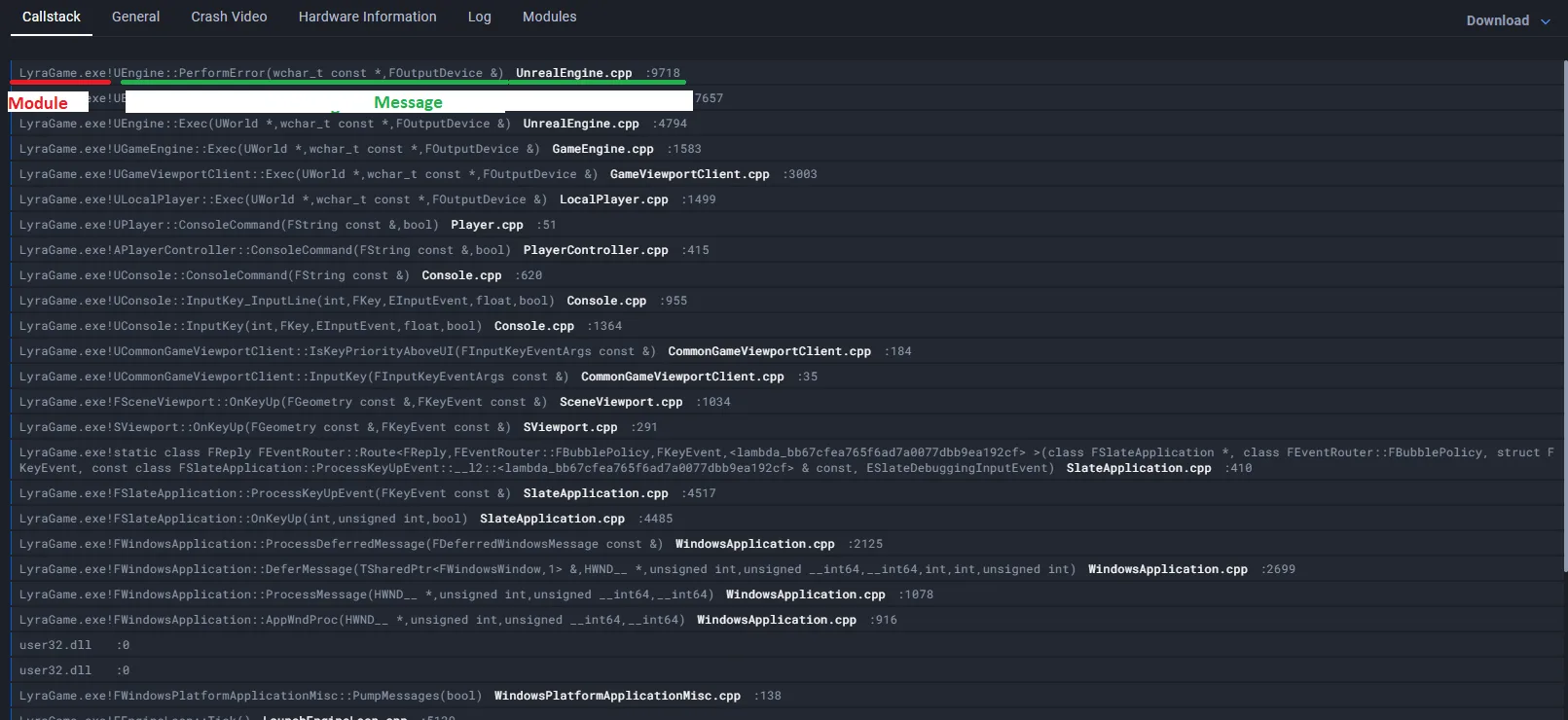
Each call stack frame has a function string in the form module!message, separated by an exclamation mark (!). The text before the ! is the module, and the text after it is the message. If there is no ! character, the whole string is treated as the module and the message is empty.
A rule matches a call stack line only when all three components match — Platform AND Module AND Message:
"Platform: windows" AND "Module: LyraGame" AND "Message: UEngine::PerformError*"
Pattern syntax
Module and Message accept glob (wildcard) patterns. They are not regular expressions.
A pattern is matched against a flat string, not a file path, so there is no directory or path-separator behavior — * matches across :, ., and any other character.
Two rules govern every pattern:
- Patterns must match the whole value, not part of it. A pattern is compared against the entire module or message string.
UEngine::PerformErrordoes not match the frameUEngine::PerformError(wchar_t const*, FOutputDevice&), because the frame has extra characters at the end. Add a trailing*to match a prefix:UEngine::PerformError*. - Matching is case-insensitive.
LyraGame,lyragame, andLYRAGAMEare equivalent.
The following wildcards are supported:
| Pattern | Matches | Example |
|---|---|---|
* | Any sequence of characters, including none | UEngine::* matches UEngine::PerformError() |
? | Exactly one character | ?yraGame matches LyraGame and MyraGame |
[a-f] | One character in the given range | [AIUEO]Engine matches UEngine |
[!a-f] | One character not in the given range | [!L]yraGame does not match LyraGame |
{a,b} | Any one of the comma-separated alternatives | {Lyra,Shooter}Game matches LyraGame |
So this rule ignores frames whose module is any single character followed by yra and then anything else, and whose message starts with one of A, I, U, E, or O followed by Engine::Perform:
"Platform: windows" AND "Module: ?yra*" AND "Message: [AIUEO]Engine::Perform*"
Regular expression syntax is not supported. Characters that are special in regex — including ., +, |, ^, $, (, and ) — are matched literally. This matters most for C++ symbols: the message UEngine::PerformError() matches only a frame whose message is exactly UEngine::PerformError(), parentheses included. Because real frames carry their argument list, prefer UEngine::PerformError*.
A Message pattern containing ! can never match, because ! is what separates the module from the message.
Do not put a space after the commas inside {}. Spaces are matched literally, so {Lyra, Shooter}Game matches LyraGame but not ShooterGame. The rule still works for the first alternative, which makes this easy to miss.
Also make sure your bracket pairs are closed. An unterminated [ is an invalid pattern.
FAQ
Q: What happens if I set the call stack lines value to 30?
A: The system will only group the crashes with exactly the same 30 lines of call stacks. Even if only the 15th line is different, it would be grouped into the different crash issue.
Q: What if I left the message value empty?
A: The system will only look for call stack lines with the module as its main value.
"Platform: windows" AND "Module: LyraGame"
The call stacks being ignored would be LyraGame! without any additional message.